XKEYSCORE Helper Notes
Open PDFDocument date: -
Pages: 6
Genre: manual
Banner: TOP SECRET STRAP 1
Classification: TOP SECRET STRAP 1
Dissemination: -
This GCHQ document describes new features in the XKEYSCORE Palantir helper tool, including summary/histogram import capabilities that reduce large datasets by aggregating connection data rather than creating individual events for each entry, and data sourcing features that track which XKEYSCORE queries imported specific data into Palantir. The document provides step-by-step screenshots showing how analysts can histogram network traffic by source IP, destination IP, and ports, then import aggregated results showing metadata like total session sizes and connection counts.
My notes
TOP SECRET STRAP 1
XKEYSCORE HELPER NOTES
There are several new and updated features in this release of the XKEYSCORE Palantir helper:
- Summary/Histogram import of data
- Data sourcing for XKEYSCORE queries
- Fixes for UI redraw bugs on query list refresh
- Fixes for disappearing links
Summary import
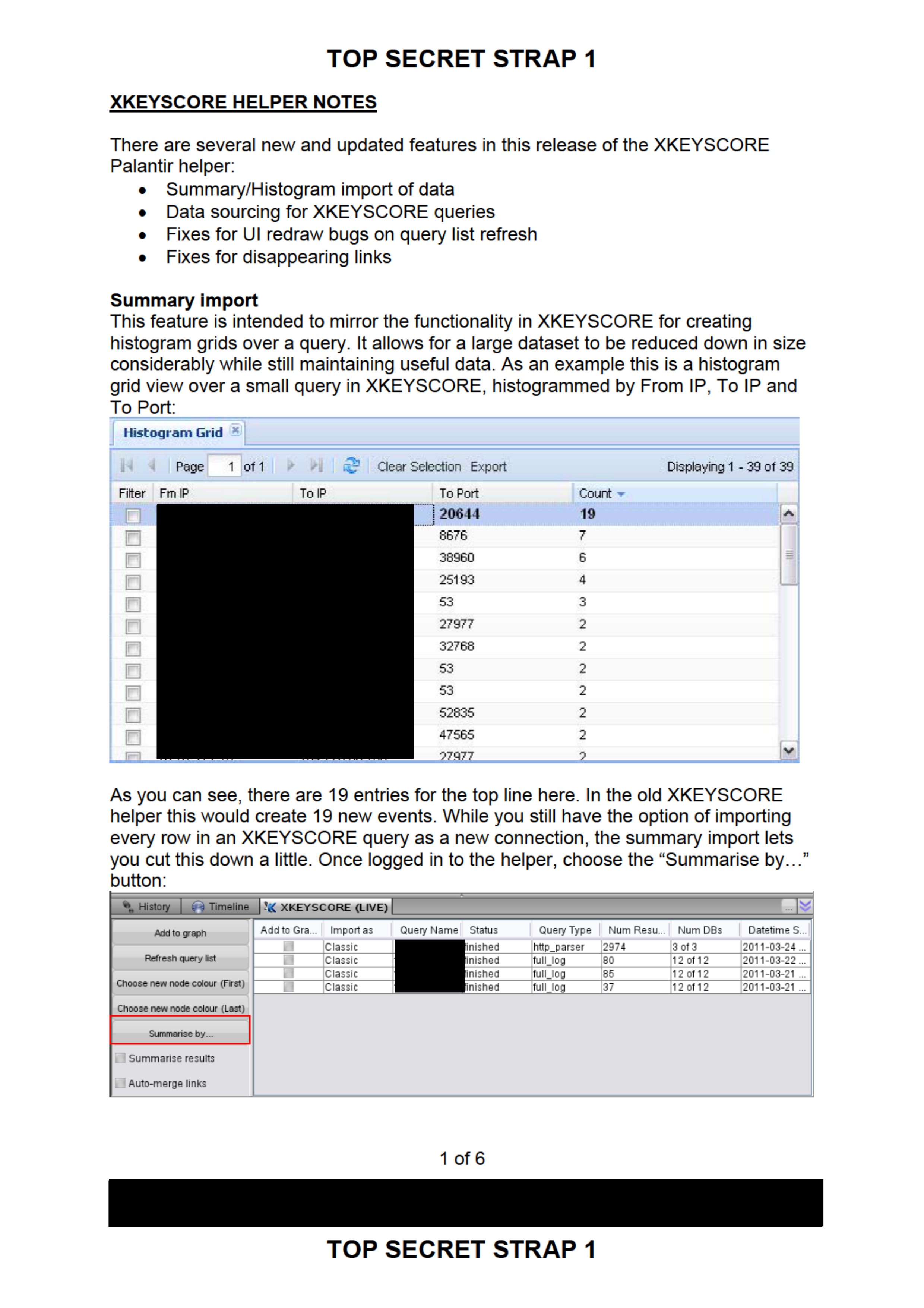
This feature is intended to mirror the functionality in XKEYSCORE for creating histogram grids over a query. It allows for a large dataset to be reduced down in size considerably while still maintaining useful data. As an example this is a histogram grid view over a small query in XKEYSCORE, histogrammed by From IP, To IP and To Port:
Histogram Grid

Page 1 of 1 Clear Selection Export Displaying 1-39 of 39
| Filter | Fm IP      | To IP      | To Port | Count▾ |
|--------|------------|------------|---------|--------|
|        | [REDACTED] | [REDACTED] | 20644   | 19     |
|        | [REDACTED] | [REDACTED] | 8676    | 7      |
|        | [REDACTED] | [REDACTED] | 38960   | 6      |
|        | [REDACTED] | [REDACTED] | 25193   | 4      |
|        | [REDACTED] | [REDACTED] | 53      | 3      |
|        | [REDACTED] | [REDACTED] | 27977   | 2      |
|        | [REDACTED] | [REDACTED] | 32768   | 2      |
|        | [REDACTED] | [REDACTED] | 53      | 2      |
|        | [REDACTED] | [REDACTED] | 53      | 2      |
|        | [REDACTED] | [REDACTED] | 52835   | 2      |
|        | [REDACTED] | [REDACTED] | 47565   | 2      |
|        | [REDACTED] | [REDACTED] | 27977   | 2      |
As you can see, there are 19 entries for the top line here. In the old XKEYSCORE helper this would create 19 new events. While you still have the option of importing every row in an XKEYSCORE query as a new connection, the summary import lets you cut this down a little. Once logged in to the helper, choose the "Summarise by..." button:
History | Timeline | XKEYSCORE (LIVE)
------------------------------------------------------------------------------------------------------------
Add to graph
Refresh query list
Choose new node colour (First)
Choose new node colour (Last)
Summarise by...
[ ] Summarise results
[ ] Auto-merge links

Add to Gra... | Import as | Query Name  | Status   | Query Type  | Num Resu... | Num DBs  | Datetime S...  |              [ ]           | Classic   | http_parser | finished | http_parser | 2974        | 3 of 3   | 2011-03-24 ... |
[ ]           | Classic   | full_log    | finished | full_log    | 80          | 12 of 12 | 2011-03-22 ... |
[ ]           | Classic   | full_log    | finished | full_log    | 85          | 12 of 12 | 2011-03-21 ... |
[ ]           | Classic   | full_log    | finished | full_log    | 37          | 12 of 12 | 2011-03-21 ... |
1 of 6
[REDACTED]
TOP SECRET STRAP 1
TOP SECRET STRAP 1
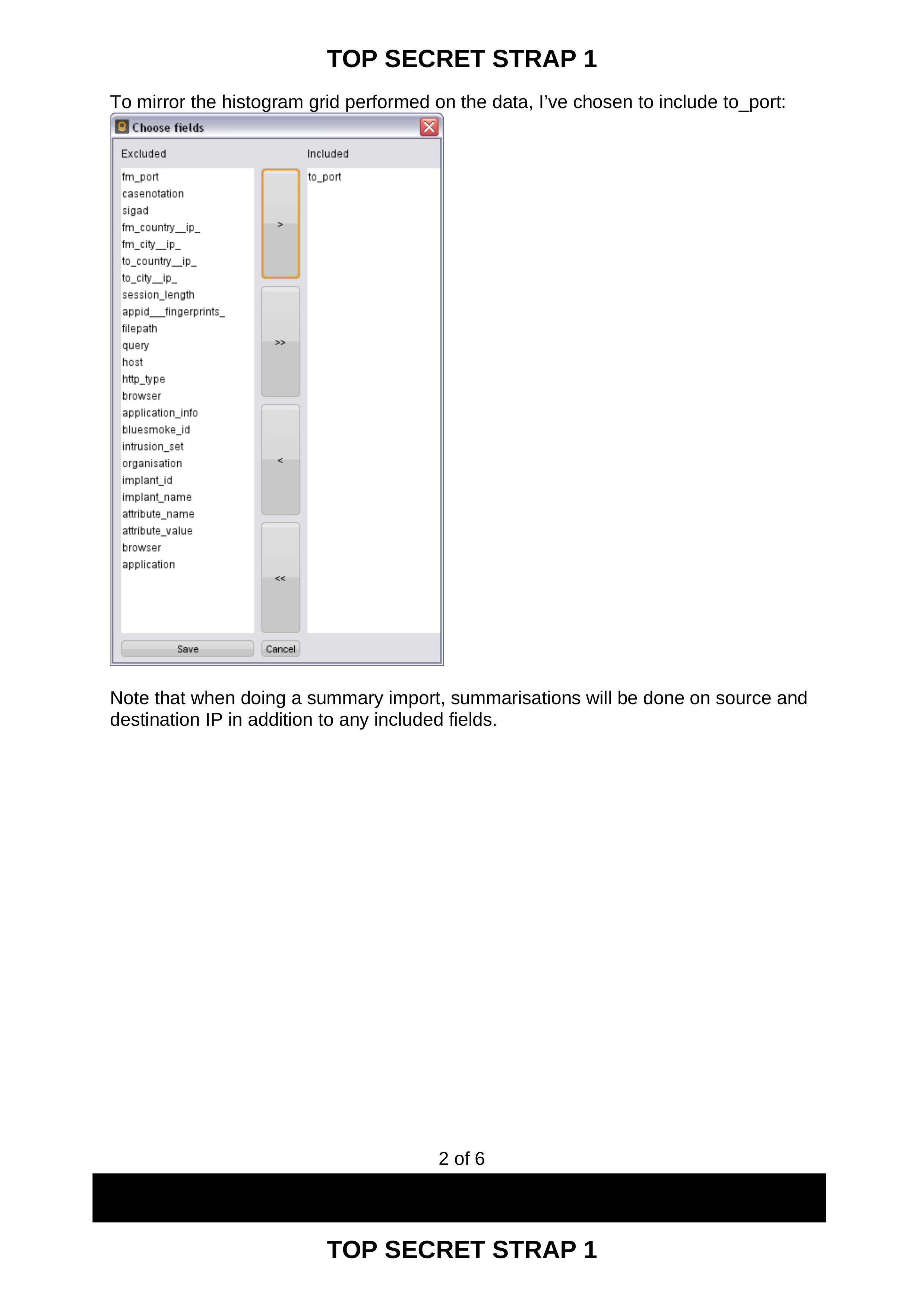
To mirror the histogram grid performed on the data, I've chosen to include to_port:
Choose fields

Excluded              | Included
----------------------|-----------
fm_port               | to_port
casenotation          |
sigad                 |
fm_country_ip_        |
fm_city_ip_           |
to_country_ip_        |
to_city_ip_           |
session_length        |
appid_fingerprints_   |
filepath              |
query                 |
host                  |
http_type             |
browser               |
application_info      |
bluesmoke_id          |
intrusion_set         |
organisation          |
implant_id            |
implant_name          |
attribute_name        |
attribute_value       |
browser               |
application           |

Save Cancel
Note that when doing a summary import, summarisations will be done on source and destination IP in addition to any included fields.
2 of 6
[REDACTED]
TOP SECRET STRAP 1
TOP SECRET STRAP 1
Graph - Administrator Account 03/25/2011 12:02 GMT
Investigation Edit Select Preferences Windows Help
TS STRAP 1
Import Click here to search Search
Histogram Selection Filters
Type: Connection
Date Range: 2011/03/21 05:29:58.000
+00:00 to 2011/03/21 08:44:57.000 +00:00.
Properties

Type              | Values                   | Classification
Application       | P2p/bittorrent           | TS STRAP1
                  | P2p/bittorrent/bencoding | TS STRAP1
IP Address (From) | [REDACTED]               | TS STRAP1
IP Address (To)   | [REDACTED]               | TS STRAP1
Port (To)         | 20644                    | TS STRAP1
Quantity          | 19                       | TS STRAP1
Session Size      | 1764 B                   | TS STRAP1

Add Matches to Graph

Related Entities

Relationship   | Related    | Data | Data End | Test
Appears In (2) | [REDACTED] |
               | [REDACTED] |

Add Entities to Graph

Related Documents
No related documents.

Recent History
[REDACTED]
[REDACTED]

Current Selection
Connection (1)
[REDACTED]

History | Timeline | XKEYSCORE (LIVE)
------------------------------------------------------------------------------------------------------------
Add to graph
Refresh query list
Choose new node colour (First)
Choose new node colour (Last)
Summarise by...
[x] Summarise results
[ ] Auto-merge links

Add to Gra... | Import as | Query Name  | Status   | Query Type  | Num Resu... | Num DBs  | Datetime S...  |              [ ]           | Classic   | id by       | finished | http_parser | 2974        | 3 of 3   | 2011-03-24 ... |
[ ]           | Classic   | full_log    | finished | full_log    | 80          | 12 of 12 | 2011-03-22 ... |
[x]           | Classic   | full_log    | finished | full_log    | 85          | 12 of 12 | 2011-03-21 ... |
[ ]           | Classic   | full_log    | finished | full_log    | 37          | 12 of 12 | 2011-03-21 ... |
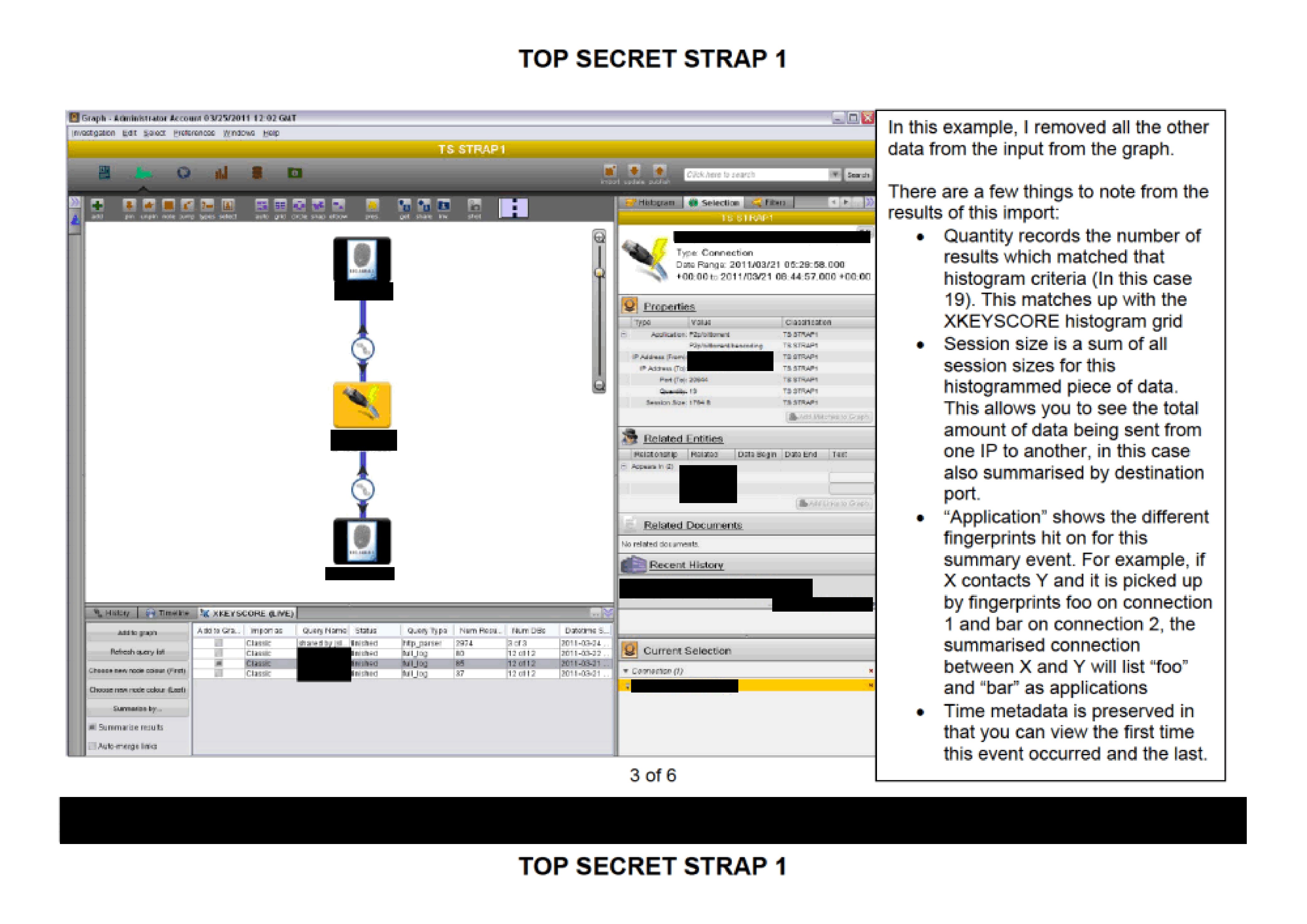
In this example, I removed all the other data from the input from the graph.
There are a few things to note from the results of this import:
- Quantity records the number of results which matched that histogram criteria (In this case 19). This matches up with the XKEYSCORE histogram grid
- Session size is a sum of all session sizes for this histogrammed piece of data. This allows you to see the total amount of data being sent from one IP to another, in this case also summarised by destination port.
- "Application” shows the different fingerprints hit on for this summary event. For example, if X contacts Y and it is picked up by fingerprints foo on connection 1 and bar on connection 2, the summarised connection between X and Y will list "foo" and "bar" as applications
- Time metadata is preserved in that you can view the first time this event occurred and the last.
3 of 6
[REDACTED]
TOP SECRET STRAP 1
TOP SECRET STRAP 1
Preferences for which fields to summarise by, whether you wish to summarise and whether you wish to automatically merge links between IP addresses and connections are saved per-user, so if you have a common histogram import then you don't need to re-select the fields to histogram on every time.
Data sourcing
Data imported into Palantir using the updated XKEYSCORE helper now has data sourcing.
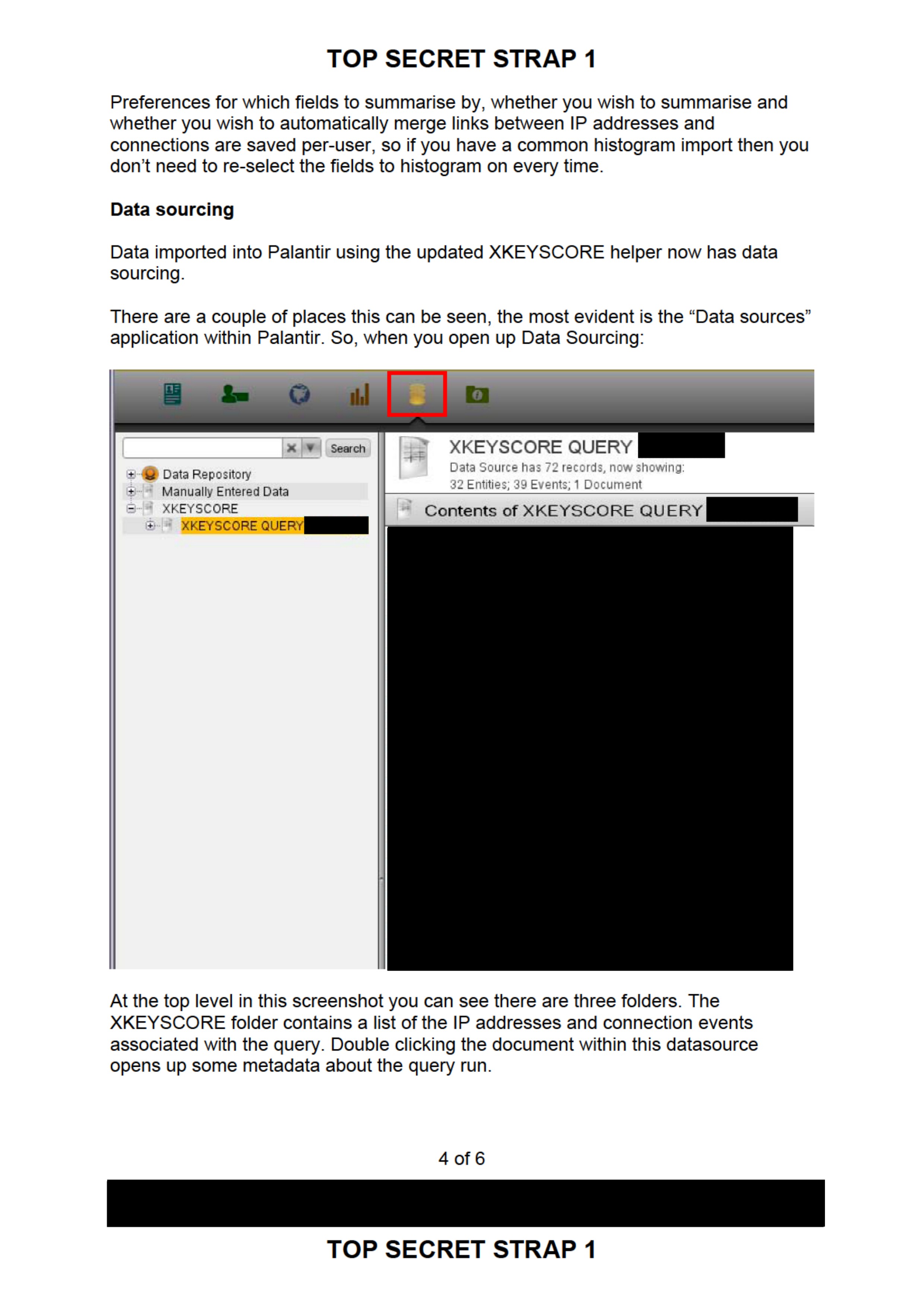
There are a couple of places this can be seen, the most evident is the "Data sources" application within Palantir. So, when you open up Data Sourcing:
Search
+ Data Repository
+ Manually Entered Data
- XKEYSCORE
  + XKEYSCORE QUERY [REDACTED]

XKEYSCORE QUERY [REDACTED]
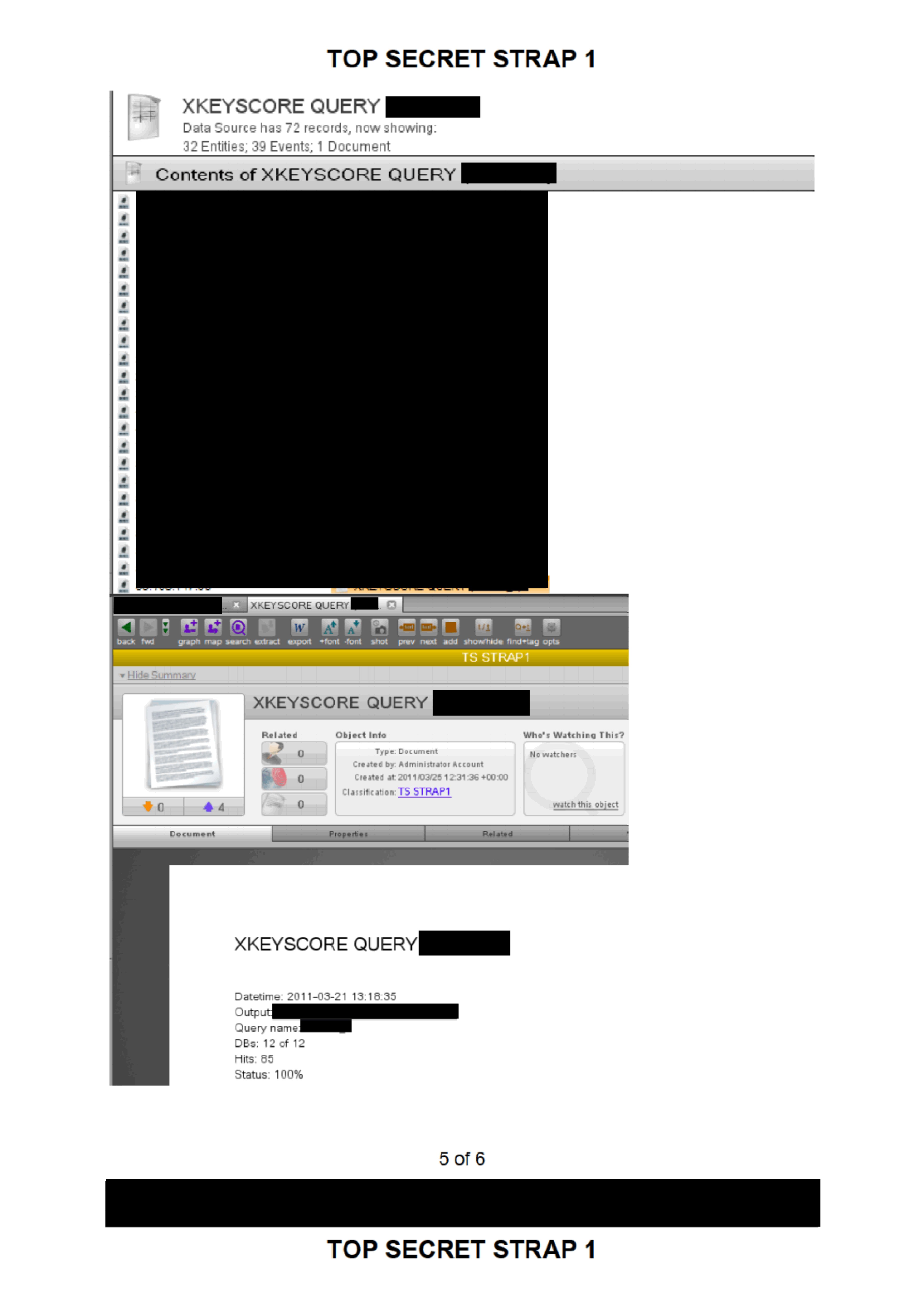
Data Source has 72 records, now showing:
32 Entities; 39 Events; 1 Document

Contents of XKEYSCORE QUERY [REDACTED]
[REDACTED]
[REDACTED]
[REDACTED]
[REDACTED]
At the top level in this screenshot you can see there are three folders. The XKEYSCORE folder contains a list of the IP addresses and connection events associated with the query. Double clicking the document within this datasource opens up some metadata about the query run.
4 of 6
[REDACTED]
TOP SECRET STRAP 1
TOP SECRET STRAP 1
XKEYSCORE QUERY [REDACTED]
Data Source has 72 records, now showing:
32 Entities; 39 Events; 1 Document

Contents of XKEYSCORE QUERY [REDACTED]
[REDACTED]
[REDACTED]
[REDACTED]
[REDACTED]
[REDACTED]
[REDACTED]
back fwd path map search extract export +font -font shot prev next add show/hide find+tag opts

TS STRAP1
Hide Summary

XKEYSCORE QUERY [REDACTED]

Related |
--------|
0       |
0       |
4       |
0       |

Object Info
Type: Document
Created by: Administrator Account
Created at: 2011/03/25 12:31:36+00:00
Classification: TS STRAP1

Who's Watching This?
No watchers
watch this object

Document | Properties | Related

XKEYSCORE QUERY [REDACTED]

Datetime: 2011-03-21 13:18:35
Output [REDACTED]
Query name [REDACTED]
DBs: 12 of 12
Hits: 85
Status: 100%
5 of 6
[REDACTED]
TOP SECRET STRAP 1
TOP SECRET STRAP 1
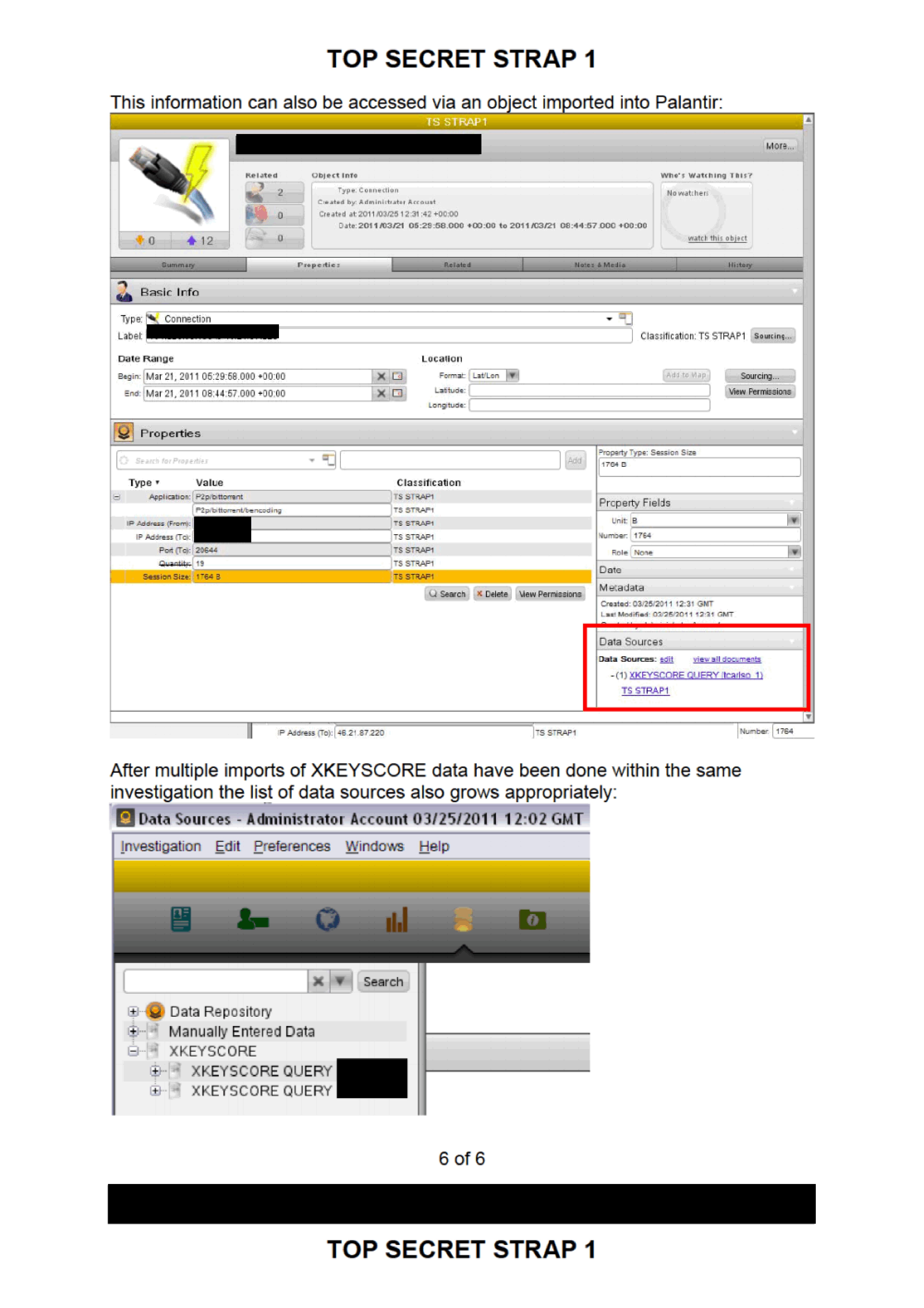
This information can also be accessed via an object imported into Palantir:
TS STRAP1

[REDACTED] More...

Related |
--------|
2       |
0       |
12      |
0       |

Type: Connection
Created by: Administrator Account
Created at: 2011/03/25 12:31:42+00:00
Date: 2011/03/21 05:29:58.000 +00:00 to 2011/03/21 08:44:57.000 +00:00

Who's Watching This?
No watchers
watch this object

Summary | Properties | Related | Notes & Media | History

Basic Info
Type: Connection
Label: [REDACTED]
Classification: TS STRAP1 | Sourcing....

Date Range
Begin: Mar 21, 2011 05:29:58.000 +00:00
End: Mar 21, 2011 08:44:57.000 +00:00

Location
Format: Lat/Lon
Latitude:
Longitude:

Add to Map
Sourcing...
View Permissions

Properties
Search for Properties Add

Type                 | Value                    | Classification
---------------------|--------------------------|-----------------
Application:         | P2p/bittorrent           | TS STRAP1
                     | P2p/bittorrent/bencoding | TS STRAP1
IP Address (From):   | [REDACTED]               | TS STRAP1
IP Address (To):     | [REDACTED]               | TS STRAP1
Port (To): 20644     | 20644                    | TS STRAP1
Quantity: 19         | 19                       | TS STRAP1
Session Size: 1764 B | 1764 B                   | TS STRAP1

Search Delete New Permissions

Property Type: Session Size
1764 B

Property Fields
Unit: B
Number: 1764
Role: None

Date
Metadata
Created: 03/25/2011 12:31 GMT
Last Modified: 03/25/2011 12:31 GMT

Data Sources
Data Sources: edit | view all documents
- (1) XKEYSCORE QUERY (tcariso 1)
  TS STRAP1

Q Search | X Delete | View Permissions

Number: 1764
IP Address (To): 46.21.87.220 | TS STRAP1
After multiple imports of XKEYSCORE data have been done within the same investigation the list of data sources also grows appropriately:
Data Sources - Administrator Account 03/25/2011 12:02 GMT
Investigation Edit Preferences Windows Help

+ Data Repository
+ Manually Entered Data
- XKEYSCORE
   + XKEYSCORE QUERY [REDACTED]
   + XKEYSCORE QUERY [REDACTED]
6 of 6
[REDACTED]
TOP SECRET STRAP 1
Published in the Same Report
(6 documents)
-
-
Behavioural Analysis: The Big Picture (Palantir could be used as part of a CNE) [pdf]
This diagram from GCHQ outlines the lifecycle of a CNE and identifies where Palantir fits into the intelligence workflow. The slide, titled "Behavioural Analysis: The Big Picture," illustrates a timeline of network exploitation from the initial infection of a target host to the eventual exfiltration of data. Crucially, it positions Palantir as a key "knowledge base" used for "Tipping to other systems." This indicates that Palantir’s software was used to aggregate data from successful hacks, allowing analysts to visualize connections and pivot (or "tip") that information toward further surveillance or offensive operations.
-
The Tale of Two Sources [pdf]
Programs: SUPERDRAKE · CROUCHINGSQUIRREL · HALTERHITCH · MVR · PPF · GORDIANKNOT · XKEYSCORE · SAMUELPEPYS · ALPINEBUTTERFLY · TRYST · FRACTALJOKER · TM · SPAY · BLACKHOLE · RAPIDTAPIR · HIDDENOTTER · SALTYOTTER · 8BALL · SORCERER · PACMAN · SNORT · WAFTER · CRIMSON · SHORTFALL · GCNET · BROADOAK · RAPTOR · GEOFUSION · MUGSHOT · HACIENDA · FOXTRAIL · FANNER · GLOBALSURGE · PENSIVEGIRAFFE · HRMAP · MUTANTBROTH · SAMPEPYS · INTEGERSPIN · MWX · MARBLEPOLLS · MOONRAKER · RT · DISTILLERY · SQUEAL · DEADSEA · GTE · WDM · TKB · TRAFFIC MASTER · CHOKEPOINT · CONTENT CLOUD · MAPREDUCE · EVENTS · CLOUD · AGILITY · PALANTIR -
SDSG Integrated Analytics Workshop (14 Oct 2011) [pdf]
This document is a summary of a workshop held by the SIGINT Development Steering Group (SDSG) on October 14, 2011, evaluating and comparing the strengths, weaknesses, and potential use of advanced analytics tools, specifically Palantir and Mamba, for intelligence analysis. It discusses the tools' capabilities in data integration, collaboration, and visualization, along with concerns about security, usability, and the risks of relying on commercial software.
Marking: SECRET -
TWO FACE [pdf]
This document describes the GCHQ's TWO FACE project, a part of the Cyber Defence mission, which focuses on enhancing analysis and knowledge sharing tools using Palantir software. It outlines various data sources integrated with Palantir, such as XKEYSCORE and GEOFUSION, and the project's goals to automate and improve data importation, analysis capabilities, and user interface performance. The document also discusses training, user access, and collaboration within the Five Eyes intelligence community, as well as ongoing development to address gaps in existing cyber defense tools. It provides detailed instructions for using Palantir's capabilities to analyze and visualize data from multiple sources, with a focus on cyber defense and network defense operations. Key features include handling large datasets, running complex queries, and automating data integration. The document also highlights ongoing improvements, such as the addition of new data sources and the refinement of analytic tools to better support the cyber defense mission.
Programs: TWOFACE · PALANTIR · FRACTALJOKER · FRACTALWEB · PENSIVEGIRAFFE · XKEYSCORE · LIVE · AUTOASSOC · SOCIALANTHROPOID · INFINITEMONKEYS · KARMAPOLICE · SAMPEPYS · HRMAP · MUTANTBROTH · GEOFUSION · HACIENDA · FOXTRAIL · CROUCHINGSQUIRREL · PITCHFORD · HALTERHITCH · GORDIANKNOT · SAMUELPEPYS · MUGSHOT · RAPIDTAPIR · FIVEALIVE · GOOGLEFUSION · INTEGERSPIN · DEADSEA · MOONRAKER · OBERON · DISCOVER · 8BALL · CASK -
GCHQ VisWeek 2008 Conference Report [pdf]
This GCHQ document summarizes key findings from the VisWeek 2008 visualization conference in Ohio, highlighting techniques and tools relevant to SIGINT analysis including collaborative analysis capabilities, graph visualization methods, and the Palantir Government platform. The report recommends incorporating features like analyst notebooks for tracking investigations, collaborative workspaces for multiple analysts, and various graph layout algorithms into GCHQ's MONTE VISTA visualization system.
Programs: MONTE VISTA · MAMBA · CHARTBREAKER · PIGS EAR · KNIME · RAPTOR · BROAD OAK · HAUSTORIUM · SALAMANCA · IIB · INFOVIS · PALANTIR




Related Documents
-
GRIMPLATE - First Steps Toward Identifying Adversarial Use of BitTorrent [pdf]
This document outlines the NSA's GRIMPLATE program, which was developed to monitor and analyze BitTorrent traffic on the Department of Defense's NIPRnet to identify potentially malicious activity. The program focuses on crawling the Distributed Hash Table (DHT) of BitTorrent networks to gather data on file-sharing nodes and peer connections, in order to detect and mitigate threats while building a case for halting unauthorized P2P usage on secure networks.
-
Tracking Targets Through Proxies & Anonymizers [pdf]
This NSA presentation details methods for tracking and de-anonymizing internet users who employ privacy tools like Tor, proxies, and VPN services such as AnchorFree's Hotspot Shield. The document explains how the agency reverse-engineers anonymization tools, creates "fingerprints" to identify their traffic in surveillance systems, and correlates encrypted connections to reveal users' real IP addresses and locations—acknowledging this work "makes for sad analysts" when targets successfully obscure their identities.
-
TWO FACE [pdf]
This document describes the GCHQ's TWO FACE project, a part of the Cyber Defence mission, which focuses on enhancing analysis and knowledge sharing tools using Palantir software. It outlines various data sources integrated with Palantir, such as XKEYSCORE and GEOFUSION, and the project's goals to automate and improve data importation, analysis capabilities, and user interface performance. The document also discusses training, user access, and collaboration within the Five Eyes intelligence community, as well as ongoing development to address gaps in existing cyber defense tools. It provides detailed instructions for using Palantir's capabilities to analyze and visualize data from multiple sources, with a focus on cyber defense and network defense operations. Key features include handling large datasets, running complex queries, and automating data integration. The document also highlights ongoing improvements, such as the addition of new data sources and the refinement of analytic tools to better support the cyber defense mission.
Programs: TWOFACE · PALANTIR · FRACTALJOKER · FRACTALWEB · PENSIVEGIRAFFE · XKEYSCORE · LIVE · AUTOASSOC · SOCIALANTHROPOID · INFINITEMONKEYS · KARMAPOLICE · SAMPEPYS · HRMAP · MUTANTBROTH · GEOFUSION · HACIENDA · FOXTRAIL · CROUCHINGSQUIRREL · PITCHFORD · HALTERHITCH · GORDIANKNOT · SAMUELPEPYS · MUGSHOT · RAPIDTAPIR · FIVEALIVE · GOOGLEFUSION · INTEGERSPIN · DEADSEA · MOONRAKER · OBERON · DISCOVER · 8BALL · CASK -
HIDDENSALAMANDER - Alerting and Characterization of Botnet Activity in TURMOIL [pdf]
This NSA briefing describes HIDDENSALAMANDER, a TURMOIL component that detects, tracks, and characterizes botnet command-and-control traffic on passive collection sensors worldwide, generating enriched metadata about bot herders, infected machines, attack commands, and malware families while providing low-latency defensive alerts when botnet activity involves high-value targets or protected networks. The system extends beyond traditional signature matching by decrypting Zeus RC4-encrypted traffic, extracting payload details like target IPs and DDoS commands, tracking C2 servers across multiple sessions, and categorizing botnet lifecycle stages (configuration, infection, reconnaissance, C&C communication, attack, exfiltration) to support both offensive attribution and defensive response.
Programs: HIDDENSALAMANDER · TURMOIL · CLOUDSHIELD · NETEZZA · TUTELAGE · GMPLACE · RONIN · CYBERCLOUD · MARINA · GHOSTMACHINE · QBOT · ASDF · MARIPOSA · XKEYSCORE · GOGADGET · TURQI · TRAFFICTHIEF · FALLOUT · POUNDSAND · BLUESMOKE · AEG · TURNABOUT · QUANTUMBOT -
Analyzing Mobile/Cellular DNI in XKEYSCORE, May 2009 [pdf]
The XKEYSCORE document explains how the agency analyzes mobile/cellular device internet usage by collecting and processing both converged DNI/DNR data within cellular networks and traditional internet traffic, using various tools and indicators to identify mobile users even when their device type isn't immediately evident. The document demonstrates how the system can track mobile internet activity across applications like Yahoo Mail and identifies devices through various technical "hints" including MSISDN codes, browser fingerprints, and user agent strings.