XKEYSCORE Workflows 2009
Open PDFDocument date: 2009-03-05
Pages: 24
Genre: slides
Banner: SECRET//COMINT//REL TO USA, AUS, CAN, GBR, NZL
Classification: SECRET COMINT
Dissemination: REL TO USA, AUS, CAN, GBR, NZL
A 2009 XKeyscore training presentation on Workflows — standing automated queries that run on a schedule against XKeyscore's rolling buffer — walking analysts through the Workflow Central request wizard to build recurring searches with follow-on actions like email alerts, session downloads to Agility, MAILORDER forwarding and SQL reports, with login banners showing the Menwith Hill Station Human Rights Act and Sensitive Targeting Approval compliance regime.
My notes
SECRET//COMINT//REL TO USA, AUS, CAN, GBR, NZL
XKEYSCORE Workflows
05 March 2009
SECRET//COMINT//REL TO USA, AUS, CAN, GBR, NZL
DERIVED FROM: NSA/CSSM 1-52
DATED: 20070108
DECLASSIFY ON: 20320108
SECRET//COMINT//REL TO USA, AUS, CAN, GBR, NZL
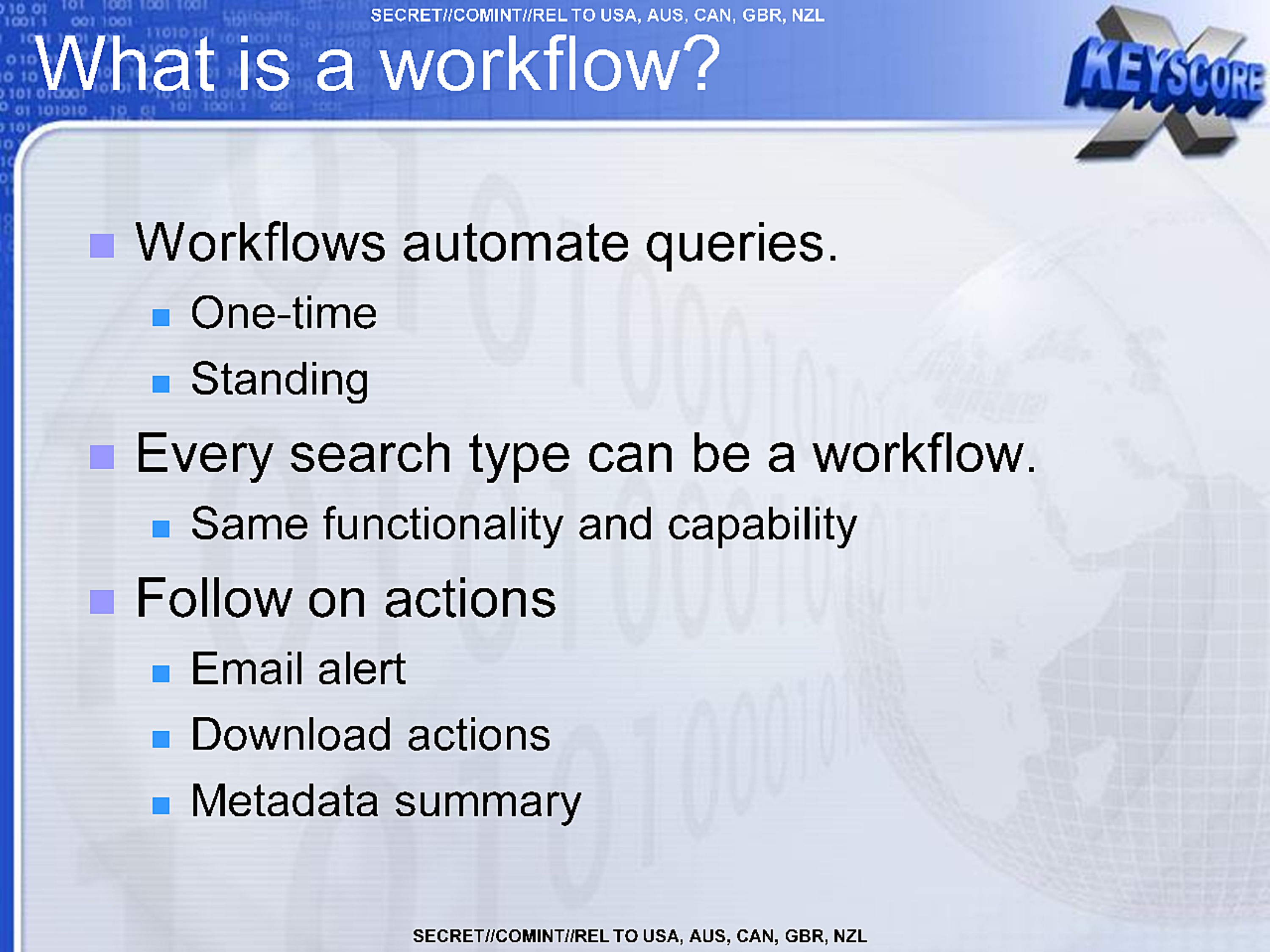
What is a workflow?
- Workflows automate queries.
- One-time
- Standing
- Every search type can be a workflow.
- Same functionality and capability
- Follow on actions
- Email alert
- Download actions
- Metadata summary
SECRET//COMINT//REL TO USA, AUS, CAN, GBR, NZL
SECRET//COMINT//REL TO USA, AUS, CAN, GBR, NZL
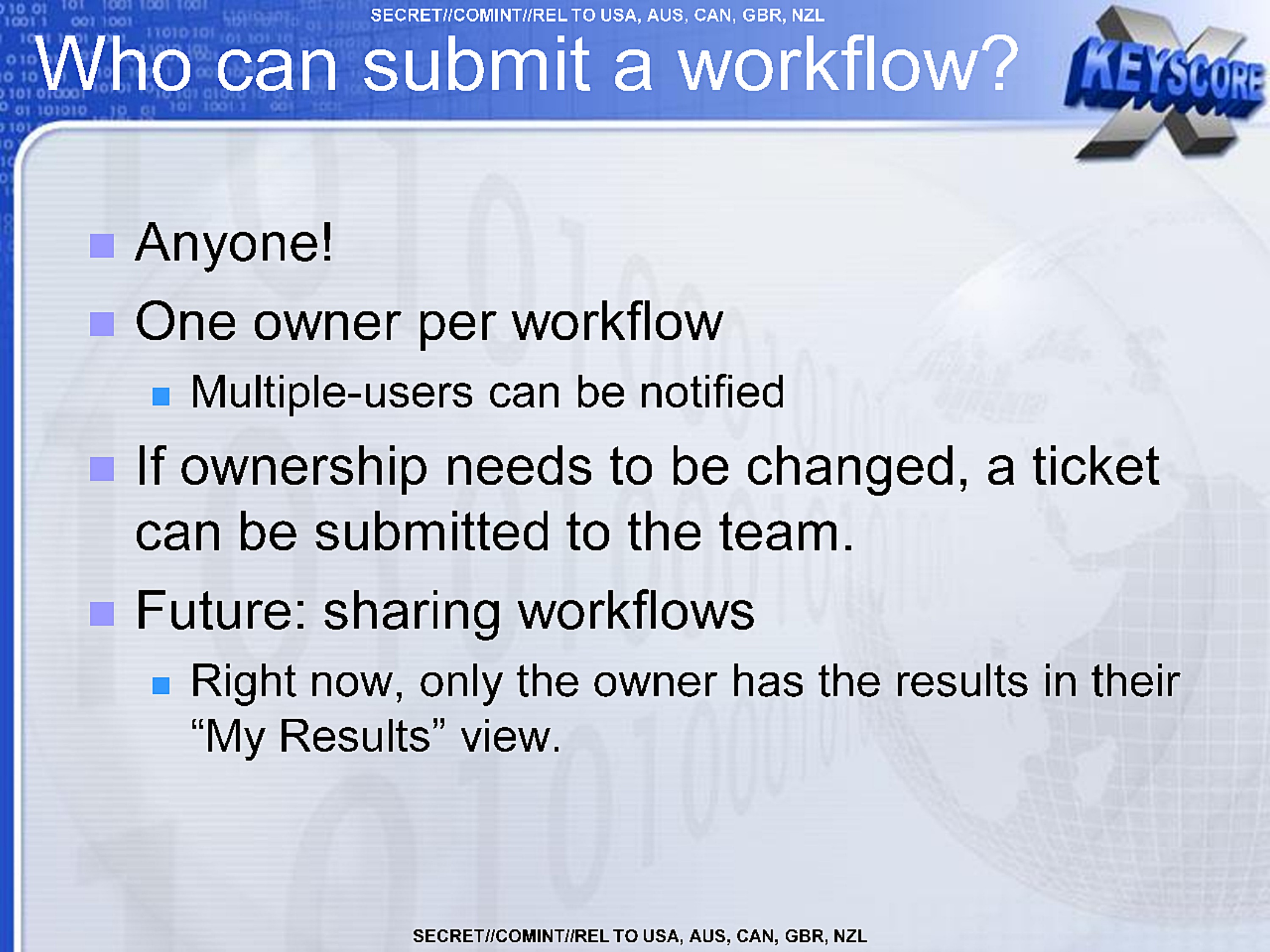
Who can submit a workflow?
- Anyone!
- One owner per workflow
- Multiple-users can be notified
- If ownership needs to be changed, a ticket can be submitted to the team.
- Future: sharing workflows
- Right now, only the owner has the results in their "My Results" view.
SECRET//COMINT//REL TO USA, AUS, CAN, GBR, NZL
SECRET//COMINT//REL TO USA, AUS, CAN, GBR, NZL
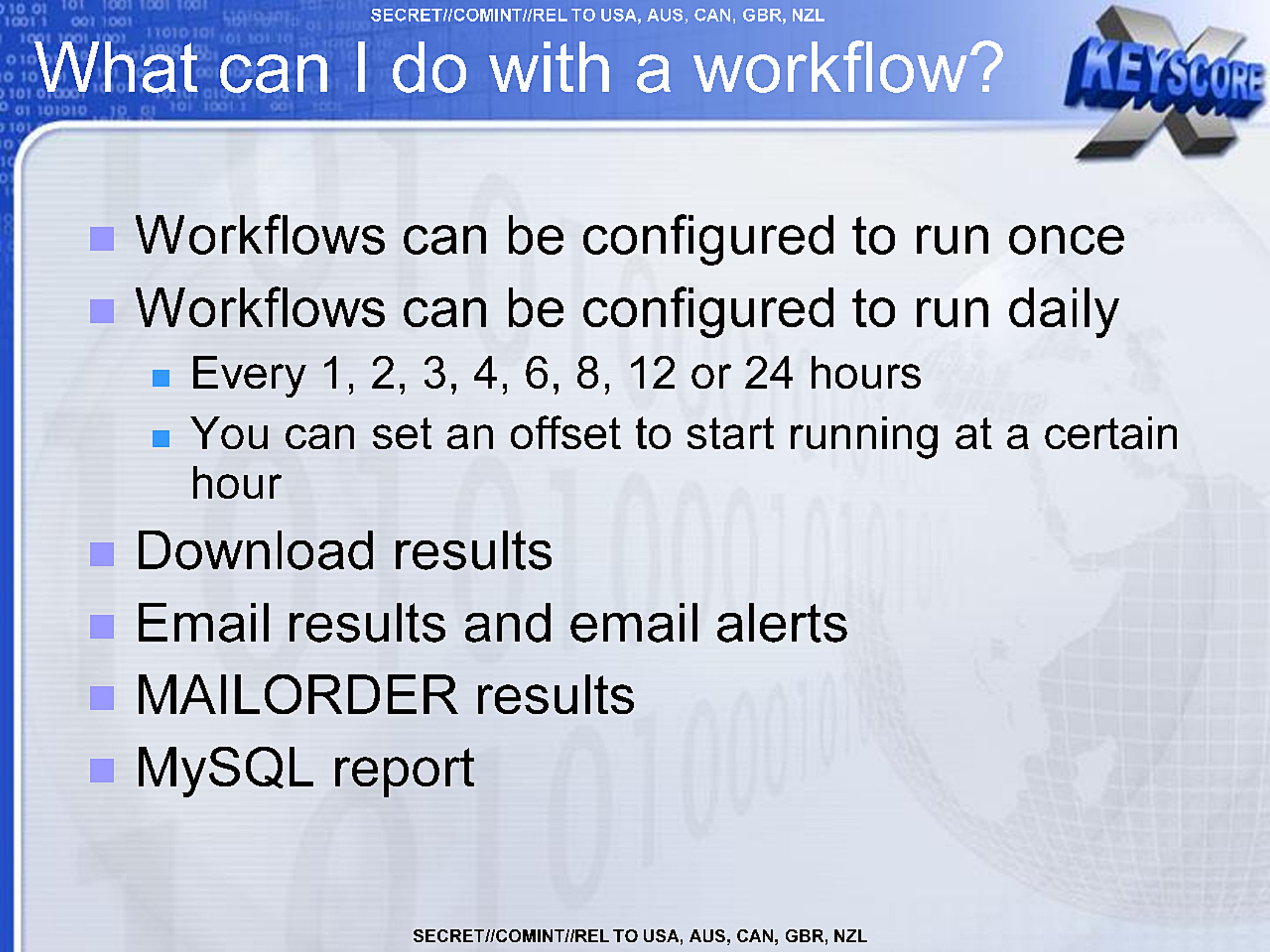
What can I do with a workflow?
- Workflows can be configured to run once
- Workflows can be configured to run daily
- Every 1, 2, 3, 4, 6, 8, 12 or 24 hours
- You can set an offset to start running at a certain hour
- Download results
- Email results and email alerts
- MAILORDER results
- MySQL report
SECRET//COMINT//REL TO USA, AUS, CAN, GBR, NZL
SECRET//COMINT//REL TO USA, AUS, CAN, GBR, NZL
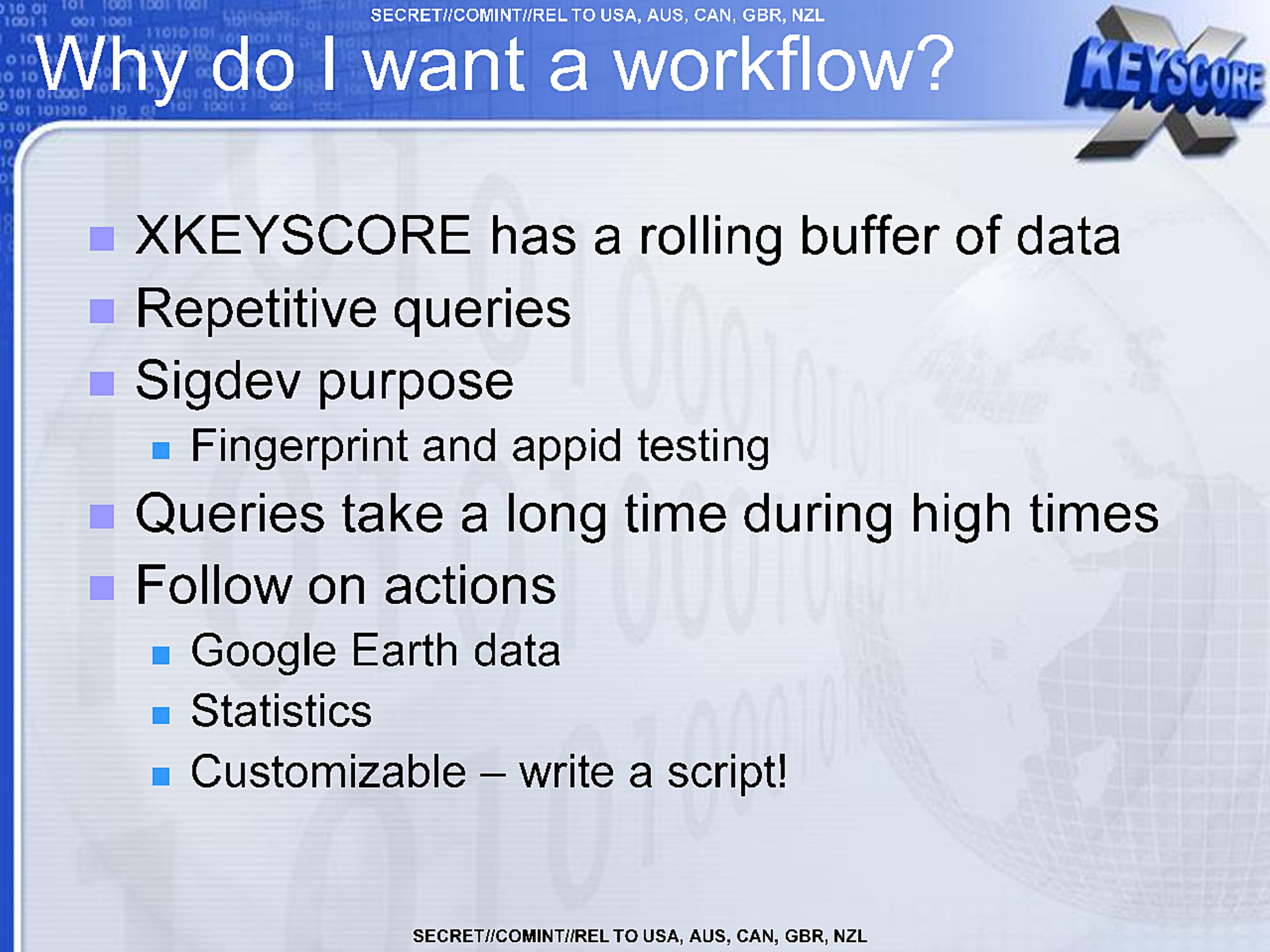
Why do I want a workflow?
- XKEYSCORE has a rolling buffer of data
- Repetitive queries
- Sigdev purpose
- Fingerprint and appid testing
- Queries take a long time during high times
- Follow on actions
- Google Earth data
- Statistics
- Customizable – write a script!
SECRET//COMINT//REL TO USA, AUS, CAN, GBR, NZL
SECRET//COMINT//REL TO USA, AUS, CAN, GBR, NZL
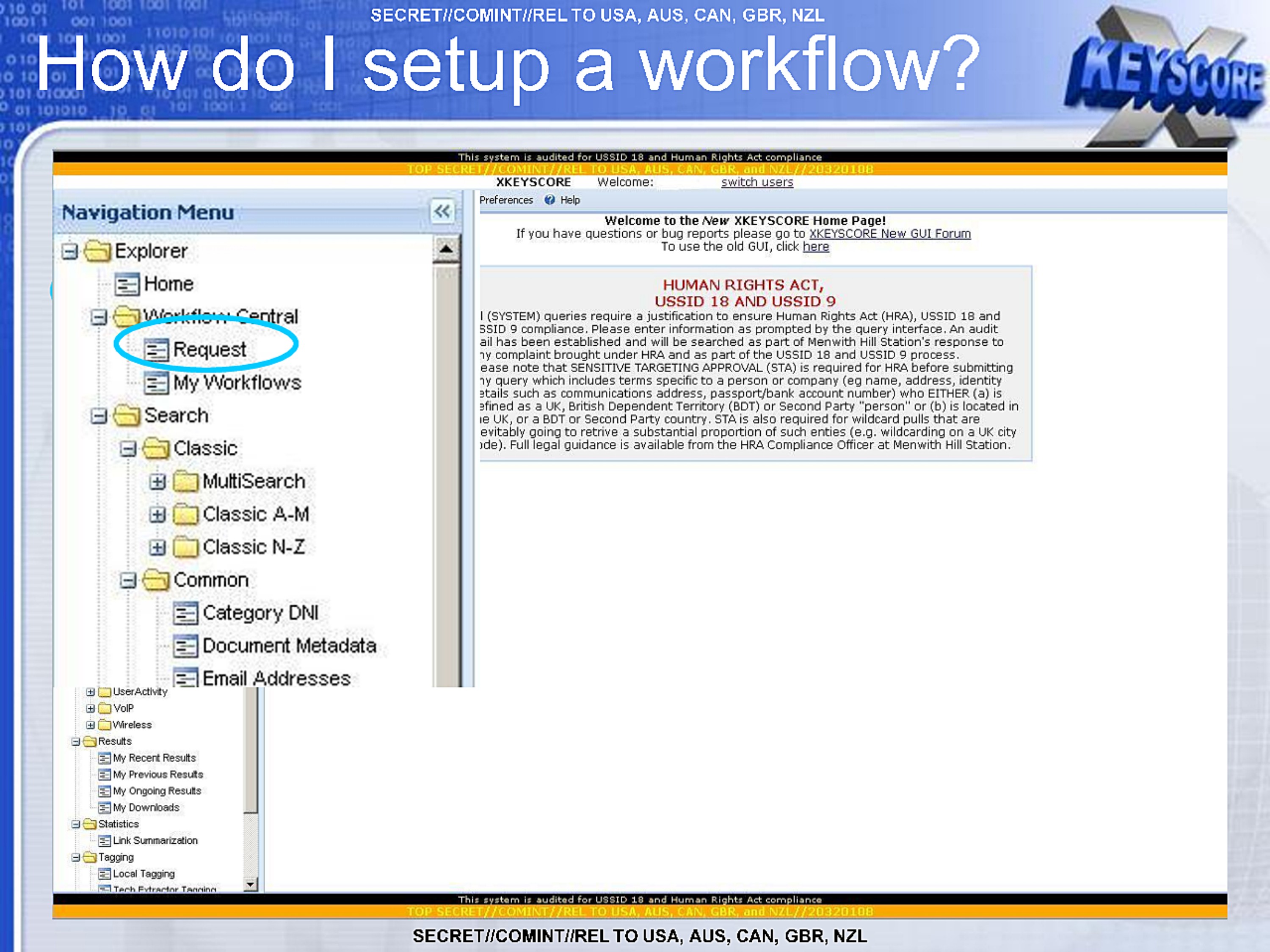
How do I setup a workflow?
This system is audited for USSID 18 and Human Rights Act compliance
TOP SECRET//COMINT//REL TO USA, AUS, CAN, GBR, and NZL//20320108
XKEYSCORE Welcome: switch users

Navigation Menu
Explorer
  Home
  Workflow Central
    Request
    My Workflows
  Search
    Classic
      MultiSearch
      Classic A-M
      Classic N-Z
    Common
      Category DNI
      Document Metadata
      Email Addresses
  UserActivity
  VoIP
  Wireless
Results
  My Recent Results
  My Previous Results
  My Ongoing Results
  My Downloads
Statistics
  Link Summarization
Tagging
  Local Tagging
  Tech Extractor Tagging

Preferences Help

Welcome to the New XKEYSCORE Home Page!
If you have questions or bug reports go to XKEYSCORE New GUI Forum
To use the old GUI, click here

HUMAN RIGHTS ACT,
USSID 18 AND USSID 9
I (SYSTEM) queries require a justification to ensure Human Rights Act (HRA), USSID 18 and
SSID 9 compliance. Please enter information as prompted by the query interface. An audit
all has been established and will be searched as part of Menwith Hill Station's response to
y complaint brought under HRA and as part of the USSID 18 and USSID 9 process.
ease note that SENSITIVE TARGETING APPROVAL (STA) is required for HRA before submitting
y query which includes terms specific to a person or company (eg name, address, identity
etails such as communications address, passport/bank account number) who EITHER (a) is
efined as a UK, British Dependent Territory (BDT) or Second Party "person" or (b) is located in
e UK, or a BDT or Second Party country. STA is also required for wildcard pulls that are
evitably going to retrive a substantial proportion of such enties (e.g. wildcarding on a UK city
de). Full legal guidance is available from the HRA Compliance Officer at Menwith Hill Station.

This system is audited for USSID 18 and Human Rights Act compliance
TOP SECRET//COMINT//REL TO USA, AUS, CAN, GBR, and NZL//20320108
SECRET//COMINT//REL TO USA, AUS, CAN, GBR, NZL
SECRET//COMINT//REL TO USA, AUS, CAN, GBR, NZL
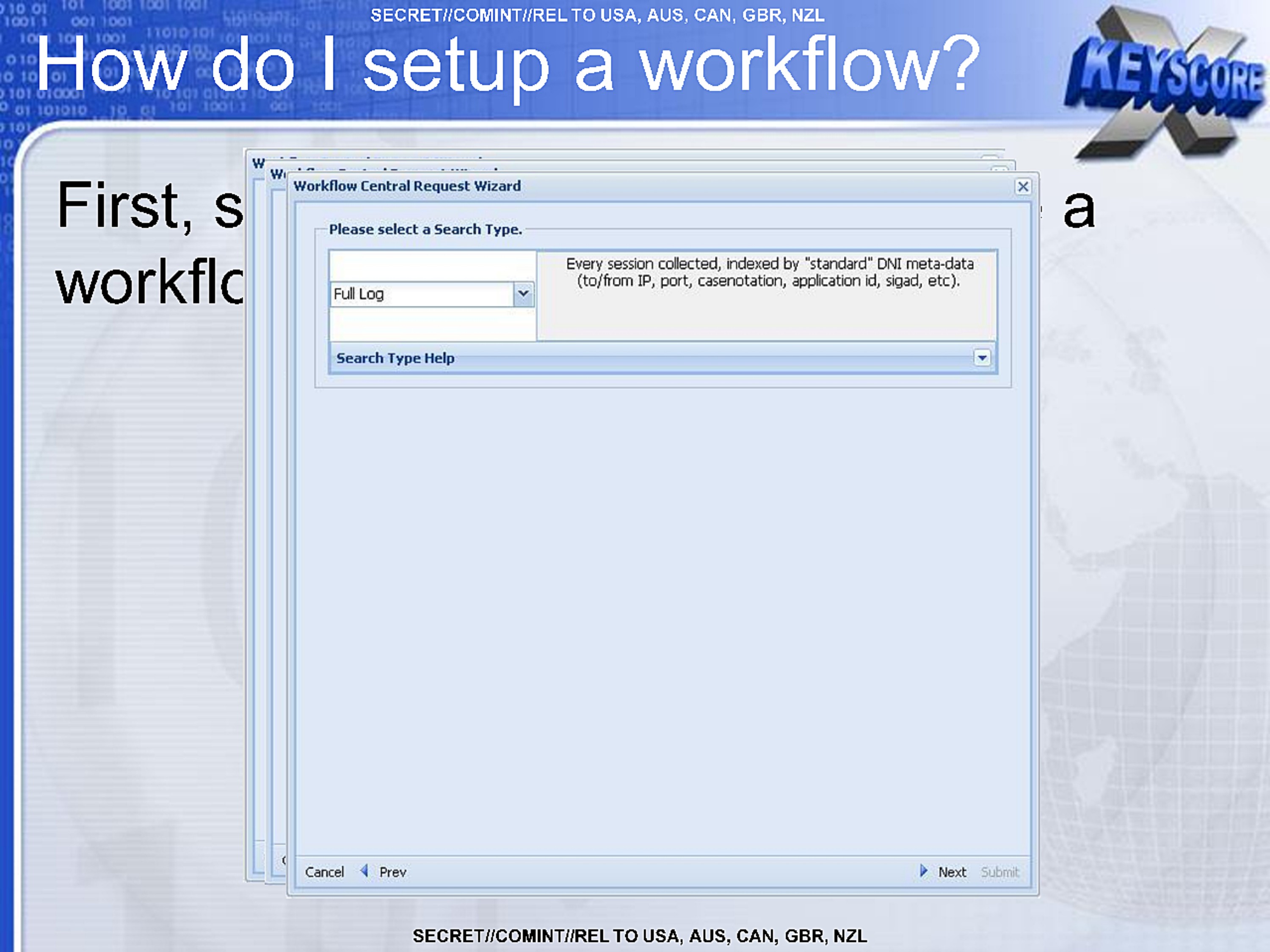
How do I setup a workflow?
First, s a
workflo
Workflow Central Request Wizard
Please select a Search Type.

Full Log

Every session collected, indexed by "standard" DNI meta-data
(to/from IP, port, casenotation, application id, sigad, etc).

Search Type Help

Cancel Prev Next Submit
SECRET//COMINT//REL TO USA, AUS, CAN, GBR, NZL
SECRET//COMINT//REL TO USA, AUS, CAN, GBR, NZL
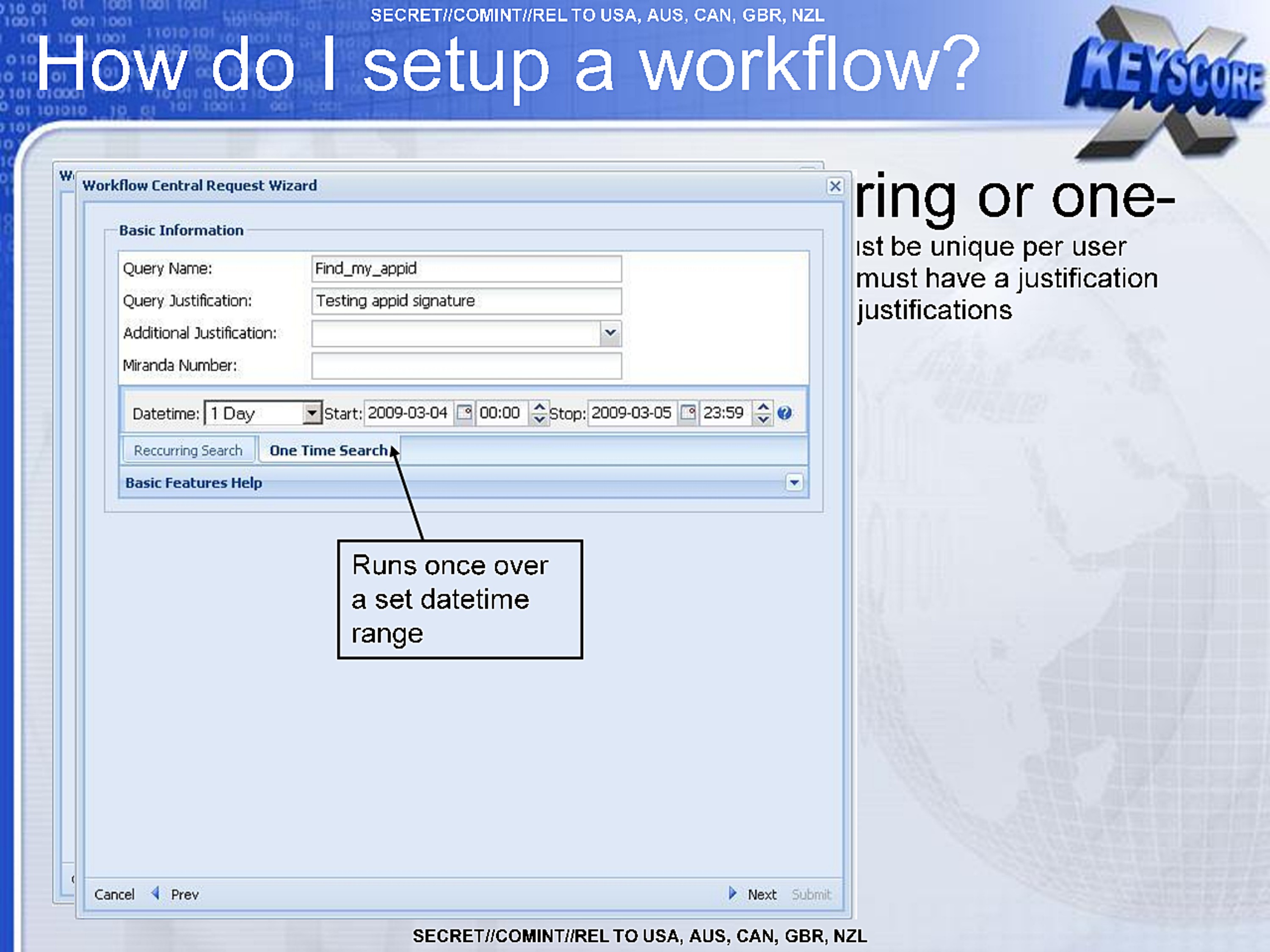
How do I setup a workflow?
Workflow Central Request Wizard
Basic Information
Query Name: Find_my_appid
Query Justification: Testing appid signature
Additional Justification:
Miranda Number:
Datetime: 1 Day Start: 2009-03-04 00:00 Stop: 2009-03-05 23:59
Reccurring Search | One Time Search
Basic Features Help

Runs once over a set datetime range

Cancel Prev Next Submit
ring or one-
st be unique per user
must have a justification
justifications
SECRET//COMINT//REL TO USA, AUS, CAN, GBR, NZL
SECRET//COMINT//REL TO USA, AUS, CAN, GBR, NZL
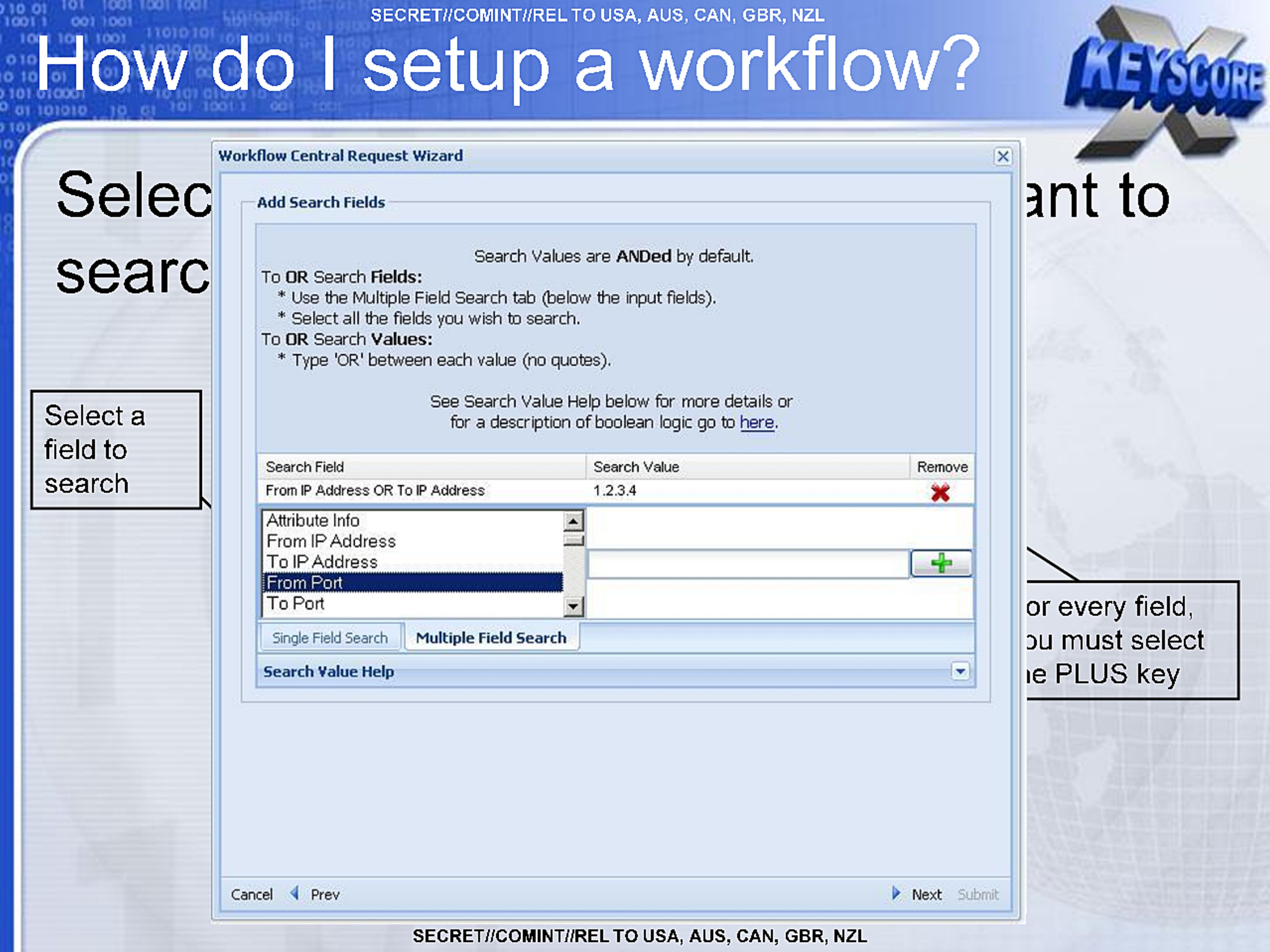
How do I setup a workflow?
Selec nt to
searc
Select a field to search
or every field,
ou must select
e PLUS key
Workflow Central Request Wizard

Add Search Fields

Search Values are ANDed by default.

To OR Search Fields:
  * Use the Multiple Field Search tab (below the input fields).
  * Select all the fields you wish to search.
To OR Search Values:
  * Type 'OR' between each value (no quotes).

See Search Value Help below for more details or
for a description of boolean logic go to here.

Search Field Search Value Remove
From IP Address OR To IP Address 1.2.3.4
Attribute Info
From IP Address
To IP Address
From Port
To Port
Single Field Search | Multiple Field Search
Search Value Help

Cancel Prev Next Submit
SECRET//COMINT//REL TO USA, AUS, CAN, GBR, NZL
SECRET//COMINT//REL TO USA, AUS, CAN, GBR, NZL
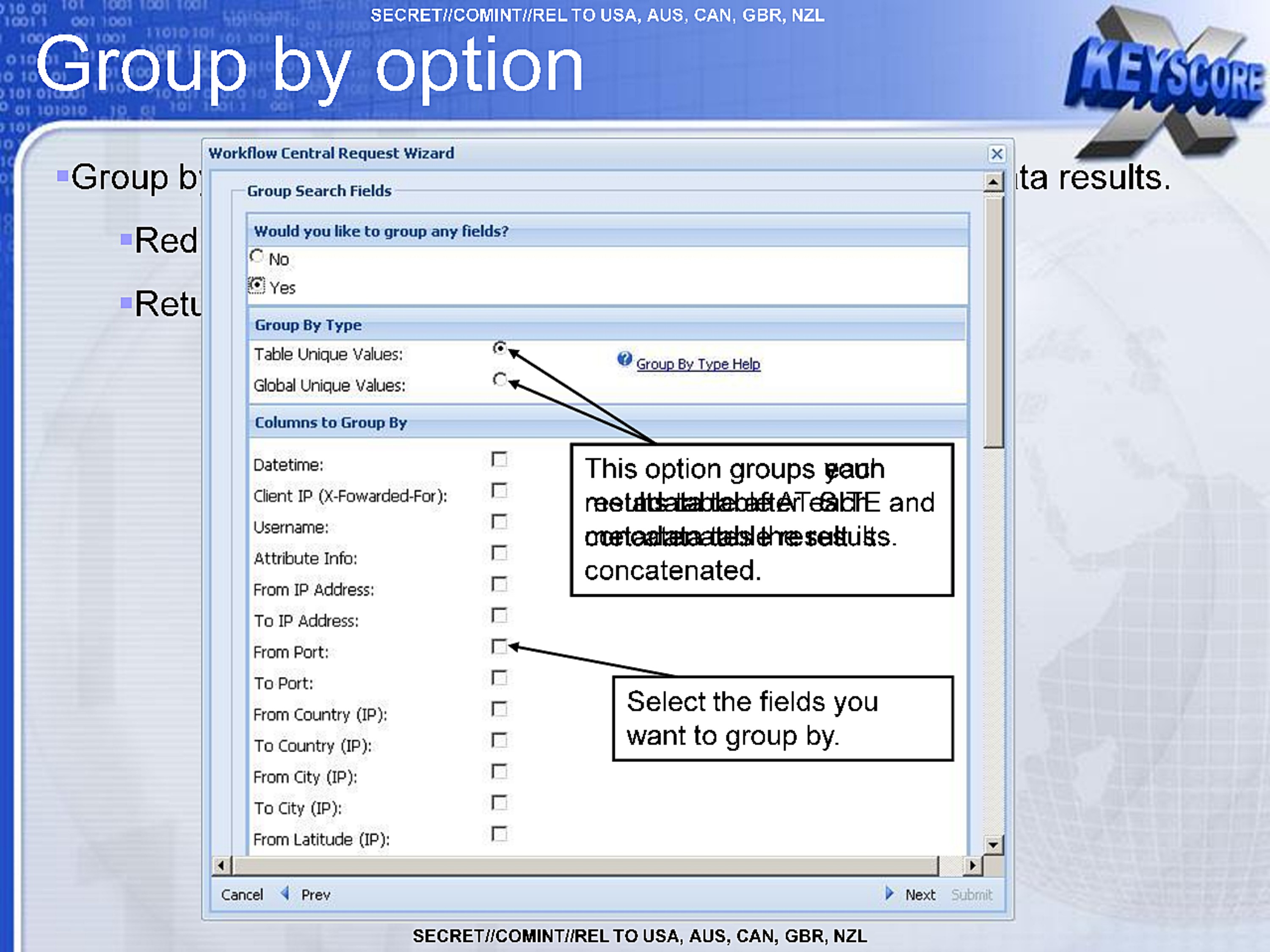
Group by option
- Group b ta results.
- Red
- Retu
Workflow Central Request Wizard
Group Search Fields
Would you like to group any fields?
No
Yes
Group By Type
Table Unique Values:
Global Unique Values:
Group By Type Help
Columns to Group By
Datetime:
Client IP (X-Fowarded-For):
Username:
Attribute Info:
From IP Address:
To IP Address:
From Port:
To Port:
From Country (IP):
To Country (IP):
From City (IP):
To City (IP):
From Latitude (IP):

This option groups each and concatenated.

Select the fields you want to group by.

Cancel Prev Next Submit
SECRET//COMINT//REL TO USA, AUS, CAN, GBR, NZL
SECRET//COMINT//REL TO USA, AUS, CAN, GBR, NZL
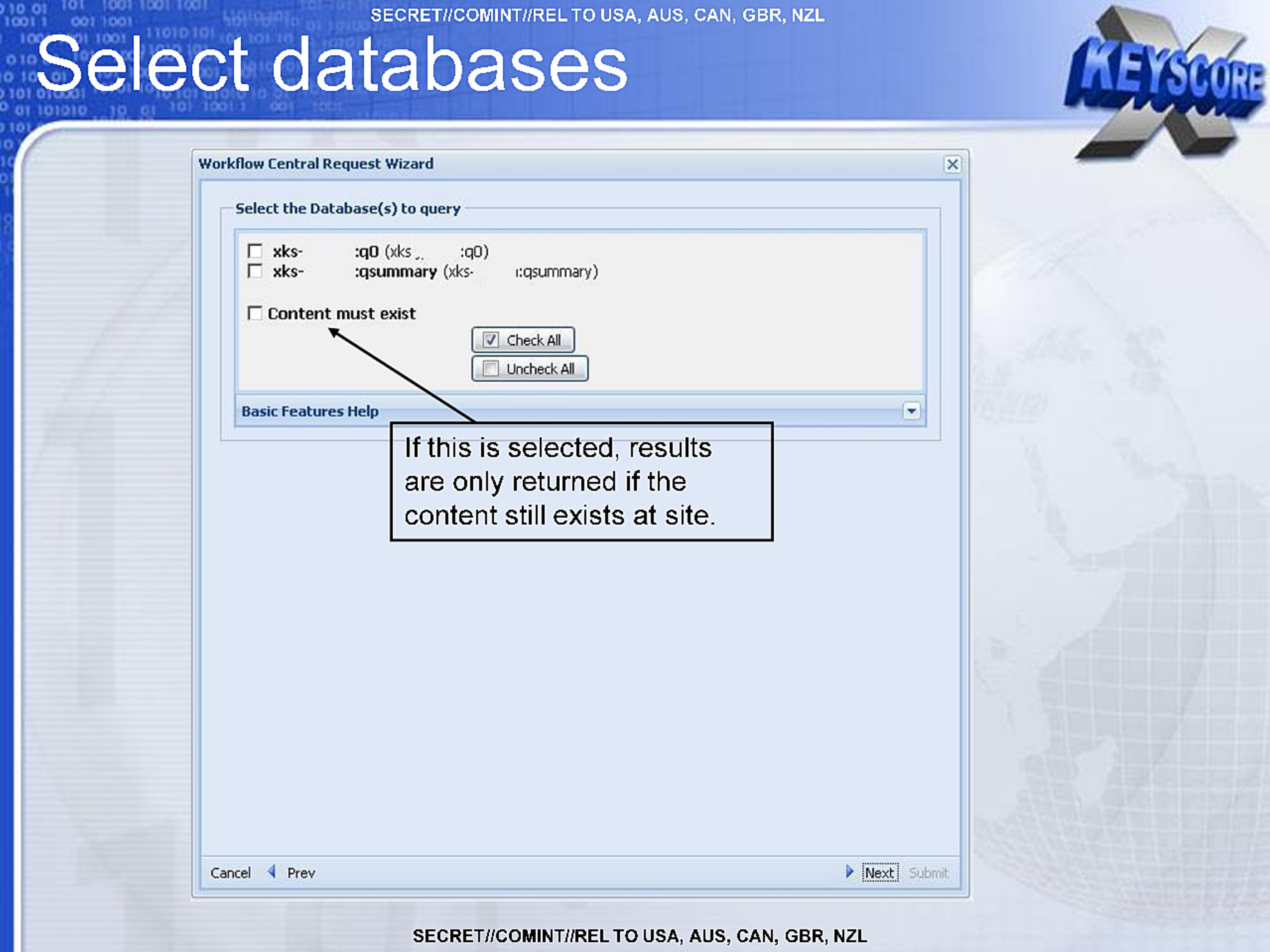
Select databases
Workflow Central Request Wizard
Select the Database(s) to query

xks-  :q0(xks    :qo)
xks-  :qsummary (xks-   qsummary)

Content must exist
Check All
Uncheck All

Basic Features Help

If this is selected, results
are only returned if the
content still exists at site.

Cancel Prev Next Submit
SECRET//COMINT//REL TO USA, AUS, CAN, GBR, NZL
SECRET//COMINT//REL TO USA, AUS, CAN, GBR, NZL
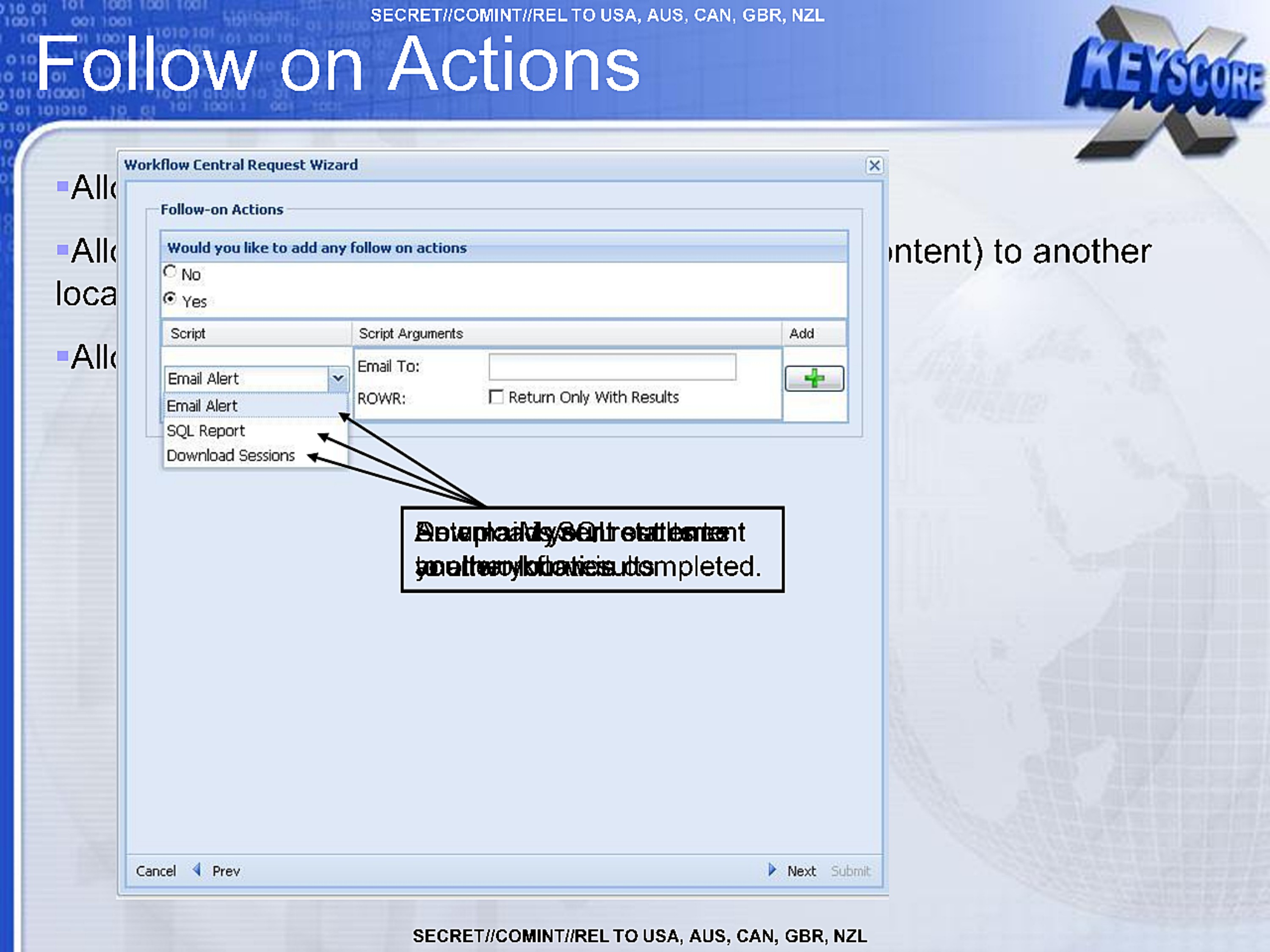
Follow on Actions
- All
- All ntent) to another loca
- All
Workflow Central Request Wizard
Follow-on Actions
Would you like to add any follow on actions
No
Yes
Script Script Arguments Add
Email Alert
Email Alert
SQL Report
Download Sessions

Script Arguments
Email To:
ROWR: Return Only With Results

mpleted.
SECRET//COMINT//REL TO USA, AUS, CAN, GBR, NZL
SECRET//COMINT//REL TO USA, AUS, CAN, GBR, NZL
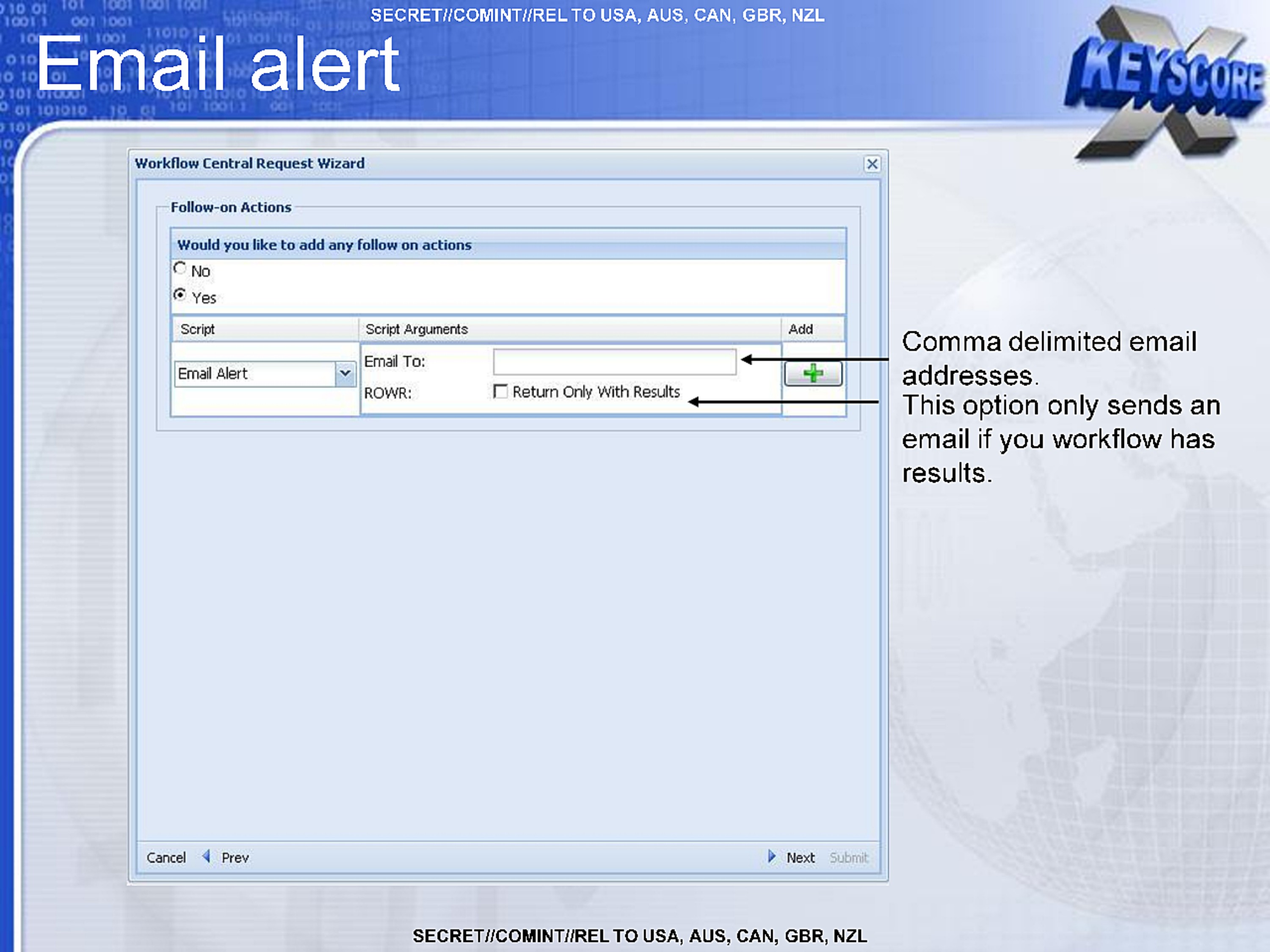
Email alert
Comma delimited email addresses.
This option only sends an email if you workflow has results.
Workflow Central Request Wizard
Follow-on Actions
Would you like to add any follow on actions
No
Yes
Script
Email Alert
Script Arguments
Email To:
ROWR: Return Only With Results
Add
SECRET//COMINT//REL TO USA, AUS, CAN, GBR, NZL
SECRET//COMINT//REL TO USA, AUS, CAN, GBR, NZL
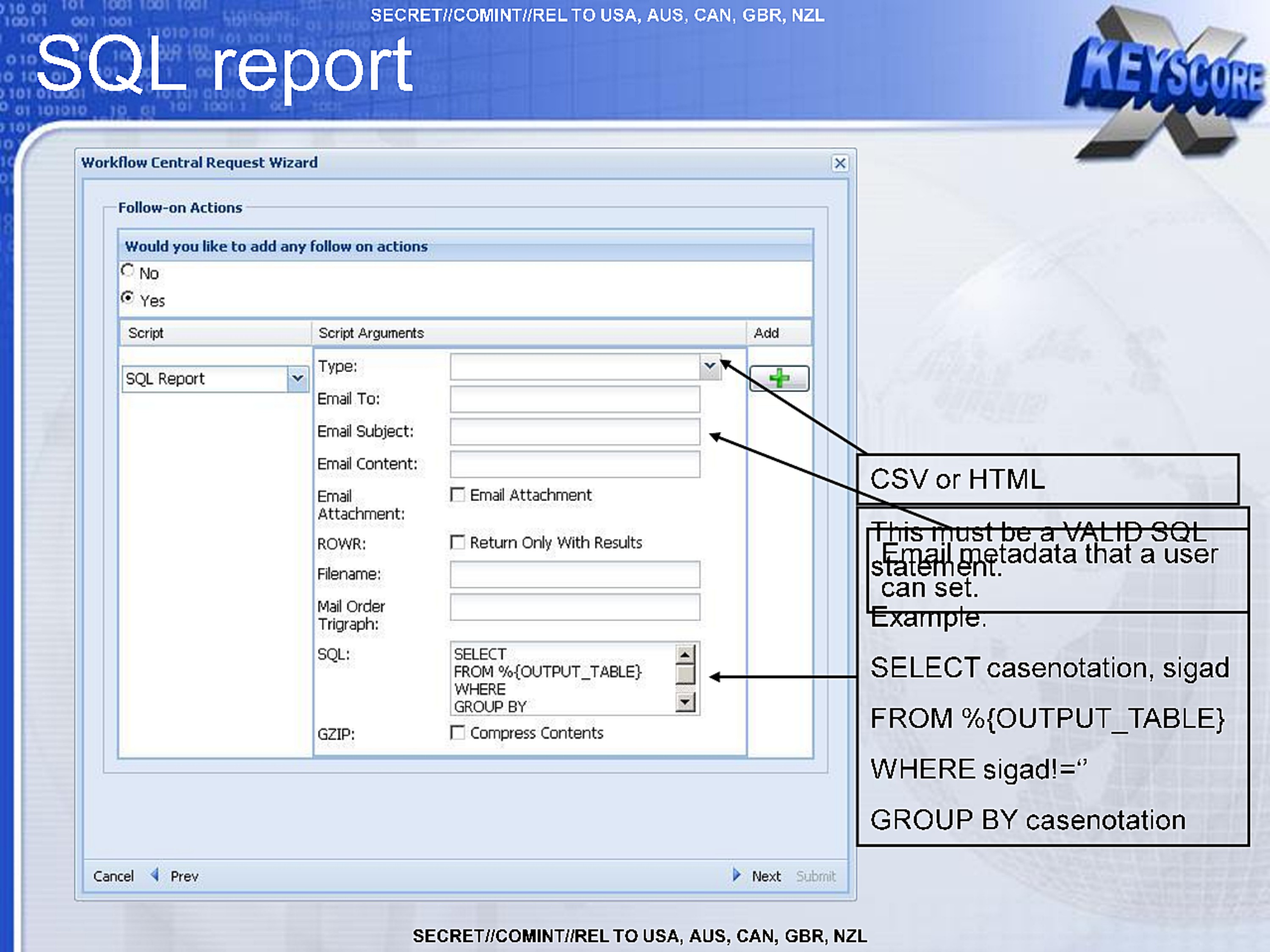
SQL report
Workflow Central Request Wizard
Follow-on Actions
Would you like to add any follow on actions
No
Yes
Script
SQL Report
Script Arguments
Type:
Email To:
Email Subject:
Email Content:
Email Attachment: Email Attachment
ROWR: Return Only With Results
Filename:
Mail Order Trigraph:
SQL: SELECT
     FROM%{OUTPUT_TABLE}
     WHERE
     GROUP BY
GZIP: Compress Contents
Add
Cancel Prev Next Submit

CSV or HTML
This must be a VALID SQL statement.

Email metadata that a user can set.

Example.

SELECT casenotation, sigad
FROM %{OUTPUT_TABLE}
WHERE sigad!=''
GROUP BY casenotation
SECRET//COMINT//REL TO USA, AUS, CAN, GBR, NZL
SECRET//COMINT//REL TO USA, AUS, CAN, GBR, NZL
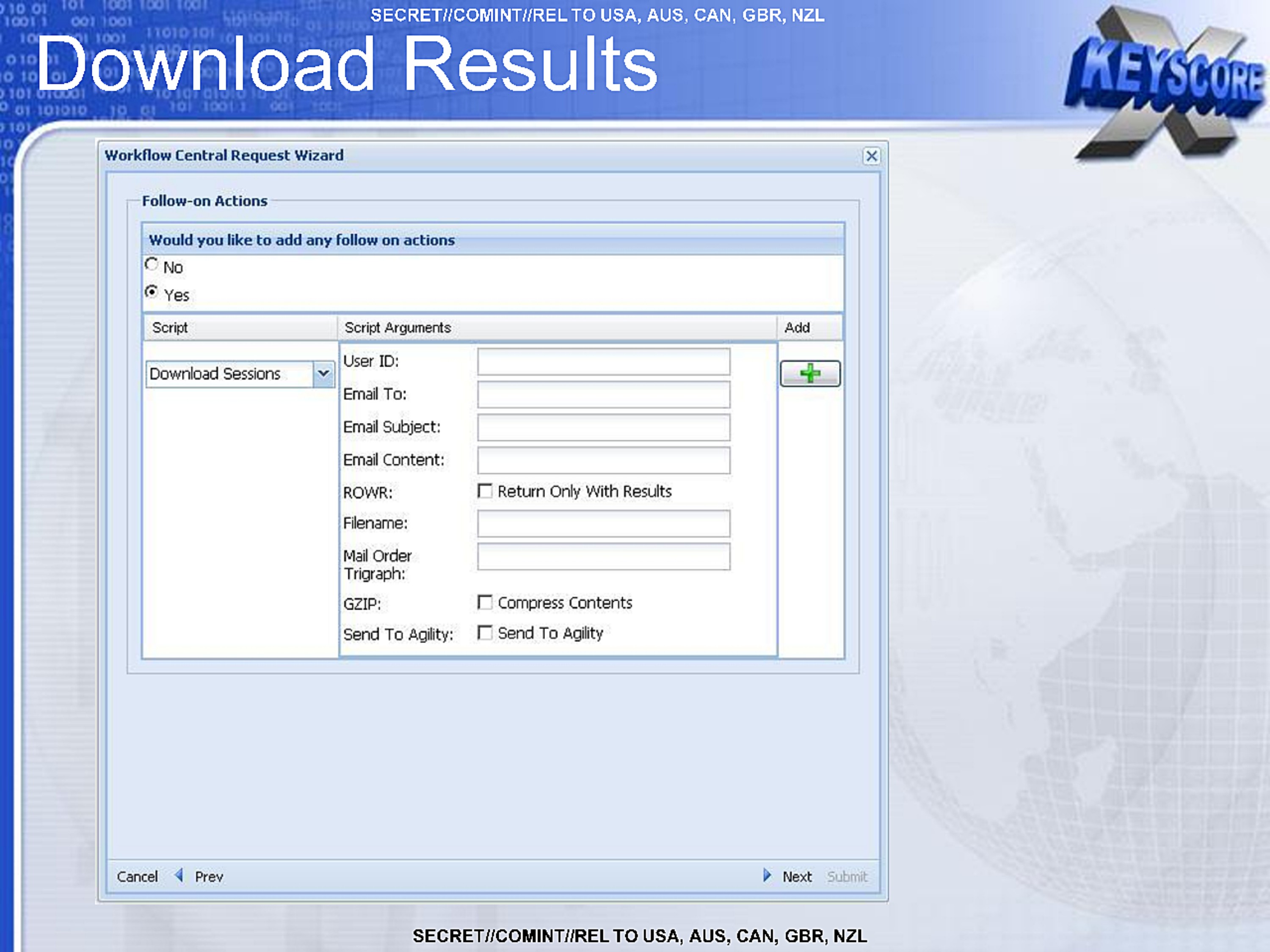
Download Results
Workflow Central Request Wizard
Follow-on Actions
Would you like to add any follow on actions
No
Yes
Script
Download Sessions
Script Arguments
User ID:
Email To:
Email Subject:
Email Content:
ROWR: Return Only With Results
Filename:
Mail Order Trigraph:
GZIP: Compress Contents
Send To Agility: Send To Agility
Add

Cancel Prev Next Submit
SECRET//COMINT//REL TO USA, AUS, CAN, GBR, NZL
SECRET//COMINT//REL TO USA, AUS, CAN, GBR, NZL
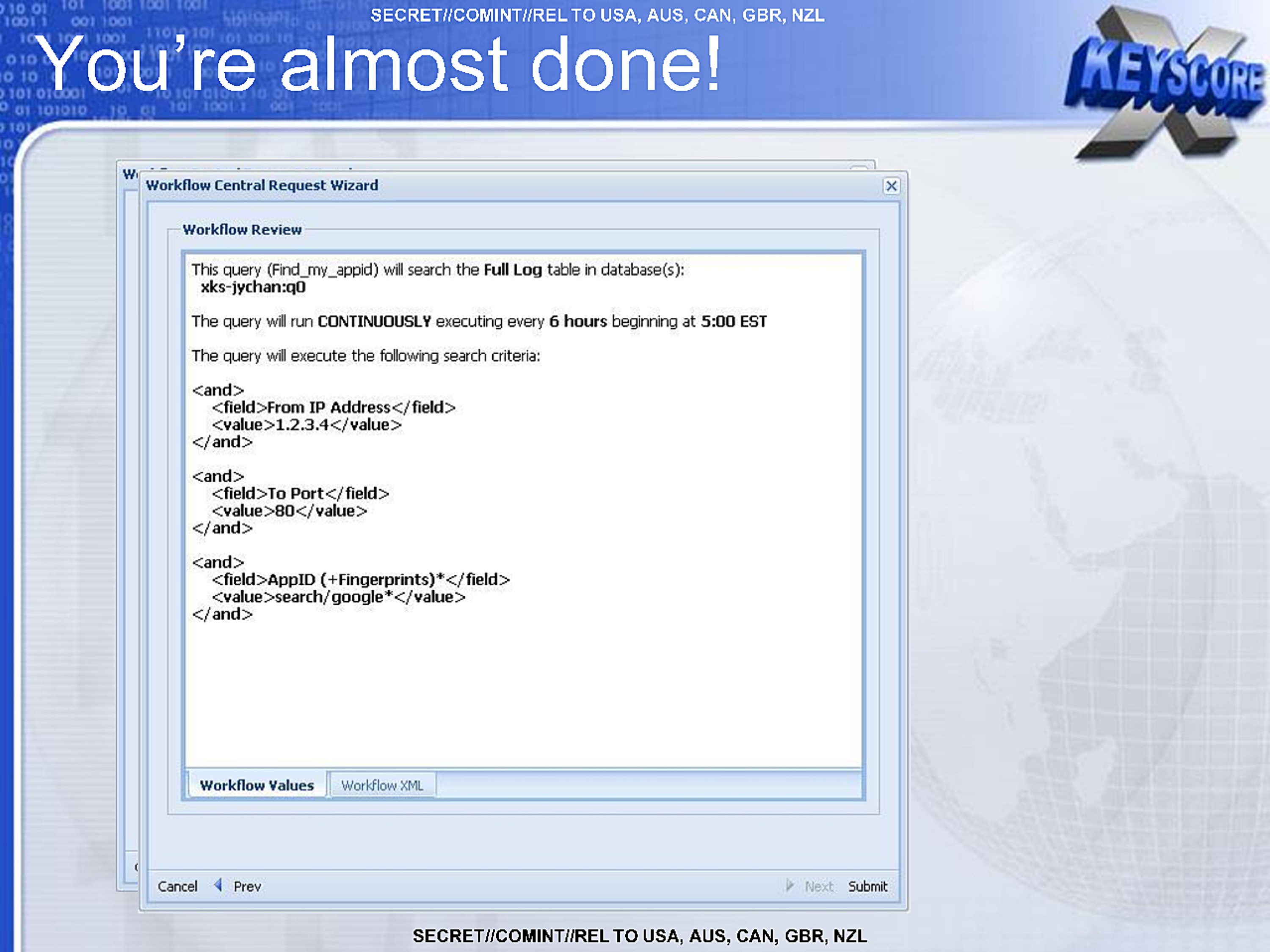
You're almost done!
Workflow Central Request Wizard
Workflow Review
This query (Find_my_appid) will search the Full Log table in database(s):
 xks-jychan:q0

The query will run CONTINUOUSLY executing every 6 hours beginning at 5:00 EST

The query will execute the following search criteria:

<and>
  <field>From IP Address</field>
  <value>1.2.3.4</value>
</and>

<and>
  <field>To Port</field>
  <value>80</value>
</and>

<and>
  <field>AppID (+Fingerprints)*</field>
  <value>search/google*</value>
</and>

Workflow Values Workflow XML

Cancel Prev Next Submit
SECRET//COMINT//REL TO USA, AUS, CAN, GBR, NZL
SECRET//COMINT//REL TO USA, AUS, CAN, GBR, NZL
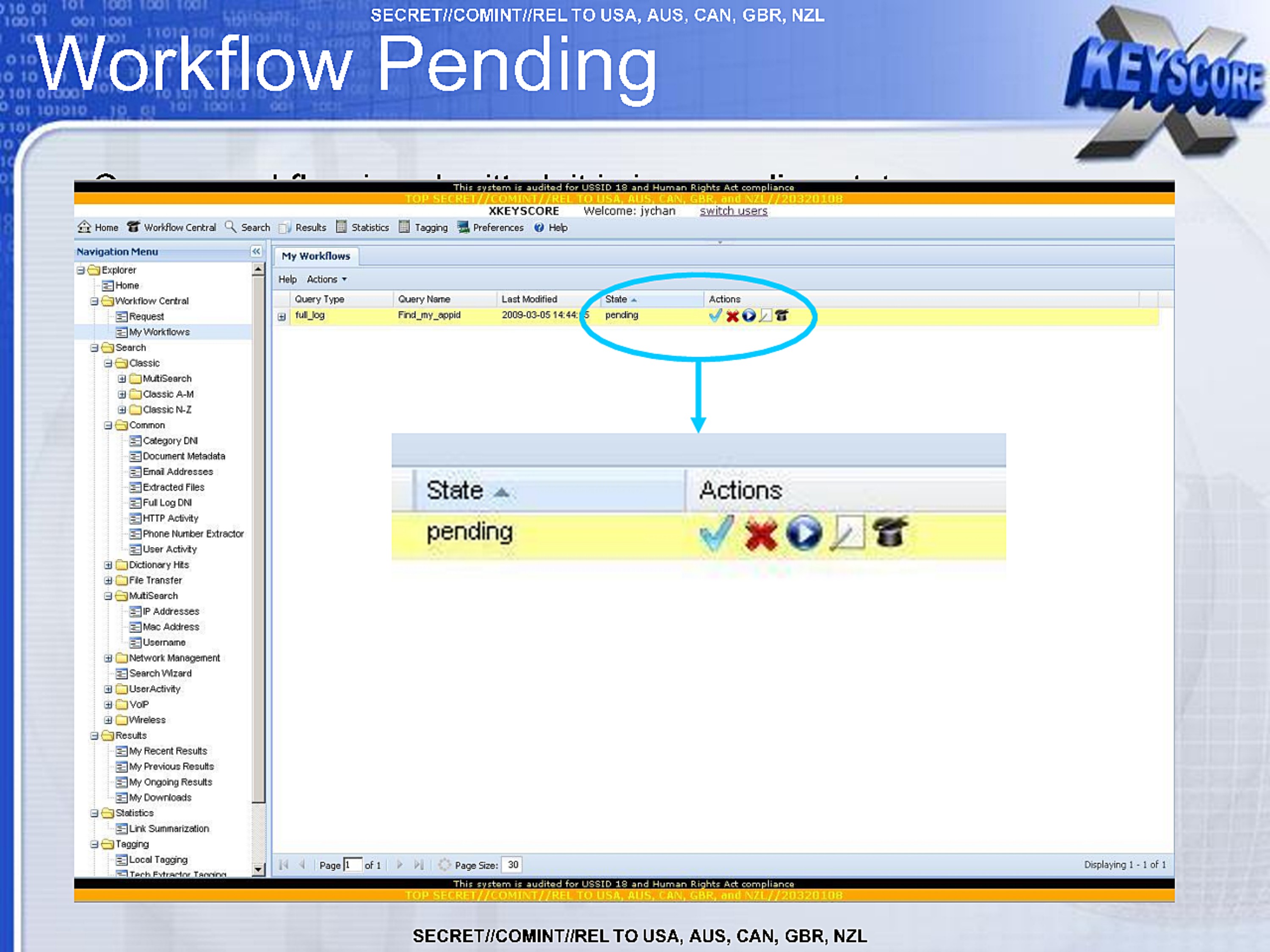
Workflow Pending
This system is audited for USSID 19 and Human Rights Act compliance
TOP SECRET//COMINT//REL TO USA, AUS, CAN, GBR, NZL//20320108
XKEYSCORE Welcome: jychan switch users

Home Workflow Central Seach Results Statistics Tagging Preferences Help

Navigation Menu
Explorer
  Home
  Workflow Central
    Request
    My Workflows
  Search
    Classic
      MultiSearch
      Classic A-M
      Classic N-Z
    Common
      Category DNI
      Document Metadata
      Email Addresses
      Extracted Files
      Full Log DNI
      HTTP Activity
      Phone Number Extractor
      User Activity
    Dictionary Hits
    File Transfer
    MultiSearch
      IP Addresses
      Mac Addresses
      Username
    Network Management
      Search Wizard
    User Activity
    VoIP
    Wireless
  Results
    My Recent Results
    My Previous Results
    My Ongoing Results
    My Downloads
  Statistics
    Link Summarization
  Tagging
    Local Tagging
    Tech Extractor Tagging

My Workflows
Help Actions

Query Type   Query Name     Last Modified       State  Actions
full_log     Find_my_appid  2009-03-05 14:14: 5 Pending

State Actions
pending
SECRET//COMINT//REL TO USA, AUS, CAN, GBR, NZL
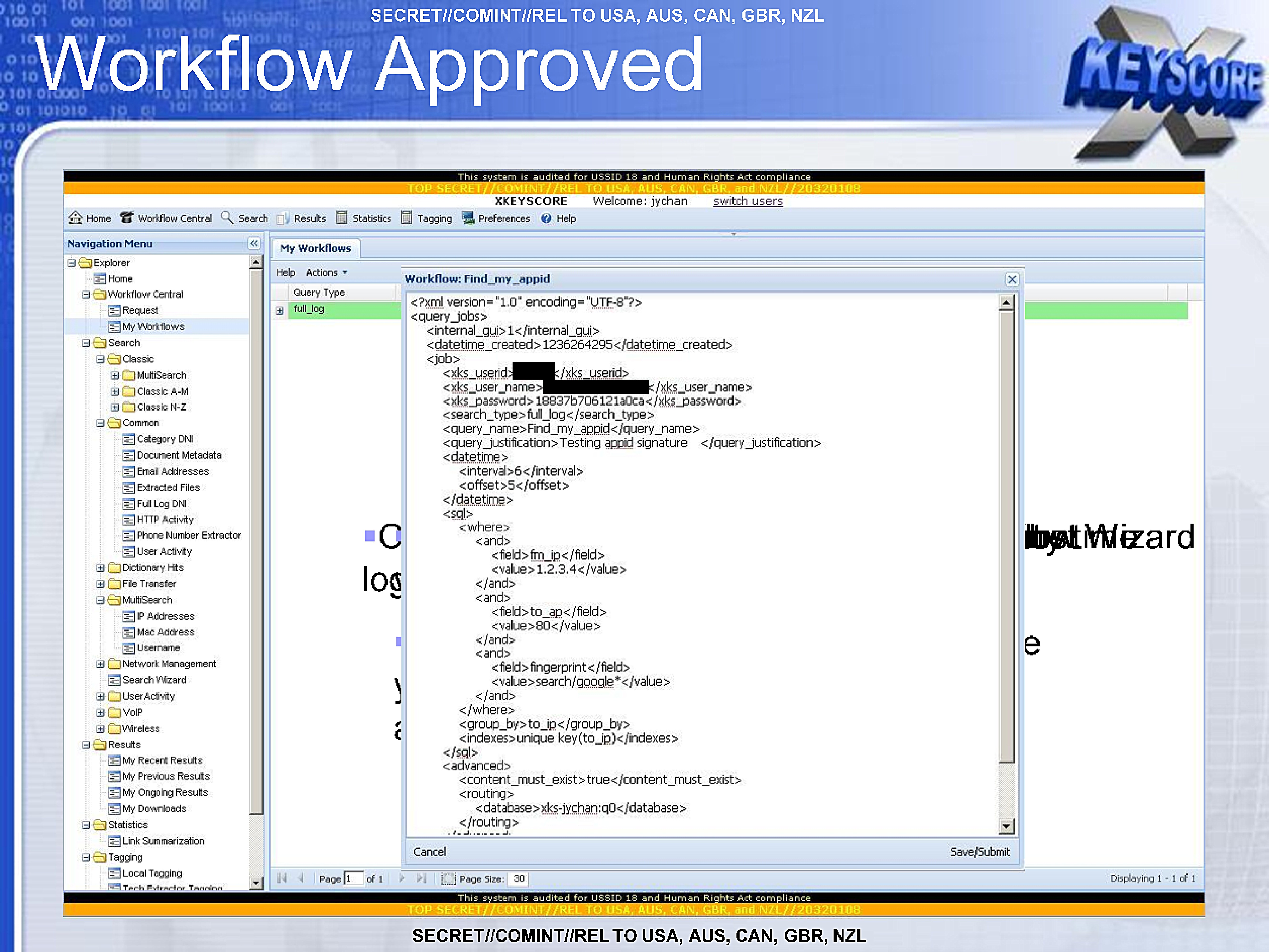
Workflow Approved
This system is audited for USSID 18 and Human Rights Act compliance
TOP SECRET//COMINT//REL TO USA, AUS, CAN, GBR, and NZL//20320108
XKEYSCORE Welcome: jychan switch users

Home Workflow Central Seach Results Statistics Tagging Preferences Help

Navigation Menu
Explorer
  Home
  Workflow Central
    Request
    My Workflows
  Search
    Classic
      MultiSearch
      Classic A-M
      Classic N-Z
    Common
      Category DNI
      Document Metadata
      Email Addresses
      Extracted Files
      Full Log DNI
      HTTP Activity
      Phone Number Extractor
      User Activity
    Dictionary Hits
    File Transfer
    MultiSearch
      IP Addresses
      Mac Address
      Username
    Network Management
      Search Wizard
    User Activity
    VoIP
    Wireless
  Results
    My Recent Results
    My Previous Results
    My Ongoing Results
    My Downloads
  Statistics
    Link Summarization
  Tagging
    Local Tagging
    Tech Extractor Tagging

My Workflows
Help Actions

Query Type
full_log

Workflow: Find_my_appid
<?xml version="1.0" encoding="UTF-8"?>
<query_jobs>
  <internal_gui>1</internal_gui>
  <datetime_created>1236264295</datetime_created>
  <job>
    <xks_userid>[REDACTED]</xks_userid>
    <xks_user_name>[REDACTED]</xks_user_name>
    <xks_password>18837b706121a0ca</xks_password>
    <search_type>full_log</search_type>
    <query_name>Find_my_appid</query_name>
    <query_justification>Testing appid signature  </query_justification>
    <datetime>
      <interval>6</interval>
      <offset>5</offset>
    </datetime>
    <sql>
      <where>
        <and>
          <field>fm_ip</field>
          <value>1.2.3.4</value>
        </and>
        <and>
          <field>to_ap</field>
          <value>80</value>
        </and>
        <and>
          <field>fingerprint</field>
          <value>search/google*</value>
        </and>
      </where>
      <group_by>to_ip</group_by>
      <indexes>unique key(to_ip)</indexes>
    </sql>
    <advanced>
      <content_must_exist>true</content_must_exist>
      <routing>
        <database>xks-jychan:q0</database>
      </routing>
    </advanced>

Cancel Save/Submit

Page 1 of 1
Page Size: 30   Displaying 1 - 1 of 1

This system is audited for USSID 18 and Human Rights Act compliance
TOP SECRET//COMINT//REL TO USA, AUS, CAN, GBR, and NZL//20320108
SECRET//COMINT//REL TO USA, AUS, CAN, GBR, NZL
SECRET//COMINT//REL TO USA, AUS, CAN, GBR, NZL
Common mistakes
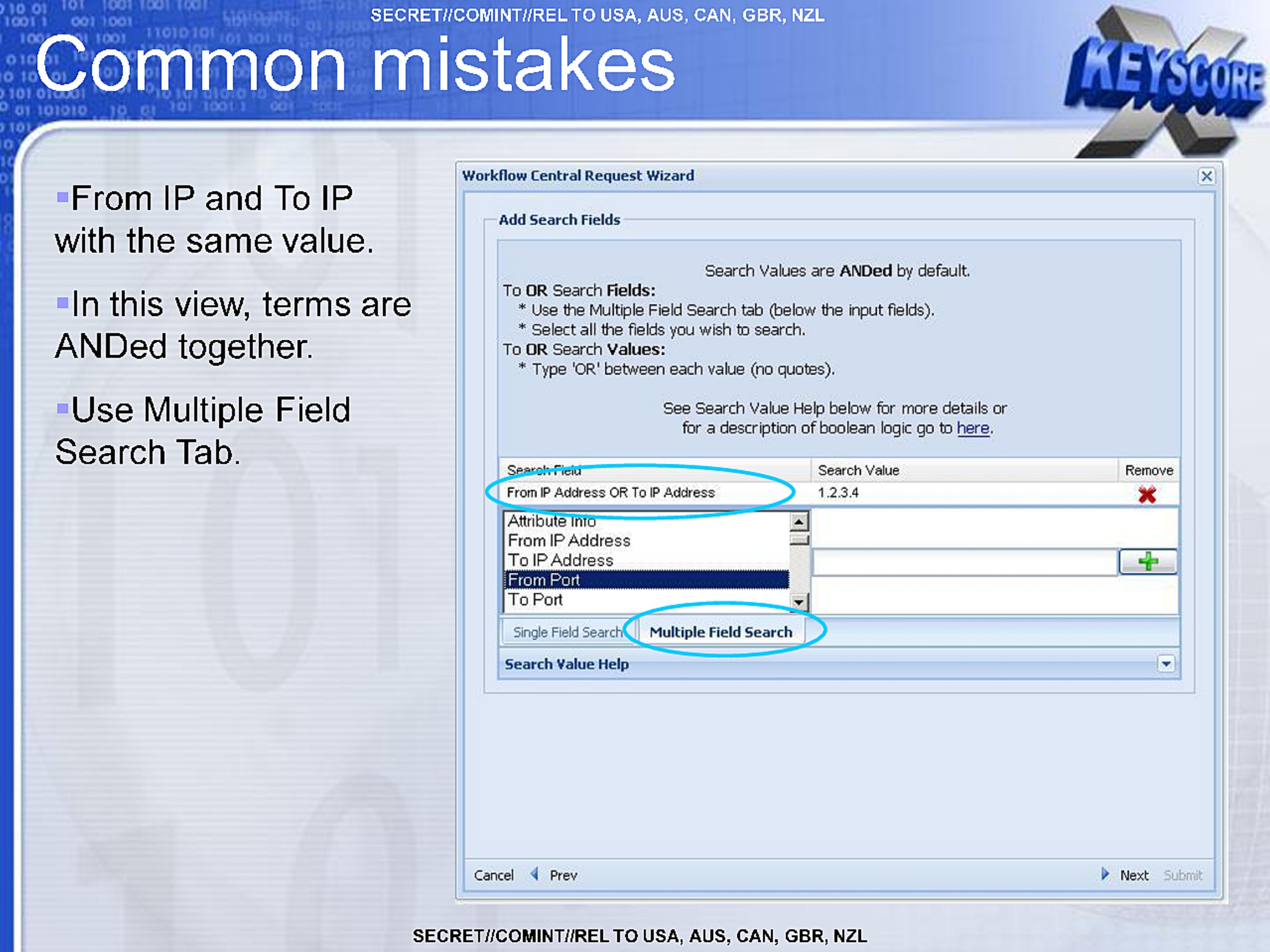
- From IP and To IP with the same value.
- In this view, terms are ANDed together.
- Use Multiple Field Search Tab.
Workflow Central Request Wizard
Add Search Fields

Search Values are ANDed by default.

To OR Search Fields:
  * Use the Multiple Field Search tab (below the input fields).
  * Select all the fields you wish to search.
To OR Search Values:
  * Type 'OR' between each value (no quotes).

See Search Value Help below for more details or
for a description of boolean logic to go here.

Search Field                      Search Value   Remove
From IP Address OR To IP Address  1.2.3.4
Attribute Info
From IP Address
To IP Address
From Port
To Port

Single Field Search | Multiple Field Search
Search Value Help

Cancel Prev Next Submit
SECRET//COMINT//REL TO USA, AUS, CAN, GBR, NZL
Common mistakes
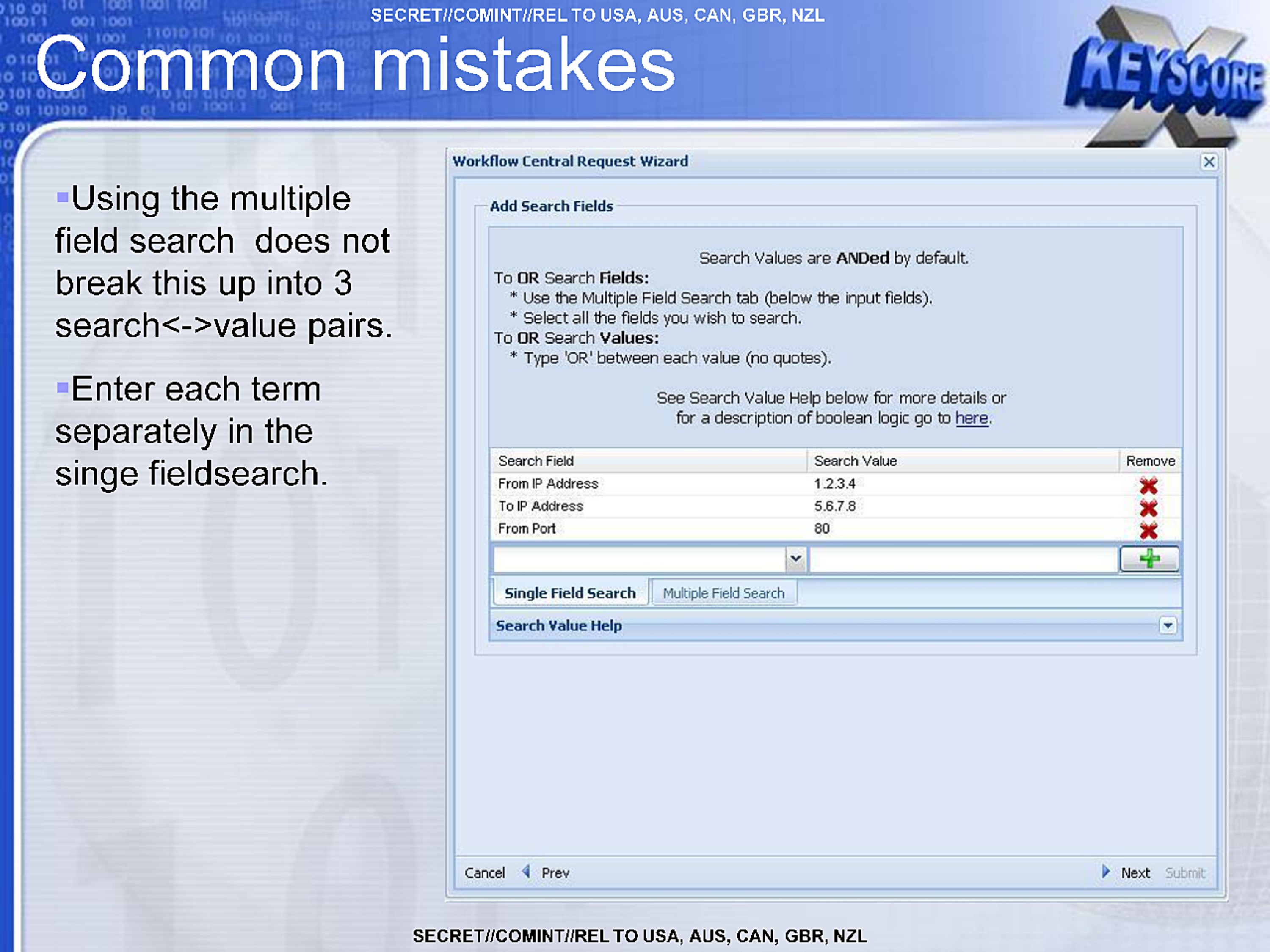
- Using the multiple field search does not break this up into 3 search<->value pairs.
- Enter each term separately in the singe fieldsearch.
Workflow Central Request Wizard
Add Search Fields

Search Values are ANDed by default.

To OR Search Fields:
  * Use the Multiple Field Search tab (below the input fields).
  * Select all the fields you wish to search.
To OR Search Values:
  * Type 'OR' between each value (no quotes).

See Search Value Help below for more details or
for a description of boolean logic to go here.

Search Field                      Search Value   Remove
From IP Address                   1.2.3.4
To IP Address                     5.6.7.8
From Port                         80

Single Field Search | Multiple Field Search
Search Value Help

Cancel Prev Next Submit
SECRET//COMINT//REL TO USA, AUS, CAN, GBR, NZL
SECRET//COMINT//REL TO USA, AUS, CAN, GBR, NZL
Common mistakes
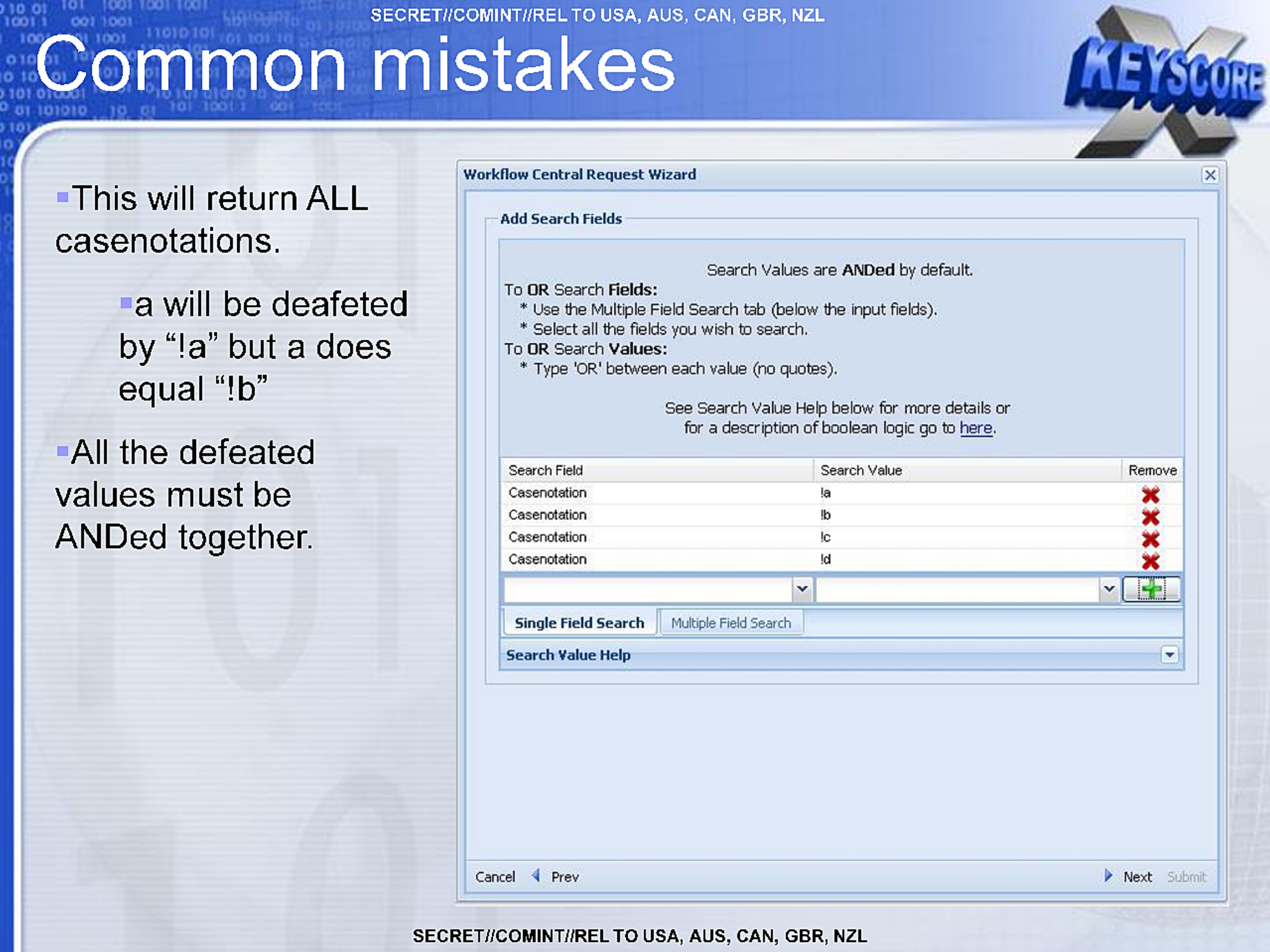
- This will return ALL casenotations.
- "a" will be defeated by "!a" but "a" does equal "!b"
- All the defeated values must be ANDed together.
Workflow Central Request Wizard
Add Search Fields

Search Values are ANDed by default.

To OR Search Fields:
  * Use the Multiple Field Search tab (below the input fields).
  * Select all the fields you wish to search.
To OR Search Values:
  * Type 'OR' between each value (no quotes).

See Search Value Help below for more details or
for a description of boolean logic to go here.

Search Field                      Search Value   Remove
Casenotation                      !a
Casenotation                      !b
Casenotation                      !c
Casenotation                      !d

Single Field Search | Multiple Field Search
Search Value Help
SECRET//COMINT//REL TO USA, AUS, CAN, GBR, NZL
SECRET//COMINT//REL TO USA, AUS, CAN, GBR, NZL
Common mistakes
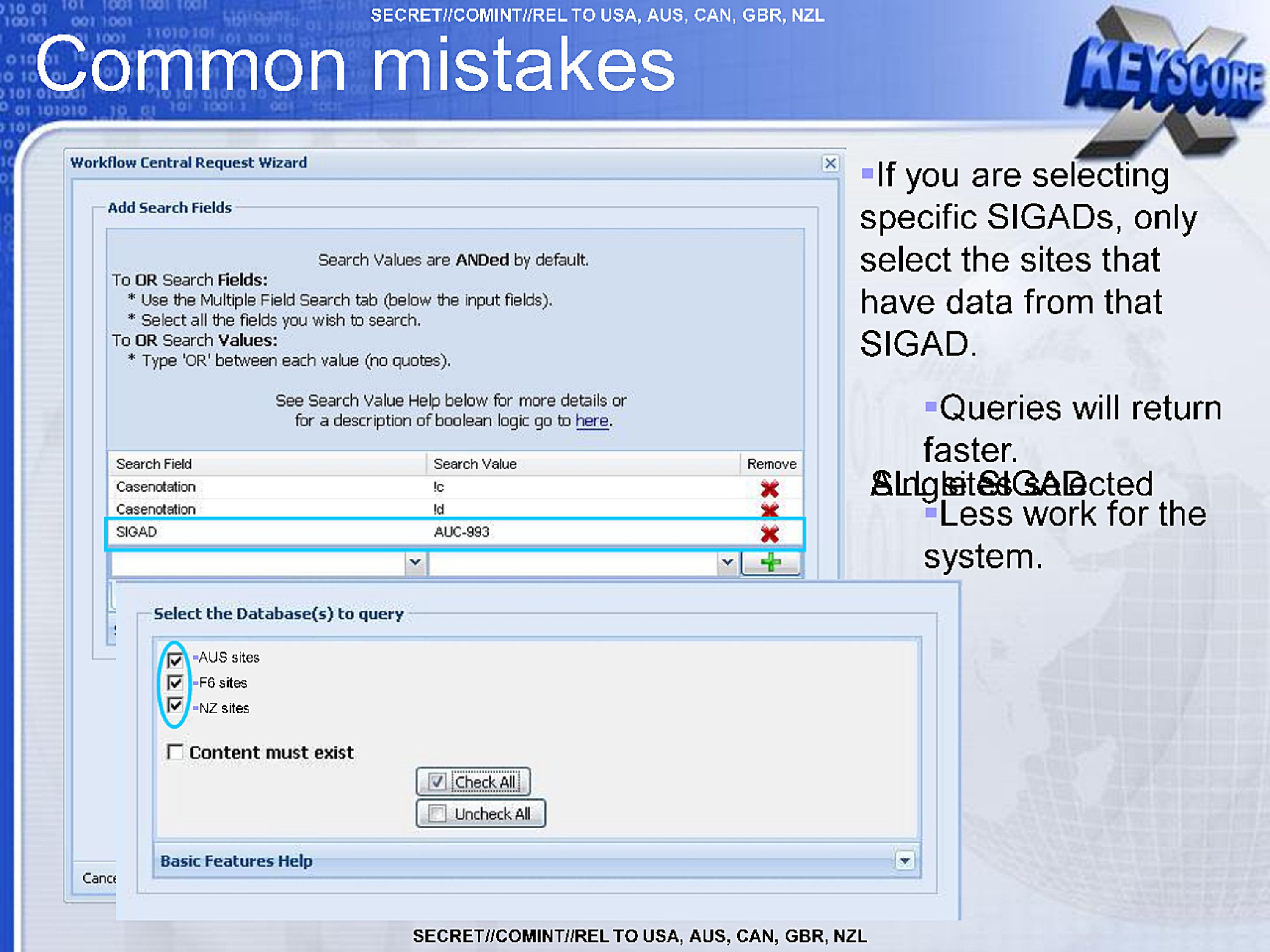
- If you are selecting specific SIGADs, only select the sites that have data from that SIGAD.
- Queries will return faster.
- All sites selected
- Less work for the system.
Workflow Central Request Wizard
Add Search Fields

Search Values are ANDed by default.

To OR Search Fields:
  * Use the Multiple Field Search tab (below the input fields).
  * Select all the fields you wish to search.
To OR Search Values:
  * Type 'OR' between each value (no quotes).

See Search Value Help below for more details or
for a description of boolean logic to go here.

Search Field    Search Value   Remove
Casenotation    !c
Casenotation    !d
SIGAD           AUC-993

Select the Database(s) to query
=AUS sites
=F6 sites
=NZ sites

Content must exist

Check All
Uncheck All

Basic Features Help
SECRET//COMINT//REL TO USA, AUS, CAN, GBR, NZL
Common mistakes
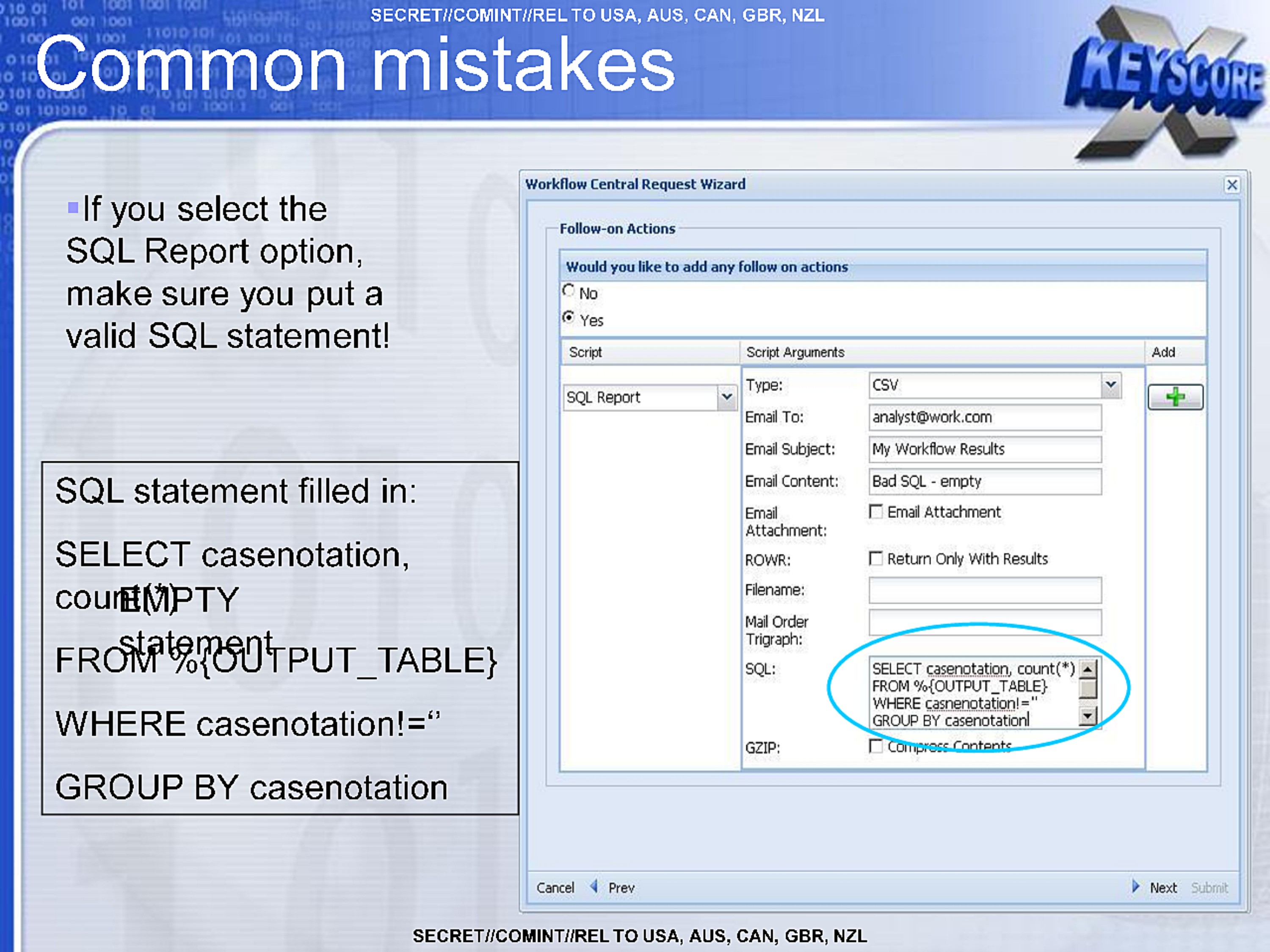
- If you select the SQL Report option, make sure you put a valid SQL statement!
SQL statement filled in:
SELECT casenotation,
count(*)
FROM %{OUTPUT_TABLE}
WHERE casenotation!=''
GROUP BY casenotation
Workflow Central Request Wizard
Follow-on Actions
Would you like to add any follow on actions
No
Yes

Script
SQL Report

Script Arguments
Type: CSV
Email To: analyst@work.com
Email Subject: My Workflow Results
Email Content: Bad SQL - empty
Email Attachment: Email Attachment
ROWR: Return Only With Results
Filename:
Mail Order Trigraph:
SQL: SELECT casenotation, count(*)
     FROM %{OUTPUT_TABLE}
     WHERE casenotation!=''
     GROUP BY casenotation
GZIP: Compress Contents
Add

Cancel Prev Next Submit
SECRET//COMINT//REL TO USA, AUS, CAN, GBR, NZL
SECRET//COMINT//REL TO USA, AUS, CAN, GBR, NZL
Questions?
xks_workflow@r1.r.nsa
SECRET//COMINT//REL TO USA, AUS, CAN, GBR, NZL
Published in the Same Report
(10 of 46 documents)
-
XKEYSCORE intro [pdf]
A TOP SECRET NSA presentation from 2008 introducing XKeyscore — one of the earliest overview documents in the archive — describing the system as a globally distributed Linux cluster across approximately 150 sites and 700+ servers that stores a ~3-day rolling buffer of all unfiltered internet traffic, and demonstrating its core capabilities for finding previously unknown targets by mining metadata, tracking documents by embedded image hashes, detecting encryption and VPN use, and language tracking.
Programs: XKEYSCORE · TURMOIL · TURBULENCE · TRAFFICTHIEF · WEALTHYCLUSTER · MOONSHINE · SEARCHLIGHT · MARINA · PSC · SSO · TIMBERLINEPeople: bin Laden, Osama“'Brasil é um grande alvo', diz jornalista sobre vigilância dos EUA” - O Globo ↗ (2013-07-07) · “XKeyscore: NSA tool collects 'nearly everything a user does on the internet'” - The Guardian ↗ (2013-07-31) · “No Place to Hide” - Metropolitan Books ↗ (2014-05-13) · “XKEYSCORE: NSA’s Google for the World’s Private Communications” - The Intercept ↗ (2015-07-01) · Greenwald, Glenn · Bridi, Sônia · Marquis-Boire, Morgan · Lee, Micah -
Advanced HTTP Activity Analysis [pdf]
This NSA training document from 2009 teaches intelligence analysts how to analyze HTTP internet traffic and exploit it using the XKEYSCORE surveillance system to monitor and identify internet users globally.
“XKEYSCORE: NSA’s Google for the World’s Private Communications” - The Intercept ↗ (2015-07-01) · “No Place to Hide” - Metropolitan Books ↗ (2014-05-13) · Marquis-Boire, Morgan · Greenwald, Glenn · Lee, Micah -
Analyzing Mobile/Cellular DNI in XKEYSCORE, May 2009 [pdf]
The XKEYSCORE document explains how the agency analyzes mobile/cellular device internet usage by collecting and processing both converged DNI/DNR data within cellular networks and traditional internet traffic, using various tools and indicators to identify mobile users even when their device type isn't immediately evident. The document demonstrates how the system can track mobile internet activity across applications like Yahoo Mail and identifies devices through various technical "hints" including MSISDN codes, browser fingerprints, and user agent strings.
-
Atomic SIGINT Data Format (ASDF) Configuration Read Me [pdf]
This document is a technical configuration guide for setting up XKEYSCORE surveillance systems to generate and forward metadata in the Atomic SIGINT Data Format (ASDF) to various data repositories including MARINA, which tracks users' browser activity and online behavior.
Marking: SECRET -
CADENCE Read Me [pdf]
This NSA engineering manual details how to configure XKEYSCORE—the agency's sprawling surveillance system—to integrate with CADENCE, an automated keyword scanning tool that filters intercepted communications and routes intelligence based on search terms submitted by analysts.
-
How to configure category throttling in XKEYSCORE [pdf]
An NSA technical guide explains how to configure "category throttling" in XKEYSCORE—a feature that automatically stops forwarding intercepted communications once analyst-defined collection targets hit predetermined data volume or session count limits, allowing the surveillance system to continue processing but prevent overflow from high-volume targets.
-
CNE Analysis in XKEYSCORE [pdf]
This document is an NSA training presentation from October 2009 demonstrating how XKEYSCORE integrates with Computer Network Exploitation (CNE) operations, allowing analysts to search and analyze data extracted from compromised computers including keystrokes, browser history, registry files, documents, emails, and directory structures collected through implants like UNITEDRAKE and OLYMPUS.
Programs: XKEYSCORE · OLYMPUS · UNITEDRAKE · PINWALE · TUNINGFORK · TURBOCHASER · MARINA · JOLLYROGER · TREASUREMAP · TURBINE · PRESSUREWAVE · MAD · TUCKER · EXPANDINGPULLY · UNIX · SEARCHLIGHT · KEYLOGGER · PILBEAM · FOXACID · WAYTIDE · SHADOWQUEST · SEAGULLFARO · DARKHELMET · LUTEUSICARUS · FOGGYBOTTOM · GREENCHAOS · RADIUS · NKB · VALIDATOR -
Communications System - How To Guide [pdf]
A TOP SECRET and sensitive compartmented information (SCI) how-to document for the NSA’s XKEYSCORE “Comms” backbone, laying out ports, peer/allow rules, bandwidth pools, and proxy classifications that stitch clusters to central control—a scalable architecture for moving surveillance data with security markings baked in. It also walks through firewall exceptions, HTTPS port-sharing, and a MAILORDER file pipeline, exposing the nuts‑and‑bolts of how collection flows across sites, proxies, and viewers.
-
DEEPDIVE Readme [pdf]
This document is a confidential technical guide that provides step-by-step procedures for configuring an XKEYSCORE server to function as a DEEPDIVE server. DEEPDIVE enhances XKEYSCORE by adding a front-end filter and a rolling buffer of all unfiltered data, creating a federated query system that can scan all collection sites with a single query.
-
DNI101 [pdf]
This TOP SECRET training guide, "DNI 101," provides a workflow for Digital Network Intelligence analysts on how to investigate a target's email address, detailing the specific tools, databases, and methodology used, and stressing the critical difference between initial open-source/classified research and the active "targeting" of raw SIGINT repositories like XKEYSCORE, PINWALE, and MARINA.
Programs: NKB · FOXTRAIL · FOREMAN · PINWALE · LIONHEART · XKEYSCORE · DISHFIRE · MARINA · MECWEB · MAINWAY · TRAFFICTHIEF · MAUI · ANCHORY · M3 · INTELLINK · HOMEBASE · PROTON · UTT · CADENCE · SPEEDBUMP · TUNINGFORK · MASTERSHAKE · BLACKPEARL · JACKSPARROW · ROADBED · STORYDUTY · LIONROAR · DOPHONE · UIS

Related Documents
-
XKEYSCORE Workflows 2011 [pdf]
A 2011 XKeyscore training presentation on Workflows — an updated version of the 2009 briefing — teaching analysts to build automated standing queries, with new content including creating workflows directly from existing query results, a "Find and Forward VoIP" follow-on action routing intercepted calls to NUCLEON, result-sharing between users, and a database-selection screen naming numerous live sites including TAO STAT, multiple DEEPDIVE systems, and TURBULENCE deployments at Menwith Hill.
Programs: XKEYSCORE · MAILORDER · DEEPDIVE · TURBULENCE · TURTLERACE · TURBOPOUND · TURTLEALE · JACKNIFE · TIMBERLINE · TURBOTEC · TURBOALE · NUCLEON · AGILITY · SSO -
X-KEYSCORE as a SIGDEV tool 2009 [pdf]
A 2009 TOP SECRET NSA presentation describing XKeyscore as a SIGINT development tool — explaining how it captures and temporarily stores the full content of internet traffic (the 95%+ that was previously dropped because it didn't match any target) across 125 sites worldwide, "slowing down the internet" so analysts can retroactively reconstruct a target's entire online session, discover new targets, and search the content of documents, web searches, emails and chats that contain no tasked selector.
Programs: XKEYSCORE · PINWALE · TRAFFICTHIEF · MARINA · AGILITY · PILBEAM · MAILORDER · CADENCE · NKB · PSC · SSO · UIS“XKEYSCORE: NSA’s Google for the World’s Private Communications” - The Intercept ↗ (2015-07-01) · “No Place to Hide” - Metropolitan Books ↗ (2014-05-13) · “FRA has access to controversial surveillance system” - SVT Nyheter ↗ (2013-12-11) · Marquis-Boire, Morgan · Greenwald, Glenn · Lee, Micah · Bergman, Sven · Dyfvermark, Joachim · Gallagher, Ryan · Laurin, Fredrik · Struwe, Filip -
XKEYSCORE System Administration [pdf]
A December 2012 TOP SECRET XKeyscore System Administration training manual — the detailed technical guide for the engineers who ran XKeyscore field-site clusters — covering the system's Red Hat Linux architecture, master/slave cluster design, database and processing pipeline, the GUI (including built-in Tor, botnet and CNE search menus), the DeepDive full-take packet processor, the xks command-line tool, and monitoring and troubleshooting, with live screenshots from the Timberline site (USF-790) and Menwith Hill Station.
Programs: XKEYSCORE · WEALTHYCLUSTER · MAILORDER · CADENCE · ROGUESTITCH · QUANTUMBOT · COTTONCHAINSAW · MPTRII · SCARFACE · ZAMENSIS · MAPREDUCE · GENESIS · REDUCER · DEEPDIVE · ASDF · CYBER · BULKCRYPT · METTLESOME · PACKETSPLAYYER · PROMOTER · DEFRAG · XFIP · TRAFFICTHIEF · ENDACE · TIMBERLINE · MUSCULAR · FIST · STARPROC -
The Unofficial XKEYSCORE User Guide [pdf]
A TOP SECRET XKeyscore user guide written by a Booz Allen Hamilton consultant, providing step-by-step instructions for 32 classic search types — including email address queries, password extraction from mail server IPs, phone number extraction, HTTP activity analysis, document metadata fingerprinting and workflow automation — with worked examples targeting counterterrorism subjects in Afghanistan, Pakistan, Iran and Sweden, viewed through an Agility instance bearing the ECI RAGTIME classification banner confirming the tool was accredited for FISA-authorised collection.
Programs: XKEYSCORE · PINWALE · RAGTIME · AGILITY · METAFRAME · TIMBERLINE · YAKIMA · REDMINE · TUNINGFORK · FOGGYBOTTOM · FOXTRAIL · CADENCE · UTT · NKB · AIRGAP · DOPHONEPeople: bin Laden, Osama“XKEYSCORE: NSA’s Google for the World’s Private Communications” - The Intercept ↗ (2015-07-01) · “No Place to Hide” - Metropolitan Books ↗ (2014-05-13) · “FRA has access to controversial surveillance system” - SVT Nyheter ↗ (2013-12-11) · Marquis-Boire, Morgan · Greenwald, Glenn · Lee, Micah · Bergman, Sven · Dyfvermark, Joachim · Gallagher, Ryan · Laurin, Fredrik · Struwe, Filip -
How to configure category throttling in XKEYSCORE [pdf]
An NSA technical guide explains how to configure "category throttling" in XKEYSCORE—a feature that automatically stops forwarding intercepted communications once analyst-defined collection targets hit predetermined data volume or session count limits, allowing the surveillance system to continue processing but prevent overflow from high-volume targets.