CADENCE Read Me
Open PDFDocument date: -
Pages: 4
Genre: manual
Banner: CONFIDENTIAL//SI
Classification: CONFIDENTIAL SI
Dissemination: -
This NSA engineering manual details how to configure XKEYSCORE—the agency's sprawling surveillance system—to integrate with CADENCE, an automated keyword scanning tool that filters intercepted communications and routes intelligence based on search terms submitted by analysts.
My notes
CONFIDENTIAL//SI
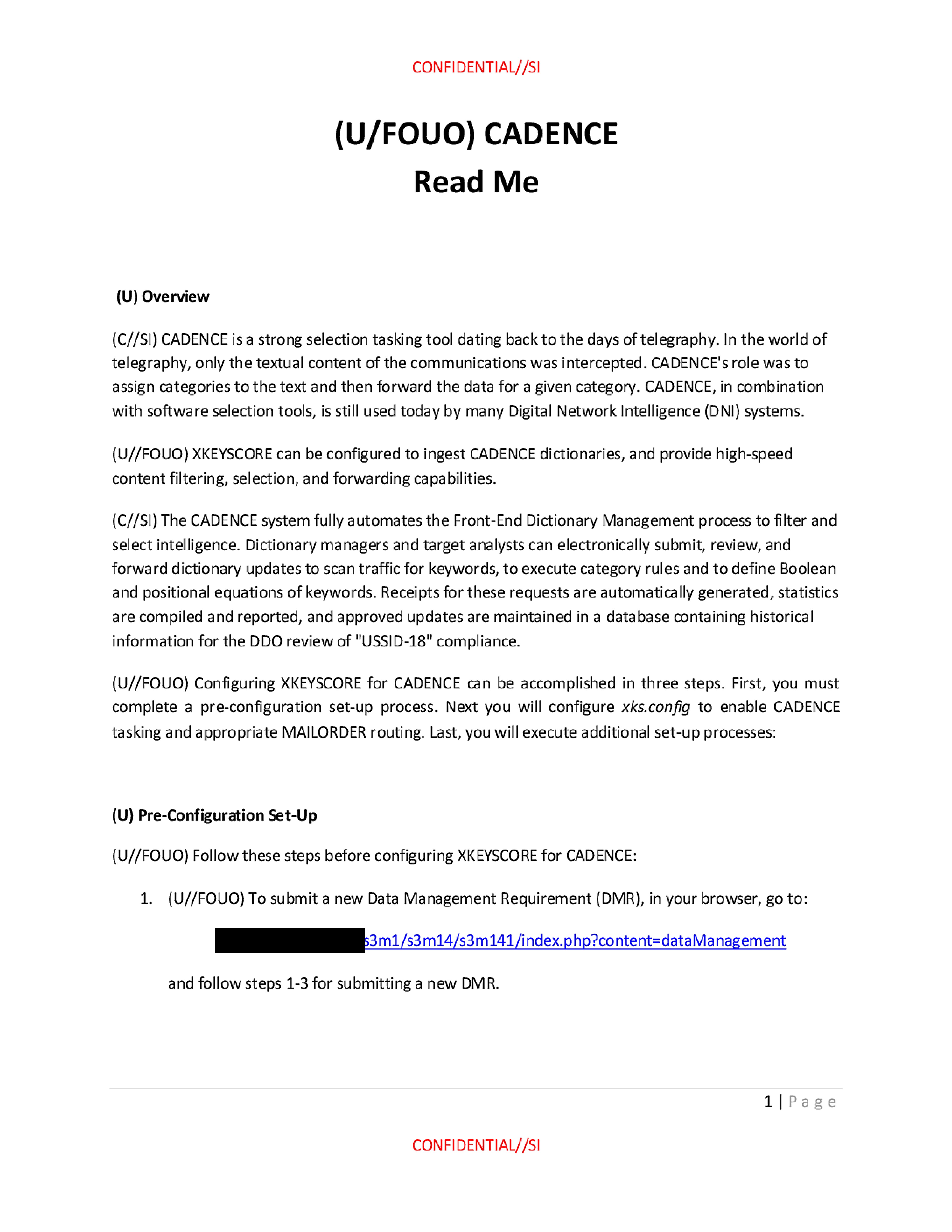
(U/FOUO) CADENCE Read Me
(U) Overview
(C//SI) CADENCE is a strong selection tasking tool dating back to the days of telegraphy. In the world of telegraphy, only the textual content of the communications was intercepted. CADENCE's role was to assign categories to the text and then forward the data for a given category. CADENCE, in combination with software selection tools, is still used today by many Digital Network Intelligence (DNI) systems.
(U//FOUO) XKEYSCORE can be configured to ingest CADENCE dictionaries, and provide high-speed content filtering, selection, and forwarding capabilities.
(C//SI) The CADENCE system fully automates the Front-End Dictionary Management process to filter and select intelligence. Dictionary managers and target analysts can electronically submit, review, and forward dictionary updates to scan traffic for keywords, to execute category rules and to define Boolean and positional equations of keywords. Receipts for these requests are automatically generated, statistics are compiled and reported, and approved updates are maintained in a database containing historical information for the DDO review of "USSID-18" compliance.
(U//FOUO) Configuring XKEYSCORE for CADENCE can be accomplished in three steps. First, you must complete a pre-configuration set-up process. Next you will configure xks.config to enable CADENCE tasking and appropriate MAILORDER routing. Last, you will execute additional set-up processes:
(U) Pre-Configuration Set-Up
(U//FOUO) Follow these steps before configuring XKEYSCORE for CADENCE:
- (U//FOUO) To submit a new Data Management Requirement (DMR), in your browser, go to:
[REDACTED]s3m1/s3m14/s3m141/index.php?content=dataManagement
and follow steps 1-3 for submitting a new DMR.
1 Page
CONFIDENTIAL//SI
CONFIDENTIAL//SI
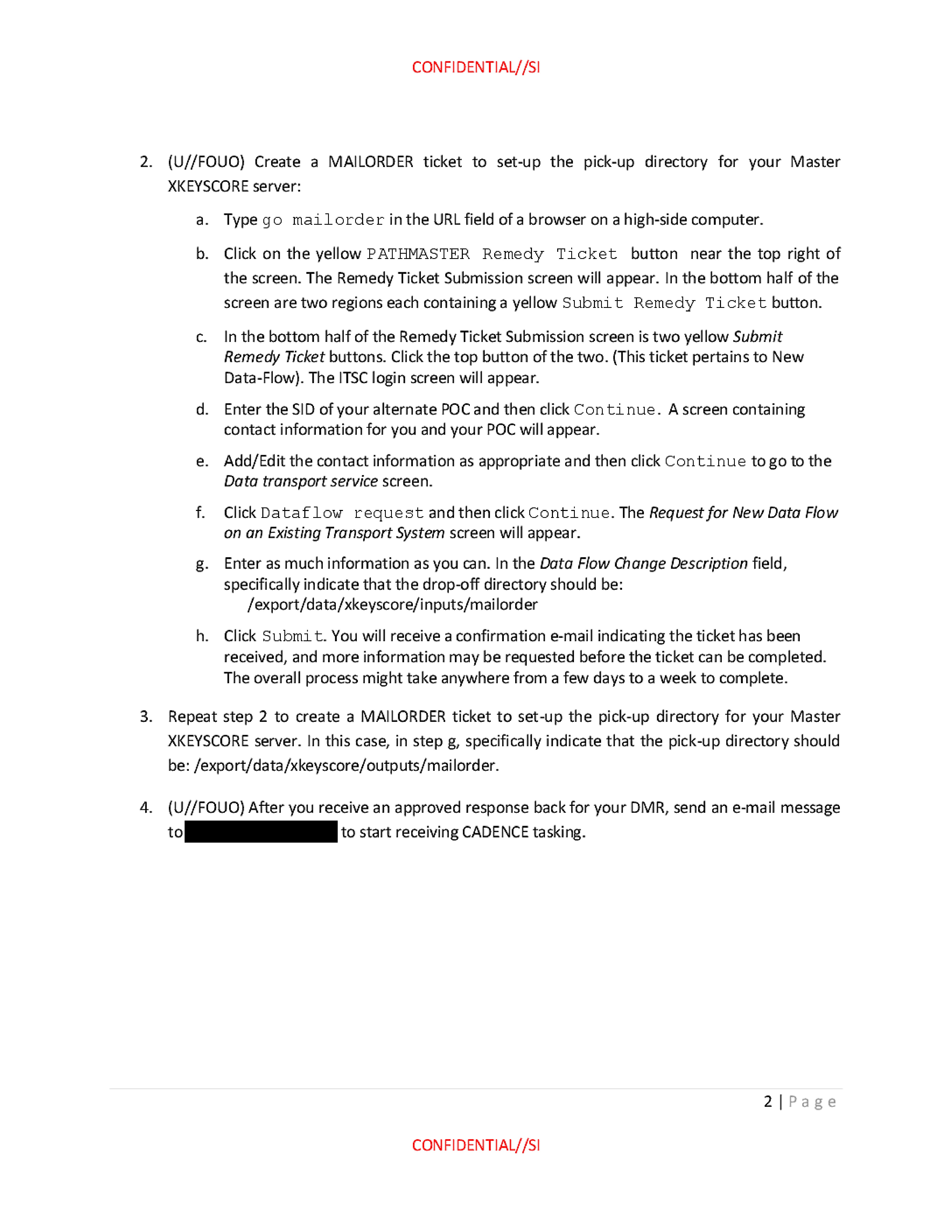
- (U//FOUO) Create a MAILORDER ticket to set-up the pick-up directory for your Master XKEYSCORE server:
a. Type go mailorder in the URL field of a browser on a high-side computer.
b. Click on the yellow PATHMASTER Remedy Ticket button near the top right of the screen. The Remedy Ticket Submission screen will appear. In the bottom half of the screen are two regions each containing a yellow Submit Remedy Ticket button.
c. In the bottom half of the Remedy Ticket Submission screen is two yellow Submit Remedy Ticket buttons. Click the top button of the two. (This ticket pertains to New Data-Flow). The ITSC login screen will appear.
d. Enter the SID of your alternate POC and then click Continue. A screen containing contact information for you and your POC will appear.
e. Add/Edit the contact information as appropriate and then click Continue to go to the Data transport service screen.
f. Click Dataflow request and then click Continue. The Request for New Data Flow on an Existing Transport System screen will appear.
g. Enter as much information as you can. In the Data Flow Change Description field, specifically indicate that the drop-off directory should be:
/export/data/xkeyscore/inputs/mailorder
h. Click Submit. You will receive a confirmation e-mail indicating the ticket has been received, and more information may be requested before the ticket can be completed. The overall process might take anywhere from a few days to a week to complete.
- Repeat step 2 to create a MAILORDER ticket to set-up the pick-up directory for your Master XKEYSCORE server. In this case, in step g, specifically indicate that the pick-up directory should be: /export/data/xkeyscore/outputs/mailorder.
- (U//FOUO) After you receive an approved response back for your DMR, send an e-mail message to [REDACTED] to start receiving CADENCE tasking.
2 Page
CONFIDENTIAL//SI
CONFIDENTIAL//SI
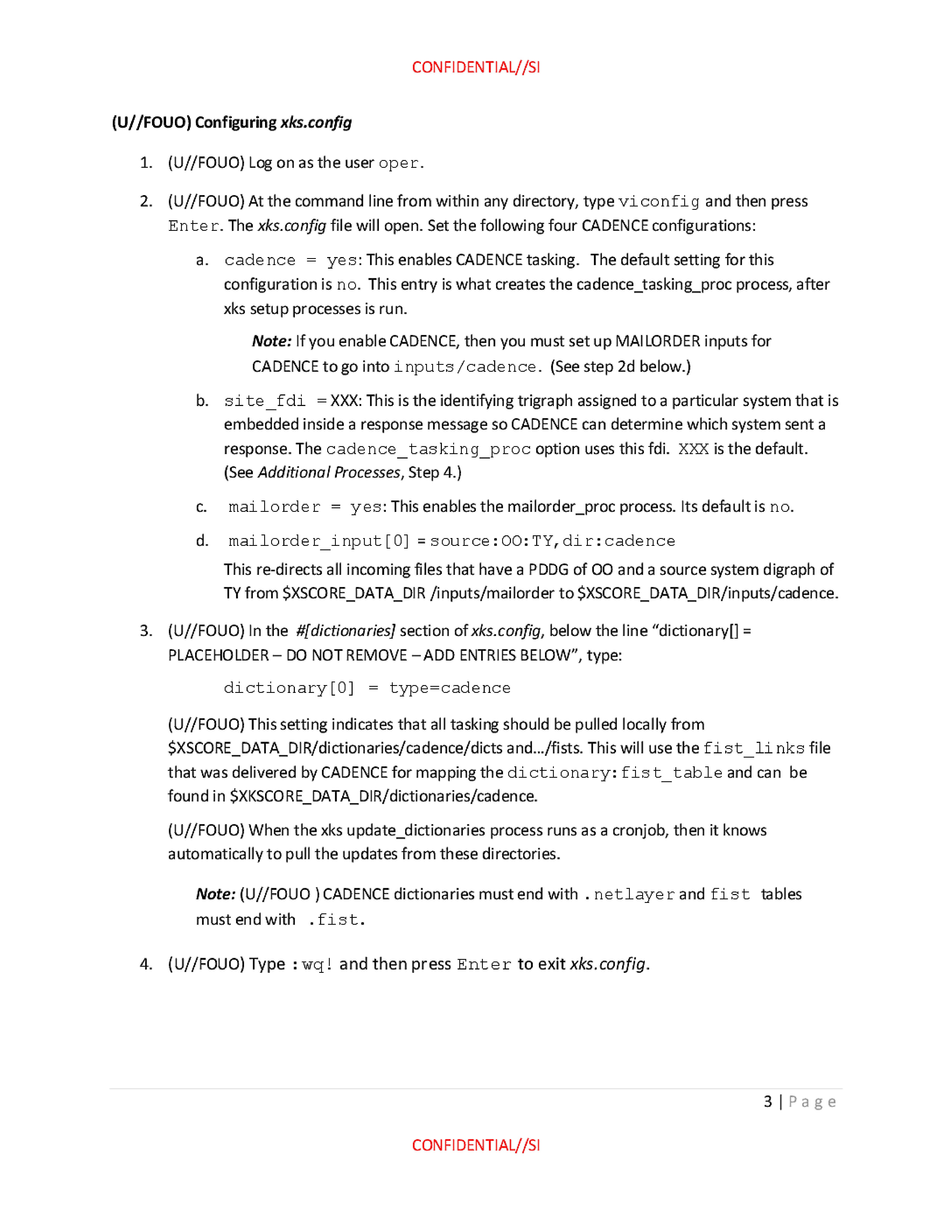
(U//FOUO) Configuring xks.config
- (U//FOUO) Log on as the user oper.
- (U//FOUO) At the command line from within any directory, type viconfig and then press Enter. The xks.config file will open. Set the following four CADENCE configurations:
a. cadence = yes: This enables CADENCE tasking. The default setting for this configuration is no. This entry is what creates the cadence_tasking_proc process, after xks setup processes is run.
Note: If you enable CADENCE, then you must set up MAILORDER inputs for CADENCE to go into inputs/cadence. (See step 2d below.)
b. site_fdi = XXX: This is the identifying trigraph assigned to a particular system that is embedded inside a response message so CADENCE can determine which system sent a response. The cadence_tasking_proc option uses this fdi. XXX is the default. (See Additional Processes, Step 4.)
c. mailorder = yes: This enables the mailorder_proc process. Its default is no.
d. mailorder_input [0] = source:OO:TY dir:cadence
This re-directs all incoming files that have a PDDG of OO and a source system digraph of TY from $XSCORE_DATA_DIR/inputs/mailorder to $XSCORE_DATA_DIR/inputs/cadence.
- (U//FOUO) In the #[dictionaries] section of xks.config, below the line "dictionary[] = PLACEHOLDER - DO NOT REMOVE - ADD ENTRIES BELOW", type:
dictionary [0] = type=cadence
(U//FOUO) This setting indicates that all tasking should be pulled locally from $XSCORE_DATA_DIR/dictionaries/cadence/dicts and.../fists. This will use the fist_links file that was delivered by CADENCE for mapping the dictionary: fist table and can be found in $XKSCORE_DATA_DIR/dictionaries/cadence.
(U//FOUO) When the xks update_dictionaries process runs as a cronjob, then it knows automatically to pull the updates from these directories.
Note: (U//FOUO) CADENCE dictionaries must end with .netlayer and fist tables must end with .fist.
- (U//FOUO) Type :wq! and then press Enter to exit xks.config.
3 Page
CONFIDENTIAL//SI
CONFIDENTIAL//SI
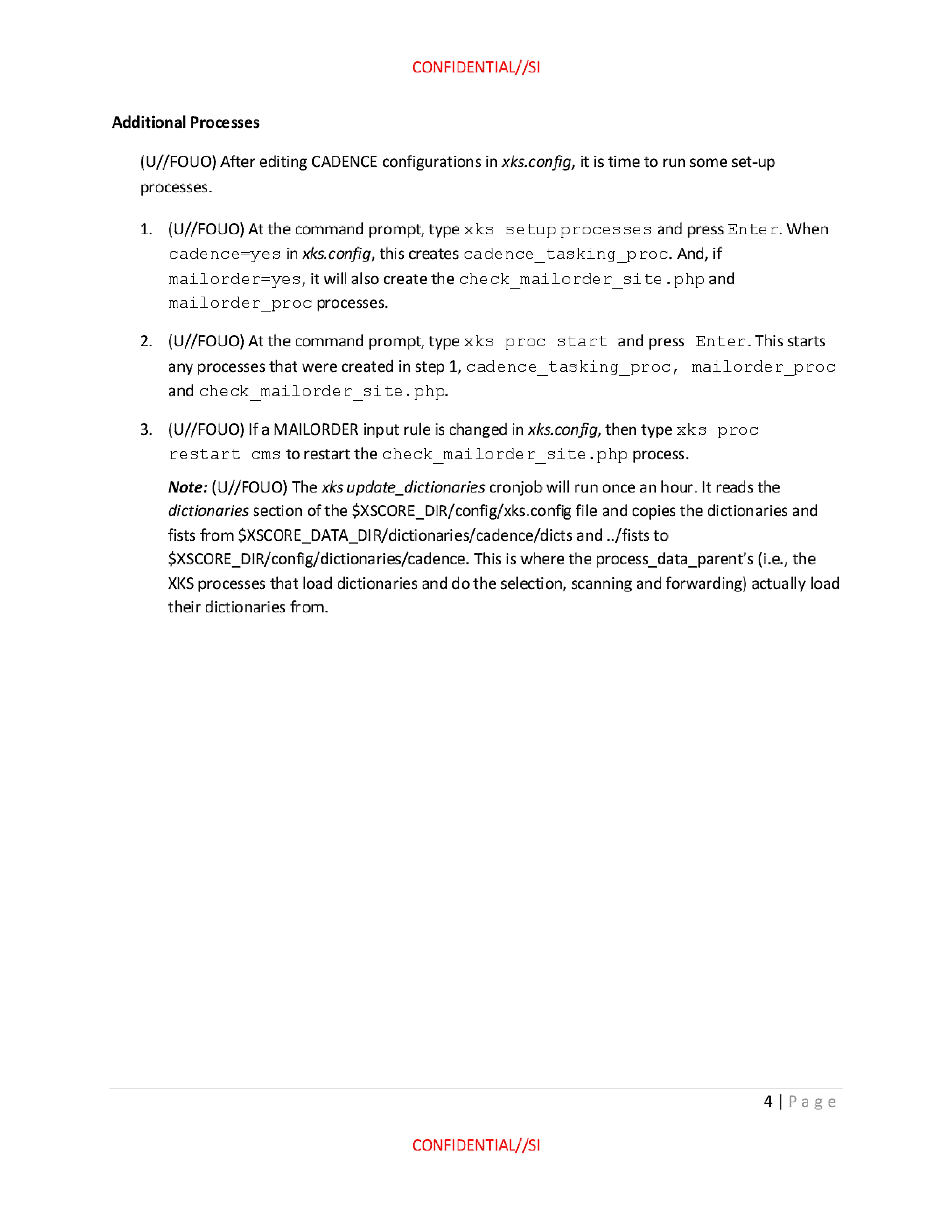
Additional Processes
(U//FOUO) After editing CADENCE configurations in xks.config, it is time to run some set-up processes.
- (U//FOUO) At the command prompt, type xks setup processes and press Enter. When cadence=yes in xks.config, this creates cadence_tasking_proc. And, if mailorder=yes, it will also create the check_mailorder_site.php and mailorder_proc processes.
- (U//FOUO) At the command prompt, type xks proc start and press Enter. This starts any processes that were created in step 1, cadence_tasking_proc, mailorder_proc and check_mailorder_site.php.
- (U//FOUO) If a MAILORDER input rule is changed in xks.config, then type xks proc restart cms to restart the check_mailorder_site.php process.
Note: (U//FOUO) The xks update_dictionaries cronjob will run once an hour. It reads the dictionaries section of the $XSCORE_DIR/config/xks.config file and copies the dictionaries and fists from $XSCORE_DATA_DIR/dictionaries/cadence/dicts and ../fists to $XSCORE_DIR/config/dictionaries/cadence. This is where the process_data_parent's (i.e., the XKS processes that load dictionaries and do the selection, scanning and forwarding) actually load their dictionaries from.
4 Page
CONFIDENTIAL//SI
Published in the Same Report
(10 of 46 documents)
-
XKEYSCORE intro [pdf]
A TOP SECRET NSA presentation from 2008 introducing XKeyscore — one of the earliest overview documents in the archive — describing the system as a globally distributed Linux cluster across approximately 150 sites and 700+ servers that stores a ~3-day rolling buffer of all unfiltered internet traffic, and demonstrating its core capabilities for finding previously unknown targets by mining metadata, tracking documents by embedded image hashes, detecting encryption and VPN use, and language tracking.
Programs: XKEYSCORE · TURMOIL · TURBULENCE · TRAFFICTHIEF · WEALTHYCLUSTER · MOONSHINE · SEARCHLIGHT · MARINA · PSC · SSO · TIMBERLINEPeople: bin Laden, Osama“'Brasil é um grande alvo', diz jornalista sobre vigilância dos EUA” - O Globo ↗ (2013-07-07) · “XKeyscore: NSA tool collects 'nearly everything a user does on the internet'” - The Guardian ↗ (2013-07-31) · “No Place to Hide” - Metropolitan Books ↗ (2014-05-13) · “XKEYSCORE: NSA’s Google for the World’s Private Communications” - The Intercept ↗ (2015-07-01) · Greenwald, Glenn · Bridi, Sônia · Marquis-Boire, Morgan · Lee, Micah -
Advanced HTTP Activity Analysis [pdf]
This NSA training document from 2009 teaches intelligence analysts how to analyze HTTP internet traffic and exploit it using the XKEYSCORE surveillance system to monitor and identify internet users globally.
“XKEYSCORE: NSA’s Google for the World’s Private Communications” - The Intercept ↗ (2015-07-01) · “No Place to Hide” - Metropolitan Books ↗ (2014-05-13) · Marquis-Boire, Morgan · Greenwald, Glenn · Lee, Micah -
Analyzing Mobile/Cellular DNI in XKEYSCORE, May 2009 [pdf]
The XKEYSCORE document explains how the agency analyzes mobile/cellular device internet usage by collecting and processing both converged DNI/DNR data within cellular networks and traditional internet traffic, using various tools and indicators to identify mobile users even when their device type isn't immediately evident. The document demonstrates how the system can track mobile internet activity across applications like Yahoo Mail and identifies devices through various technical "hints" including MSISDN codes, browser fingerprints, and user agent strings.
-
Atomic SIGINT Data Format (ASDF) Configuration Read Me [pdf]
This document is a technical configuration guide for setting up XKEYSCORE surveillance systems to generate and forward metadata in the Atomic SIGINT Data Format (ASDF) to various data repositories including MARINA, which tracks users' browser activity and online behavior.
Marking: SECRET -
How to configure category throttling in XKEYSCORE [pdf]
An NSA technical guide explains how to configure "category throttling" in XKEYSCORE—a feature that automatically stops forwarding intercepted communications once analyst-defined collection targets hit predetermined data volume or session count limits, allowing the surveillance system to continue processing but prevent overflow from high-volume targets.
-
CNE Analysis in XKEYSCORE [pdf]
This document is an NSA training presentation from October 2009 demonstrating how XKEYSCORE integrates with Computer Network Exploitation (CNE) operations, allowing analysts to search and analyze data extracted from compromised computers including keystrokes, browser history, registry files, documents, emails, and directory structures collected through implants like UNITEDRAKE and OLYMPUS.
Programs: XKEYSCORE · OLYMPUS · UNITEDRAKE · PINWALE · TUNINGFORK · TURBOCHASER · MARINA · JOLLYROGER · TREASUREMAP · TURBINE · PRESSUREWAVE · MAD · TUCKER · EXPANDINGPULLY · UNIX · SEARCHLIGHT · KEYLOGGER · PILBEAM · FOXACID · WAYTIDE · SHADOWQUEST · SEAGULLFARO · DARKHELMET · LUTEUSICARUS · FOGGYBOTTOM · GREENCHAOS · RADIUS · NKB · VALIDATOR -
Communications System - How To Guide [pdf]
A TOP SECRET and sensitive compartmented information (SCI) how-to document for the NSA’s XKEYSCORE “Comms” backbone, laying out ports, peer/allow rules, bandwidth pools, and proxy classifications that stitch clusters to central control—a scalable architecture for moving surveillance data with security markings baked in. It also walks through firewall exceptions, HTTPS port-sharing, and a MAILORDER file pipeline, exposing the nuts‑and‑bolts of how collection flows across sites, proxies, and viewers.
-
DEEPDIVE Readme [pdf]
This document is a confidential technical guide that provides step-by-step procedures for configuring an XKEYSCORE server to function as a DEEPDIVE server. DEEPDIVE enhances XKEYSCORE by adding a front-end filter and a rolling buffer of all unfiltered data, creating a federated query system that can scan all collection sites with a single query.
-
DNI101 [pdf]
This TOP SECRET training guide, "DNI 101," provides a workflow for Digital Network Intelligence analysts on how to investigate a target's email address, detailing the specific tools, databases, and methodology used, and stressing the critical difference between initial open-source/classified research and the active "targeting" of raw SIGINT repositories like XKEYSCORE, PINWALE, and MARINA.
Programs: NKB · FOXTRAIL · FOREMAN · PINWALE · LIONHEART · XKEYSCORE · DISHFIRE · MARINA · MECWEB · MAINWAY · TRAFFICTHIEF · MAUI · ANCHORY · M3 · INTELLINK · HOMEBASE · PROTON · UTT · CADENCE · SPEEDBUMP · TUNINGFORK · MASTERSHAKE · BLACKPEARL · JACKSPARROW · ROADBED · STORYDUTY · LIONROAR · DOPHONE · UIS -
Email Address vs User Activity [pdf]
This 2009 NSA training presentation explains how to use the XKEYSCORE system to search raw SIGINT, detailing the differences between the "Email Address" query, which finds email addresses in full content, and the more flexible "User Activity" query, which can search for selectors like cookies, usernames, and phone numbers.
“XKEYSCORE: NSA’s Google for the World’s Private Communications” - The Intercept ↗ (2015-07-01) · “No Place to Hide” - Metropolitan Books ↗ (2014-05-13) · Marquis-Boire, Morgan · Greenwald, Glenn · Lee, Micah





Related Documents
-
VoIP Configuration and Forwarding Read Me [pdf]
A SECRET XKeyscore configuration manual describing how to set up the system to intercept internet phone calls, faxes and video calls and forward them to NUCLEON — NSA's voice intercept repository which at time of writing supported over 8,000 users worldwide across 75 servers receiving 700,000 voice, fax, video and tag files per day.
-
SSO dictionary relevant entries [pdf]
This document provides a detailed list of relevant entries related to NSA's Special Source Operations (SSO), highlighting various NSA surveillance and data collection systems used to monitor global communications. It includes descriptions of programs such as BIGBIRD and DISHFIRE, which focus on cable and SMS interception, as well as tools like LOPERS and COURIERSKILL for processing telephony metadata and refining target selection. The entries emphasize the extensive and automated nature of the NSA's intelligence-gathering operations, particularly in relation to undersea cables and telecommunication networks, and underscore the secretive and expansive scope of SSO's global surveillance activities.
Programs: ARTIFICE · BIGBIRD · FAIRVIEW · SSO · POORWILL · PINECONE · BLACKBELT · CADENCE · BLACKNIGHT · SHIPMASTER · COURIERSKILL · THEORYMASTER · WEALTHYCLUSTER · CLIFFSIDE · DISHFIRE · MARINA · MAINWAY · NUCLEON · PINWALE · FASCIA · BANYAN · LAMPSHADE · ASSOCIATION · HOMEBASE · SEDB · FRIAR · KEYCARD · TURMOIL · TURBULENCE · UTT · IRISHBEAUTY · OCTAVE · KOZYKOVE · LITHIUM · BLARNEY · LOPERS · MAILORDER · LUMBERYARD · MERLIN · NODDY · SAGUARO · NUTHATCH · CONTRAOCTAVE · XKEYSCORE · PLANK · RODEOSTAR · SAGURA · SERENADE · STARGATE · SILVERCOLLAM · SEALION · SEAGULL · SLIVER · SORA-2 · TITANPOINTE · TUBE · VPCS · STONEGATE“NSA Spying Relies on AT&T’s ‘Extreme Willingness to Help’” - ProPublica ↗ (2015-08-15) · “AT&T Helped U.S. Spy on Internet on a Vast Scale” - The New York Times ↗ (2015-08-15) · “The Wiretap Rooms: The NSA’s Hidden Spy Hubs in Eight U.S. Cities” - The Intercept ↗ (2018-06-25) · Angwin, Julia · Larson, Jeff · Savage, Charlie · Moltke, Henrik · Poitras, Laura · Risen, James · Gallagher, Ryan -
Forwarding Selected MAILORDER Files Read Me [pdf]
An UNCLASSIFIED//FOR OFFICIAL USE ONLY XKEYSCORE administrator guide explaining how to configure an XKS cluster to forward selected intercepted sessions via MAILORDER, including category throttling limits, output directory configuration and the process setup required to switch all Digital Network Intelligence filtering and selection to the XKEYSCORE collection system.
-
UTT Configuration READ ME [pdf]
A SECRET XKeyscore configuration manual describing how to set up the Unified Targeting Tool — NSA's centralised system for pushing surveillance selectors from analysts to field site collection systems worldwide — revealing the complete data flow from analyst targeting request through MAILORDER transport to XKeyscore ingestion, including a forwarding domain table showing how intercepted data is routed to all Five Eyes partners (NSA, GCHQ, CSE, DSD, GCSB) and third parties.
Programs: UTT · TURBULENCE · XKEYSCORE · MAILORDER · SSDM · FISHWAY · SCISSORS · PINWALE · TRAFFICTHIEF -
X-KEYSCORE as a SIGDEV tool 2009 [pdf]
A 2009 TOP SECRET NSA presentation describing XKeyscore as a SIGINT development tool — explaining how it captures and temporarily stores the full content of internet traffic (the 95%+ that was previously dropped because it didn't match any target) across 125 sites worldwide, "slowing down the internet" so analysts can retroactively reconstruct a target's entire online session, discover new targets, and search the content of documents, web searches, emails and chats that contain no tasked selector.
Programs: XKEYSCORE · PINWALE · TRAFFICTHIEF · MARINA · AGILITY · PILBEAM · MAILORDER · CADENCE · NKB · PSC · SSO · UIS“XKEYSCORE: NSA’s Google for the World’s Private Communications” - The Intercept ↗ (2015-07-01) · “No Place to Hide” - Metropolitan Books ↗ (2014-05-13) · “FRA has access to controversial surveillance system” - SVT Nyheter ↗ (2013-12-11) · Marquis-Boire, Morgan · Greenwald, Glenn · Lee, Micah · Bergman, Sven · Dyfvermark, Joachim · Gallagher, Ryan · Laurin, Fredrik · Struwe, Filip