How to configure category throttling in XKEYSCORE
Open PDFDocument date: -
Pages: 2
Genre: manual
Banner: SECRET//COMINT//REL TO USA, AUS, CAN, GBR, NZL
Classification: SECRET COMINT
Dissemination: REL TO USA, AUS, CAN, GBR, NZL
An NSA technical guide explains how to configure "category throttling" in XKEYSCORE—a feature that automatically stops forwarding intercepted communications once analyst-defined collection targets hit predetermined data volume or session count limits, allowing the surveillance system to continue processing but prevent overflow from high-volume targets.
My notes
SECRET//COMINT//REL TO USA, AUS, CAN, GBR, NZL
How to configure category throttling in XKEYSCORE
Category throttling is performed by the selected output plugin, in the xks.config you need to make sure that you are using this plugin to perform forwarding. You will also need to have throttle=yes in the config for the plugin.
Ex:
plugin[selected_output] = enable=yes, config_file="throttle=yes
directory=/export/data/xkeyscore/outputs/mailorder_working
add_d706=true pass_fragments=true max_age=900 max_size=5000000"
If this was not already set, in order for the changes to take effect you will need to then perform the following commands:
xks setup plugins
xks proc saferestart
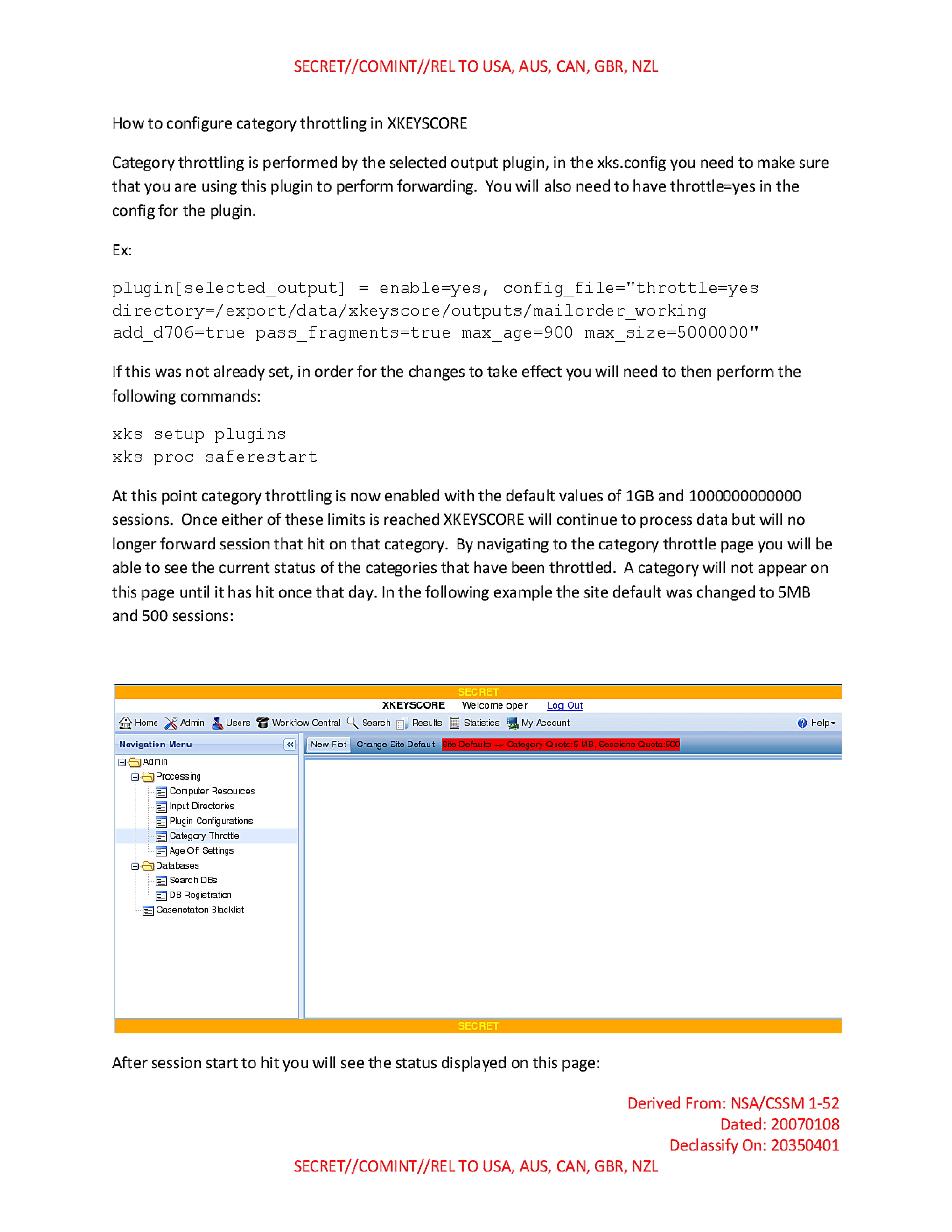
At this point category throttling is now enabled with the default values of 1GB and 1000000000000 sessions. Once either of these limits is reached XKEYSCORE will continue to process data but will no longer forward session that hit on that category. By navigating to the category throttle page you will be able to see the current status of the categories that have been throttled. A category will not appear on this page until it has hit once that day. In the following example the site default was changed to 5MB and 500 sessions:
SECRET
XKEYSCORE Welcome oper! Log Out
Home Admin Users Workflow Central Search Results Statistics My Account Help
Navigation Menu
Admin
  Processing
    Computer Resources
    Input Directories
    Plugin Configurations
    Category Throttle
    Age Off Settings
  Databases
    Search DBs
    DB Registration
  Casenotation Blacklist
New Fist | Change Site Default | Site Defaults --> Category Quota:5 MB, Sessions Quota:500
SECRET
After session start to hit you will see the status displayed on this page:
Derived From: NSA/CSSM 1-52
Dated: 20070108
Declassify On: 20350401
SECRET//COMINT//REL TO USA, AUS, CAN, GBR, NZL
SECRET//COMINT//REL TO USA, AUS, CAN, GBR, NZL
SECRET
XKEYSCORE Welcome oper! Log Out
Home Admin Users Workflow Central Search Results Statistics My Account Help
Navigation Menu
Admin
  Processing
    Computer Resources
    Input Directories
    Plugin Configurations
    Category Throttle
    Age Off Settings
  Databases
    Search DBs
    DB Registration
  Casenotation Blacklist
New Fist | Change Site Default | Site Defaults --> Category Quota:5 MB, Sessions Quota:500
TEST
Add Category Throttle Change Fist Default Reset Fist Default

Category | Daily Category Quota | Quota Remaining | Quota Over | Daily Session Quota | Sessions Remaining | Sessions Over
| -- | --- | ------- | -------- | --- | --- | ---- |
| 4 | 5 MB | 0 bytes | 342.8 KB | 500 | 298 | 0
| 2 | 5 MB | 5 MB    | 0 bytes  | 500 | 500 | 0
| 1 | 5 MB | 0 bytes | 26.5 MB  | 500 | 0   | 2025
SECRET
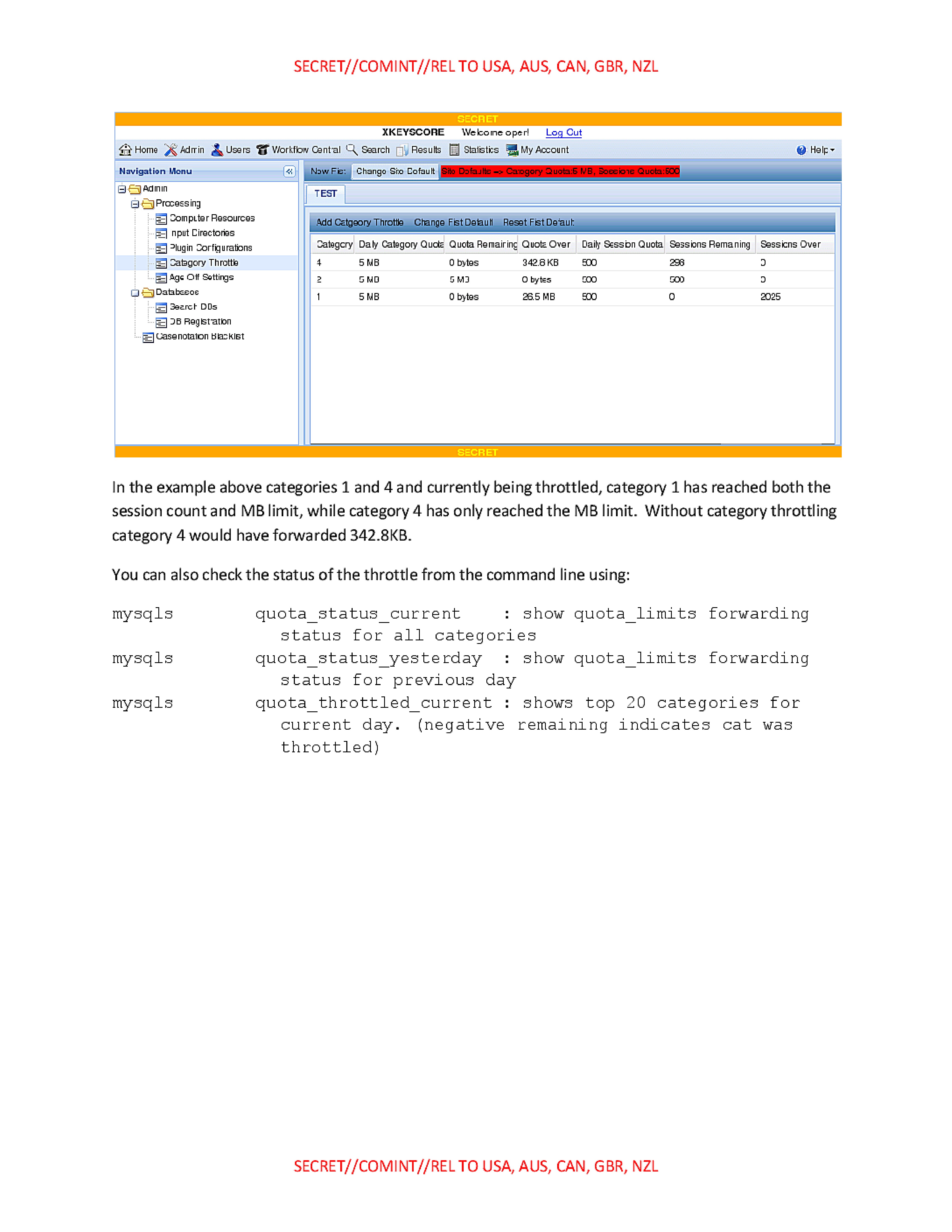
In the example above categories 1 and 4 and currently being throttled, category 1 has reached both the session count and MB limit, while category 4 has only reached the MB limit. Without category throttling category 4 would have forwarded 342.8KB.
You can also check the status of the throttle from the command line using:
mysqls quota_status_current : show quota_limits forwarding status for all categories
mysqls quota_status_yesterday : show quota_limits forwarding status for previous day
mysqls quota_throttled_current : shows top 20 categories for current day. (negative remaining indicates cat was throttled)
SECRET//COMINT//REL TO USA, AUS, CAN, GBR, NZL
Published in the Same Report
(10 of 46 documents)
-
XKEYSCORE intro [pdf]
A TOP SECRET NSA presentation from 2008 introducing XKeyscore — one of the earliest overview documents in the archive — describing the system as a globally distributed Linux cluster across approximately 150 sites and 700+ servers that stores a ~3-day rolling buffer of all unfiltered internet traffic, and demonstrating its core capabilities for finding previously unknown targets by mining metadata, tracking documents by embedded image hashes, detecting encryption and VPN use, and language tracking.
Programs: XKEYSCORE · TURMOIL · TURBULENCE · TRAFFICTHIEF · WEALTHYCLUSTER · MOONSHINE · SEARCHLIGHT · MARINA · PSC · SSO · TIMBERLINEPeople: bin Laden, Osama“'Brasil é um grande alvo', diz jornalista sobre vigilância dos EUA” - O Globo ↗ (2013-07-07) · “XKeyscore: NSA tool collects 'nearly everything a user does on the internet'” - The Guardian ↗ (2013-07-31) · “No Place to Hide” - Metropolitan Books ↗ (2014-05-13) · “XKEYSCORE: NSA’s Google for the World’s Private Communications” - The Intercept ↗ (2015-07-01) · Greenwald, Glenn · Bridi, Sônia · Marquis-Boire, Morgan · Lee, Micah -
Advanced HTTP Activity Analysis [pdf]
This NSA training document from 2009 teaches intelligence analysts how to analyze HTTP internet traffic and exploit it using the XKEYSCORE surveillance system to monitor and identify internet users globally.
“XKEYSCORE: NSA’s Google for the World’s Private Communications” - The Intercept ↗ (2015-07-01) · “No Place to Hide” - Metropolitan Books ↗ (2014-05-13) · Marquis-Boire, Morgan · Greenwald, Glenn · Lee, Micah -
Analyzing Mobile/Cellular DNI in XKEYSCORE, May 2009 [pdf]
The XKEYSCORE document explains how the agency analyzes mobile/cellular device internet usage by collecting and processing both converged DNI/DNR data within cellular networks and traditional internet traffic, using various tools and indicators to identify mobile users even when their device type isn't immediately evident. The document demonstrates how the system can track mobile internet activity across applications like Yahoo Mail and identifies devices through various technical "hints" including MSISDN codes, browser fingerprints, and user agent strings.
-
Atomic SIGINT Data Format (ASDF) Configuration Read Me [pdf]
This document is a technical configuration guide for setting up XKEYSCORE surveillance systems to generate and forward metadata in the Atomic SIGINT Data Format (ASDF) to various data repositories including MARINA, which tracks users' browser activity and online behavior.
Marking: SECRET -
CADENCE Read Me [pdf]
This NSA engineering manual details how to configure XKEYSCORE—the agency's sprawling surveillance system—to integrate with CADENCE, an automated keyword scanning tool that filters intercepted communications and routes intelligence based on search terms submitted by analysts.
-
CNE Analysis in XKEYSCORE [pdf]
This document is an NSA training presentation from October 2009 demonstrating how XKEYSCORE integrates with Computer Network Exploitation (CNE) operations, allowing analysts to search and analyze data extracted from compromised computers including keystrokes, browser history, registry files, documents, emails, and directory structures collected through implants like UNITEDRAKE and OLYMPUS.
Programs: XKEYSCORE · OLYMPUS · UNITEDRAKE · PINWALE · TUNINGFORK · TURBOCHASER · MARINA · JOLLYROGER · TREASUREMAP · TURBINE · PRESSUREWAVE · MAD · TUCKER · EXPANDINGPULLY · UNIX · SEARCHLIGHT · KEYLOGGER · PILBEAM · FOXACID · WAYTIDE · SHADOWQUEST · SEAGULLFARO · DARKHELMET · LUTEUSICARUS · FOGGYBOTTOM · GREENCHAOS · RADIUS · NKB · VALIDATOR -
Communications System - How To Guide [pdf]
A TOP SECRET and sensitive compartmented information (SCI) how-to document for the NSA’s XKEYSCORE “Comms” backbone, laying out ports, peer/allow rules, bandwidth pools, and proxy classifications that stitch clusters to central control—a scalable architecture for moving surveillance data with security markings baked in. It also walks through firewall exceptions, HTTPS port-sharing, and a MAILORDER file pipeline, exposing the nuts‑and‑bolts of how collection flows across sites, proxies, and viewers.
-
DEEPDIVE Readme [pdf]
This document is a confidential technical guide that provides step-by-step procedures for configuring an XKEYSCORE server to function as a DEEPDIVE server. DEEPDIVE enhances XKEYSCORE by adding a front-end filter and a rolling buffer of all unfiltered data, creating a federated query system that can scan all collection sites with a single query.
-
DNI101 [pdf]
This TOP SECRET training guide, "DNI 101," provides a workflow for Digital Network Intelligence analysts on how to investigate a target's email address, detailing the specific tools, databases, and methodology used, and stressing the critical difference between initial open-source/classified research and the active "targeting" of raw SIGINT repositories like XKEYSCORE, PINWALE, and MARINA.
Programs: NKB · FOXTRAIL · FOREMAN · PINWALE · LIONHEART · XKEYSCORE · DISHFIRE · MARINA · MECWEB · MAINWAY · TRAFFICTHIEF · MAUI · ANCHORY · M3 · INTELLINK · HOMEBASE · PROTON · UTT · CADENCE · SPEEDBUMP · TUNINGFORK · MASTERSHAKE · BLACKPEARL · JACKSPARROW · ROADBED · STORYDUTY · LIONROAR · DOPHONE · UIS -
Email Address vs User Activity [pdf]
This 2009 NSA training presentation explains how to use the XKEYSCORE system to search raw SIGINT, detailing the differences between the "Email Address" query, which finds email addresses in full content, and the more flexible "User Activity" query, which can search for selectors like cookies, usernames, and phone numbers.
“XKEYSCORE: NSA’s Google for the World’s Private Communications” - The Intercept ↗ (2015-07-01) · “No Place to Hide” - Metropolitan Books ↗ (2014-05-13) · Marquis-Boire, Morgan · Greenwald, Glenn · Lee, Micah






Related Documents
-
Forwarding Selected MAILORDER Files Read Me [pdf]
An UNCLASSIFIED//FOR OFFICIAL USE ONLY XKEYSCORE administrator guide explaining how to configure an XKS cluster to forward selected intercepted sessions via MAILORDER, including category throttling limits, output directory configuration and the process setup required to switch all Digital Network Intelligence filtering and selection to the XKEYSCORE collection system.
-
Communications System - How To Guide [pdf]
A TOP SECRET and sensitive compartmented information (SCI) how-to document for the NSA’s XKEYSCORE “Comms” backbone, laying out ports, peer/allow rules, bandwidth pools, and proxy classifications that stitch clusters to central control—a scalable architecture for moving surveillance data with security markings baked in. It also walks through firewall exceptions, HTTPS port-sharing, and a MAILORDER file pipeline, exposing the nuts‑and‑bolts of how collection flows across sites, proxies, and viewers.
-
XKEYSCORE System Administration [pdf]
A December 2012 TOP SECRET XKeyscore System Administration training manual — the detailed technical guide for the engineers who ran XKeyscore field-site clusters — covering the system's Red Hat Linux architecture, master/slave cluster design, database and processing pipeline, the GUI (including built-in Tor, botnet and CNE search menus), the DeepDive full-take packet processor, the xks command-line tool, and monitoring and troubleshooting, with live screenshots from the Timberline site (USF-790) and Menwith Hill Station.
Programs: XKEYSCORE · WEALTHYCLUSTER · MAILORDER · CADENCE · ROGUESTITCH · QUANTUMBOT · COTTONCHAINSAW · MPTRII · SCARFACE · ZAMENSIS · MAPREDUCE · GENESIS · REDUCER · DEEPDIVE · ASDF · CYBER · BULKCRYPT · METTLESOME · PACKETSPLAYYER · PROMOTER · DEFRAG · XFIP · TRAFFICTHIEF · ENDACE · TIMBERLINE · MUSCULAR · FIST · STARPROC -
XKEYSCORE Workflows 2009 [pdf]
A 2009 XKeyscore training presentation on Workflows — standing automated queries that run on a schedule against XKeyscore's rolling buffer — walking analysts through the Workflow Central request wizard to build recurring searches with follow-on actions like email alerts, session downloads to Agility, MAILORDER forwarding and SQL reports, with login banners showing the Menwith Hill Station Human Rights Act and Sensitive Targeting Approval compliance regime.
-
XKEYSCORE Workflows 2011 [pdf]
A 2011 XKeyscore training presentation on Workflows — an updated version of the 2009 briefing — teaching analysts to build automated standing queries, with new content including creating workflows directly from existing query results, a "Find and Forward VoIP" follow-on action routing intercepted calls to NUCLEON, result-sharing between users, and a database-selection screen naming numerous live sites including TAO STAT, multiple DEEPDIVE systems, and TURBULENCE deployments at Menwith Hill.
Programs: XKEYSCORE · MAILORDER · DEEPDIVE · TURBULENCE · TURTLERACE · TURBOPOUND · TURTLEALE · JACKNIFE · TIMBERLINE · TURBOTEC · TURBOALE · NUCLEON · AGILITY · SSO