UTT Configuration READ ME
Open PDFDocument date: -
Pages: 5
Genre: manual
Banner: SECRET//REL TO USA, FVEY
Classification: SECRET
Dissemination: REL TO USA, FVEY
A SECRET XKeyscore configuration manual describing how to set up the Unified Targeting Tool — NSA's centralised system for pushing surveillance selectors from analysts to field site collection systems worldwide — revealing the complete data flow from analyst targeting request through MAILORDER transport to XKeyscore ingestion, including a forwarding domain table showing how intercepted data is routed to all Five Eyes partners (NSA, GCHQ, CSE, DSD, GCSB) and third parties.
My notes
SECRET//REL TO USA, FVEY
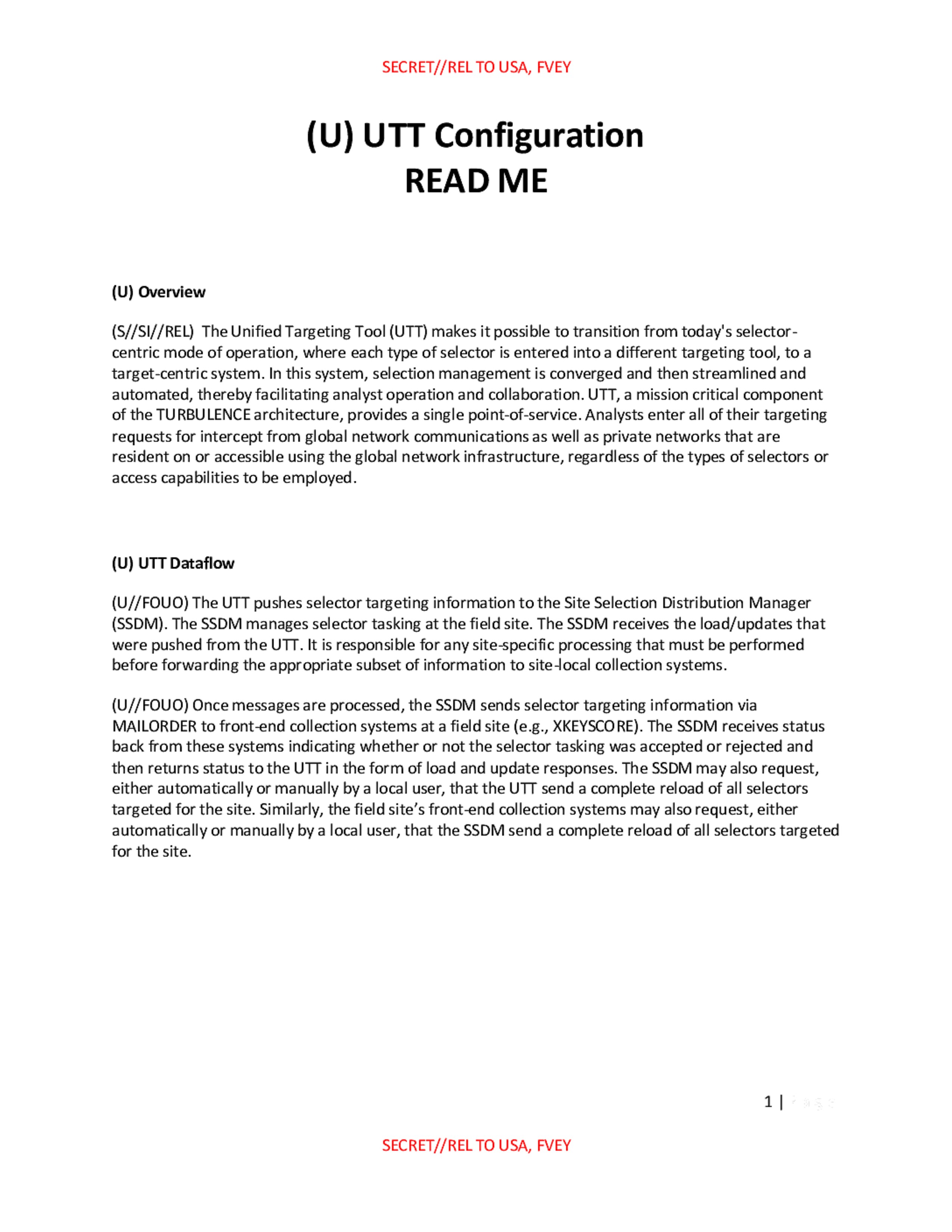
(U) UTT Configuration
READ ME
(U) Overview
(S//SI//REL) The Unified Targeting Tool (UTT) makes it possible to transition from today's selector-centric mode of operation, where each type of selector is entered into a different targeting tool, to a target-centric system. In this system, selection management is converged and then streamlined and automated, thereby facilitating analyst operation and collaboration. UTT, a mission critical component of the TURBULENCE architecture, provides a single point-of-service. Analysts enter all of their targeting requests for intercept from global network communications as well as private networks that are resident on or accessible using the global network infrastructure, regardless of the types of selectors or access capabilities to be employed.
(U) UTT Dataflow
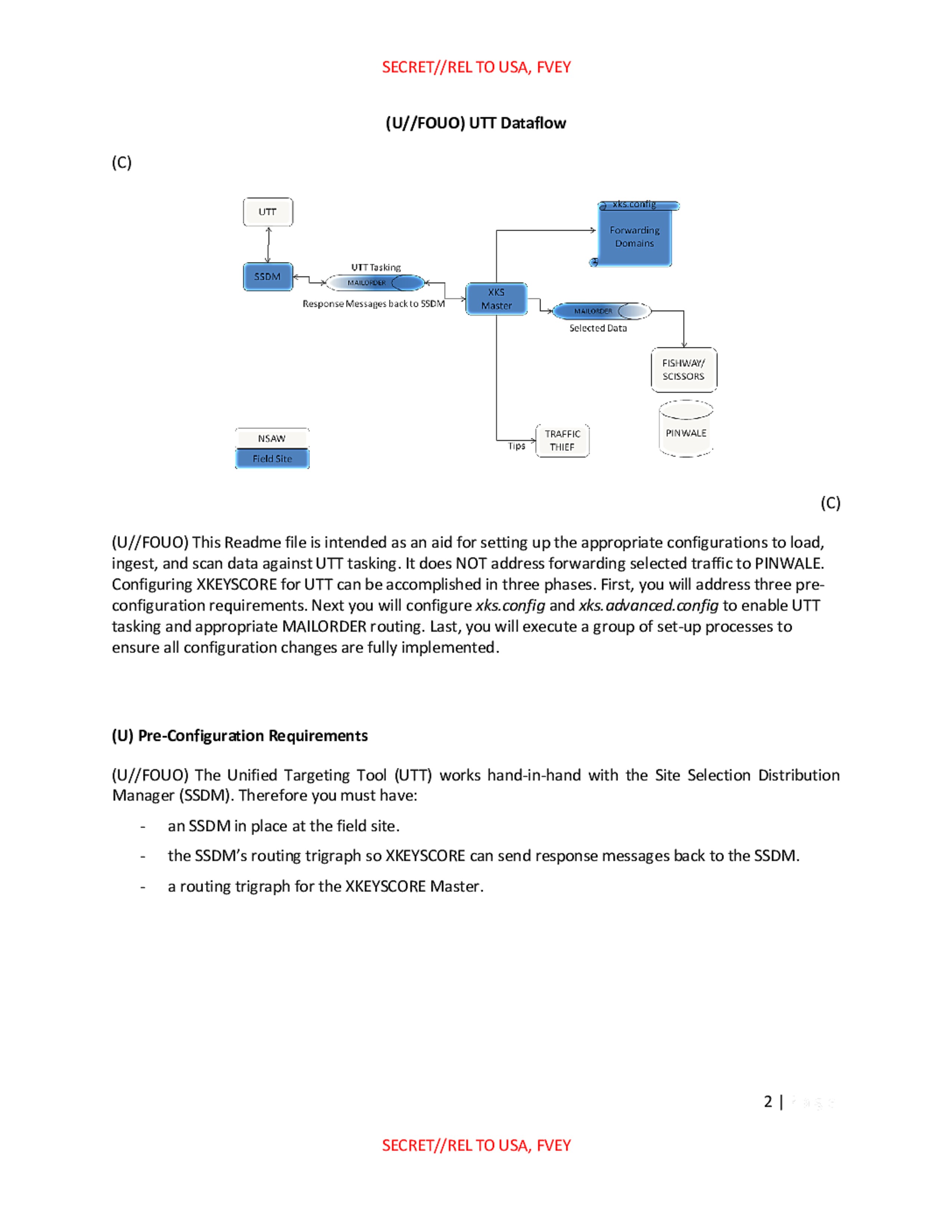
(U//FOUO) The UTT pushes selector targeting information to the Site Selection Distribution Manager (SSDM). The SSDM manages selector tasking at the field site. The SSDM receives the load/updates that were pushed from the UTT. It is responsible for any site-specific processing that must be performed before forwarding the appropriate subset of information to site-local collection systems.
(U//FOUO) Once messages are processed, the SSDM sends selector targeting information via MAILORDER to front-end collection systems at a field site (e.g., XKEYSCORE). The SSDM receives status back from these systems indicating whether or not the selector tasking was accepted or rejected and then returns status to the UTT in the form of load and update responses. The SSDM may also request, either automatically or manually by a local user, that the UTT send a complete reload of all selectors targeted for the site. Similarly, the field site's front-end collection systems may also request, either automatically or manually by a local user, that the SSDM send a complete reload of all selectors targeted for the site.
1 |
SECRET//REL TO USA, FVEY
SECRET//REL TO USA, FVEY
(U//FOUO) UTT Dataflow
(C)
UTT

SSDM

UTT Tasking

Response Messages back to SSDM

XKS Master

MAILORDER

Selected Data

FISHWAY/
SCISSORS

PINWALE

Tips

TRAFFIC
THIEF

xks.config
Forwarding
Domains

NSAW
Field Site
(C)
(U//FOUO) This Readme file is intended as an aid for setting up the appropriate configurations to load, ingest, and scan data against UTT tasking. It does NOT address forwarding selected traffic to PINWALE. Configuring XKEYSCORE for UTT can be accomplished in three phases. First, you will address three pre-configuration requirements. Next you will configure xks.config and xks.advanced.config to enable UTT tasking and appropriate MAILORDER routing. Last, you will execute a group of set-up processes to ensure all configuration changes are fully implemented.
(U) Pre-Configuration Requirements
(U//FOUO) The Unified Targeting Tool (UTT) works hand-in-hand with the Site Selection Distribution Manager (SSDM). Therefore you must have:
- an SSDM in place at the field site.
- the SSDM's routing trigraph so XKEYSCORE can send response messages back to the SSDM.
- a routing trigraph for the XKEYSCORE Master.
2 |
SECRET//REL TO USA, FVEY
SECRET//REL TO USA, FVEY
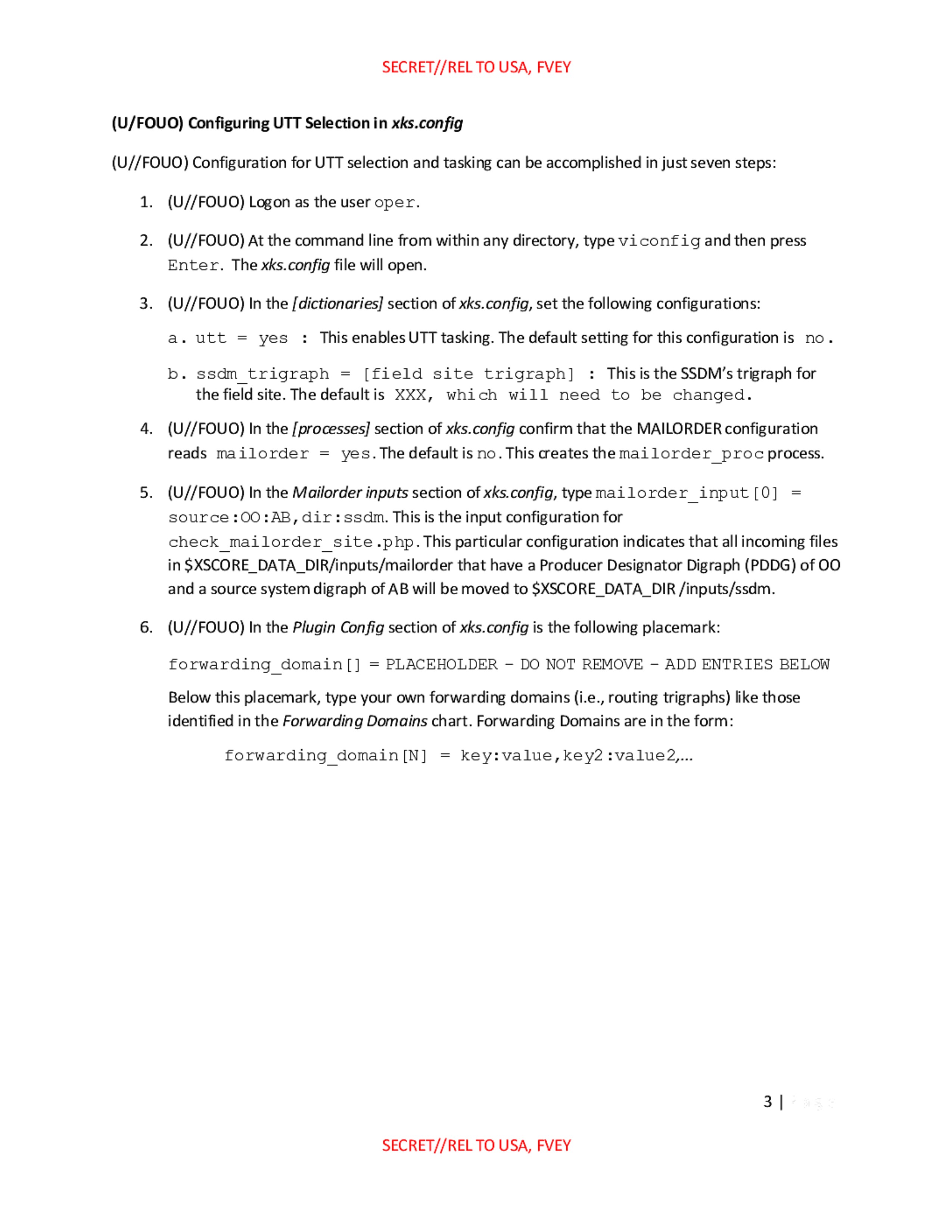
(U/FOUO) Configuring UTT Selection in xks.config
(U//FOUO) Configuration for UTT selection and tasking can be accomplished in just seven steps:
- (U//FOUO) Logon as the user
oper. - (U//FOUO) At the command line from within any directory, type
viconfigand then press Enter. Thexks.configfile will open. - (U//FOUO) In the
[dictionaries]section of xks.config, set the following configurations:
a.utt = yes: This enables UTT tasking. The default setting for this configuration isno.
b.ssdm_trigraph = [field site trigraph]: This is the SSDM's trigraph for the field site. The default isXXX, which will need to be changed. - (U//FOUO) In the
[processes]section of xks.config confirm that the MAILORDER configuration readsmailorder = yes. The default isno. This creates themailorder_procprocess. - (U//FOUO) In the
Mailorder inputssection of xks.config, typemailorder_input[0] = source:OO:AB,dir:ssdm. This is the input configuration forcheck_mailorder_site.php. This particular configuration indicates that all incoming files in$XSCORE_DATA_DIR/inputs/mailorderthat have a Producer Designator Digraph (PDDG) ofOOand a source system digraph ofABwill be moved to$XSCORE_DATA_DIR/inputs/ssdm. - (U//FOUO) In the
Plugin Configsection of xks.config is the following placemark:
forwarding_domain[] = PLACEHOLDER - DO NOT REMOVE - ADD ENTRIES BELOW
Below this placemark, type your own forwarding domains (i.e., routing trigraphs) like those identified in theForwarding Domainschart. Forwarding Domains are in the form:
forwarding_domain[N] = key:value,key2:value2,...
3 |
SECRET//REL TO USA, FVEY
SECRET//REL TO USA, FVEY
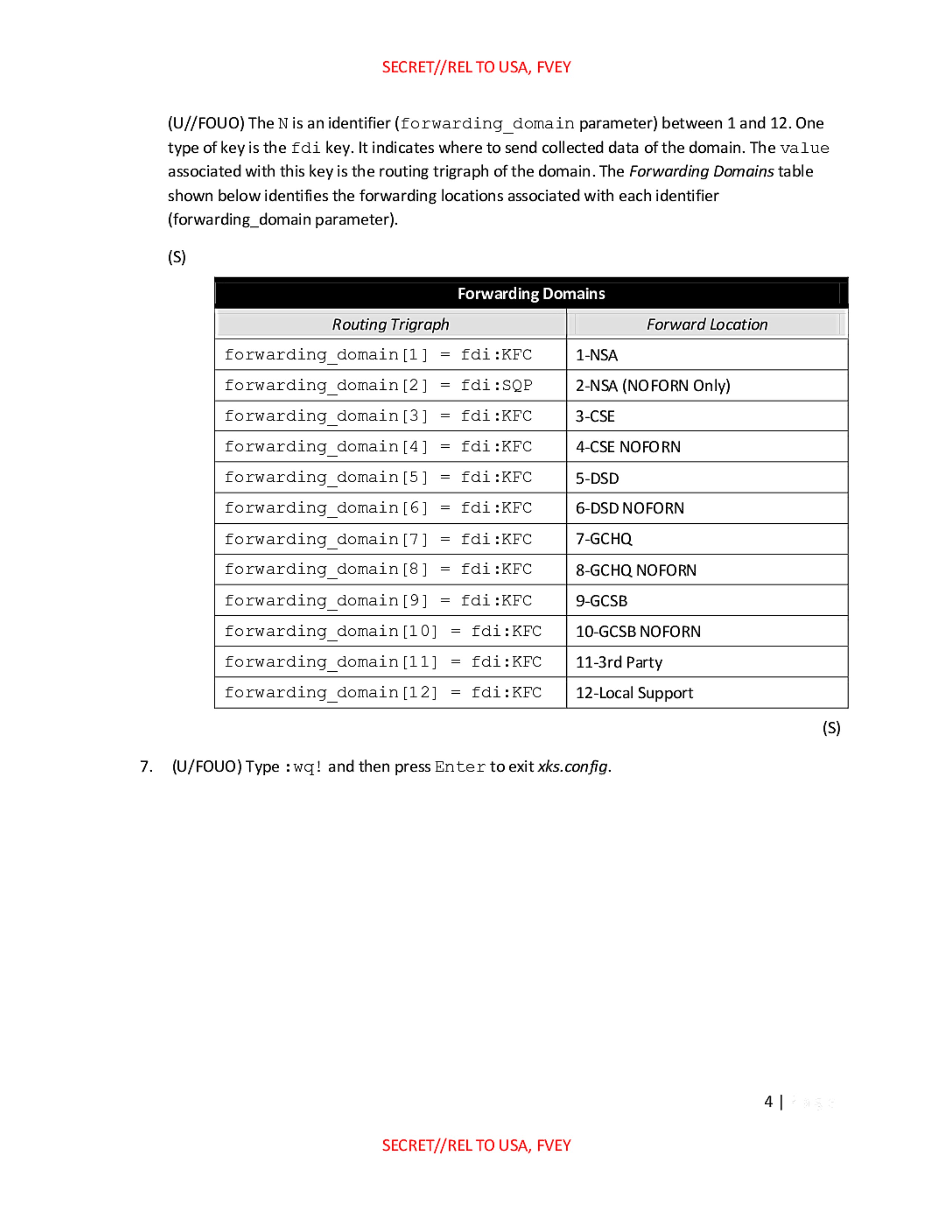
(U//FOUO) The N is an identifier (forwarding_domain parameter) between 1 and 12. One type of key is the fdi key. It indicates where to send collected data of the domain. The value associated with this key is the routing trigraph of the domain. The Forwarding Domains table shown below identifies the forwarding locations associated with each identifier (forwarding_domain parameter).
(S)
Forwarding Domains
| Routing Trigraph | Forward Location |
|---|---|
forwarding_domain[1] = fdi:KFC |
1-NSA |
forwarding_domain[2] = fdi:SQP |
2-NSA (NOFORN Only) |
forwarding_domain[3] = fdi:KFC |
3-CSE |
forwarding_domain[4] = fdi:KFC |
4-CSE NOFORN |
forwarding_domain[5] = fdi:KFC |
5-DSD |
forwarding_domain[6] = fdi:KFC |
6-DSD NOFORN |
forwarding_domain[7] = fdi:KFC |
7-GCHQ |
forwarding_domain[8] = fdi:KFC |
8-GCHQ NOFORN |
forwarding_domain[9] = fdi:KFC |
9-GCSB |
forwarding_domain[10] = fdi:KFC |
10-GCSB NOFORN |
forwarding_domain[11] = fdi:KFC |
11-3rd Party |
forwarding_domain[12] = fdi:KFC |
12-Local Support |
(S)
- (U/FOUO) Type:
wq!and then press Enter to exit xks.config.
4 |
SECRET//REL TO USA, FVEY
SECRET//REL TO USA, FVEY
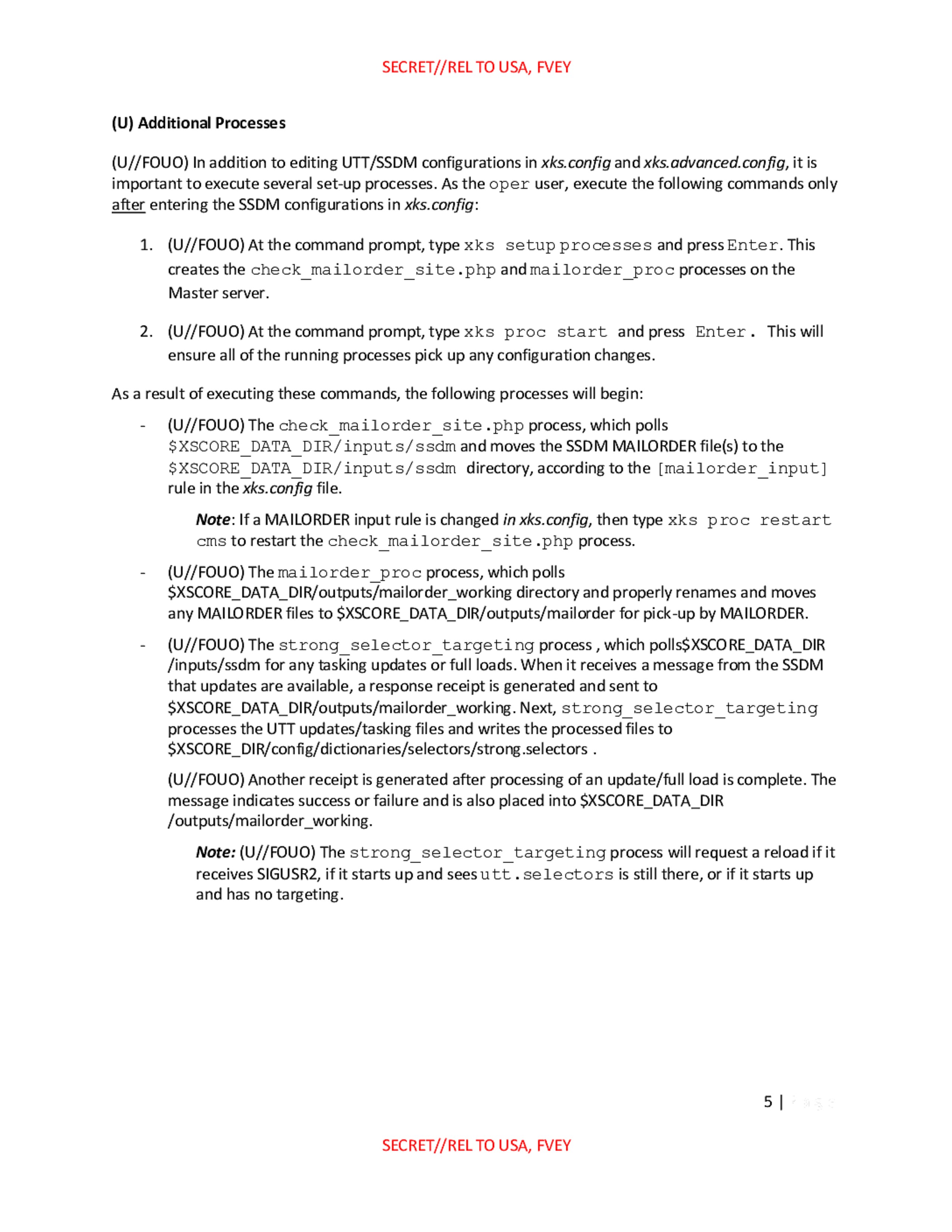
(U) Additional Processes
(U//FOUO) In addition to editing UTT/SSDM configurations in xks.config and xks.advanced.config, it is important to execute several set-up processes. As the oper user, execute the following commands only after entering the SSDM configurations in xks.config:
- (U//FOUO) At the command prompt, type
xks setup processesand press Enter. This creates thecheck_mailorder_site.phpandmailorder_procprocesses on the Master server. - (U//FOUO) At the command prompt, type
xks proc startand press Enter. This will ensure all of the running processes pick up any configuration changes.
As a result of executing these commands, the following processes will begin:
- (U//FOUO) The
check_mailorder_site.phpprocess, which polls$XSCORE_DATA_DIR/inputs/ssdmand moves the SSDM MAILORDER file(s) to the$XSCORE_DATA_DIR/inputs/ssdmdirectory, according to the[mailorder_input]rule in the xks.config file.- Note: If a MAILORDER input rule is changed in xks.config, then type
xks proc restart cmsto restart thecheck_mailorder_site.phpprocess.
- Note: If a MAILORDER input rule is changed in xks.config, then type
- (U//FOUO) The
mailorder_procprocess, which polls$XSCORE_DATA_DIR/outputs/mailorder_workingdirectory and properly renames and moves any MAILORDER files to$XSCORE_DATA_DIR/outputs/mailorderfor pick-up by MAILORDER. - (U//FOUO) The
strong_selector_targetingprocess, which polls$XSCORE_DATA_DIR/inputs/ssdmfor any tasking updates or full loads. When it receives a message from the SSDM that updates are available, a response receipt is generated and sent to$XSCORE_DATA_DIR/outputs/mailorder_working. Next,strong_selector_targetingprocesses the UTT updates/tasking files and writes the processed files to$XSCORE_DIR/config/dictionaries/selectors/strong.selectors. - (U//FOUO) Another receipt is generated after processing of an update/full load is complete. The message indicates success or failure and is also placed into
$XSCORE_DATA_DIR/outputs/mailorder_working.- Note: (U//FOUO) The
strong_selector_targetingprocess will request a reload if it receives SIGUSR2, if it starts up and seesutt.selectorsis still there, or if it starts up and has no targeting.
- Note: (U//FOUO) The
5 |
SECRET//REL TO USA, FVEY
Published in the Same Report
(10 of 46 documents)
-
XKEYSCORE intro [pdf]
A TOP SECRET NSA presentation from 2008 introducing XKeyscore — one of the earliest overview documents in the archive — describing the system as a globally distributed Linux cluster across approximately 150 sites and 700+ servers that stores a ~3-day rolling buffer of all unfiltered internet traffic, and demonstrating its core capabilities for finding previously unknown targets by mining metadata, tracking documents by embedded image hashes, detecting encryption and VPN use, and language tracking.
Programs: XKEYSCORE · TURMOIL · TURBULENCE · TRAFFICTHIEF · WEALTHYCLUSTER · MOONSHINE · SEARCHLIGHT · MARINA · PSC · SSO · TIMBERLINEPeople: bin Laden, Osama“'Brasil é um grande alvo', diz jornalista sobre vigilância dos EUA” - O Globo ↗ (2013-07-07) · “XKeyscore: NSA tool collects 'nearly everything a user does on the internet'” - The Guardian ↗ (2013-07-31) · “No Place to Hide” - Metropolitan Books ↗ (2014-05-13) · “XKEYSCORE: NSA’s Google for the World’s Private Communications” - The Intercept ↗ (2015-07-01) · Greenwald, Glenn · Bridi, Sônia · Marquis-Boire, Morgan · Lee, Micah -
Advanced HTTP Activity Analysis [pdf]
This NSA training document from 2009 teaches intelligence analysts how to analyze HTTP internet traffic and exploit it using the XKEYSCORE surveillance system to monitor and identify internet users globally.
“XKEYSCORE: NSA’s Google for the World’s Private Communications” - The Intercept ↗ (2015-07-01) · “No Place to Hide” - Metropolitan Books ↗ (2014-05-13) · Marquis-Boire, Morgan · Greenwald, Glenn · Lee, Micah -
Analyzing Mobile/Cellular DNI in XKEYSCORE, May 2009 [pdf]
The XKEYSCORE document explains how the agency analyzes mobile/cellular device internet usage by collecting and processing both converged DNI/DNR data within cellular networks and traditional internet traffic, using various tools and indicators to identify mobile users even when their device type isn't immediately evident. The document demonstrates how the system can track mobile internet activity across applications like Yahoo Mail and identifies devices through various technical "hints" including MSISDN codes, browser fingerprints, and user agent strings.
-
Atomic SIGINT Data Format (ASDF) Configuration Read Me [pdf]
This document is a technical configuration guide for setting up XKEYSCORE surveillance systems to generate and forward metadata in the Atomic SIGINT Data Format (ASDF) to various data repositories including MARINA, which tracks users' browser activity and online behavior.
Marking: SECRET -
CADENCE Read Me [pdf]
This NSA engineering manual details how to configure XKEYSCORE—the agency's sprawling surveillance system—to integrate with CADENCE, an automated keyword scanning tool that filters intercepted communications and routes intelligence based on search terms submitted by analysts.
-
How to configure category throttling in XKEYSCORE [pdf]
An NSA technical guide explains how to configure "category throttling" in XKEYSCORE—a feature that automatically stops forwarding intercepted communications once analyst-defined collection targets hit predetermined data volume or session count limits, allowing the surveillance system to continue processing but prevent overflow from high-volume targets.
-
CNE Analysis in XKEYSCORE [pdf]
This document is an NSA training presentation from October 2009 demonstrating how XKEYSCORE integrates with Computer Network Exploitation (CNE) operations, allowing analysts to search and analyze data extracted from compromised computers including keystrokes, browser history, registry files, documents, emails, and directory structures collected through implants like UNITEDRAKE and OLYMPUS.
Programs: XKEYSCORE · OLYMPUS · UNITEDRAKE · PINWALE · TUNINGFORK · TURBOCHASER · MARINA · JOLLYROGER · TREASUREMAP · TURBINE · PRESSUREWAVE · MAD · TUCKER · EXPANDINGPULLY · UNIX · SEARCHLIGHT · KEYLOGGER · PILBEAM · FOXACID · WAYTIDE · SHADOWQUEST · SEAGULLFARO · DARKHELMET · LUTEUSICARUS · FOGGYBOTTOM · GREENCHAOS · RADIUS · NKB · VALIDATOR -
Communications System - How To Guide [pdf]
A TOP SECRET and sensitive compartmented information (SCI) how-to document for the NSA’s XKEYSCORE “Comms” backbone, laying out ports, peer/allow rules, bandwidth pools, and proxy classifications that stitch clusters to central control—a scalable architecture for moving surveillance data with security markings baked in. It also walks through firewall exceptions, HTTPS port-sharing, and a MAILORDER file pipeline, exposing the nuts‑and‑bolts of how collection flows across sites, proxies, and viewers.
-
DEEPDIVE Readme [pdf]
This document is a confidential technical guide that provides step-by-step procedures for configuring an XKEYSCORE server to function as a DEEPDIVE server. DEEPDIVE enhances XKEYSCORE by adding a front-end filter and a rolling buffer of all unfiltered data, creating a federated query system that can scan all collection sites with a single query.
-
DNI101 [pdf]
This TOP SECRET training guide, "DNI 101," provides a workflow for Digital Network Intelligence analysts on how to investigate a target's email address, detailing the specific tools, databases, and methodology used, and stressing the critical difference between initial open-source/classified research and the active "targeting" of raw SIGINT repositories like XKEYSCORE, PINWALE, and MARINA.
Programs: NKB · FOXTRAIL · FOREMAN · PINWALE · LIONHEART · XKEYSCORE · DISHFIRE · MARINA · MECWEB · MAINWAY · TRAFFICTHIEF · MAUI · ANCHORY · M3 · INTELLINK · HOMEBASE · PROTON · UTT · CADENCE · SPEEDBUMP · TUNINGFORK · MASTERSHAKE · BLACKPEARL · JACKSPARROW · ROADBED · STORYDUTY · LIONROAR · DOPHONE · UIS






Related Documents
-
FAIRVIEW dataflow charts April 2012 [pdf]
This document outlines data flow diagrams that show how various types of sensitive communication, including voice, fax, and modem traffic, are handled through systems operated by the NSA and its partners. These partners include corporations, telecommunications companies, ISPs, and other entities involved in processing and managing the data through secure and classified channels. The document covers processing flows for various data types, metadata, and communications systems under NSA's control, detailing how data is routed, stored, and analyzed across different platforms and sites.
Programs: FAIRVIEW · SAGUARO · TURNSTILE · MESA · TITANPOINT · RIMROCK · MAILORDER · PINECONE · BLARNEY · STONEGATE · TINSEL · CONVEYANCE · FISHWAY · NUCLEON · PINWALE · SCISSORS · COURIERSKILL · DRIFTWOOD · ASDF · FALLOUT · MARINA · LOPERS · WEALTHYCLUSTER · PUPR · CLEARSIGHT · MIDFIELD · CADENCE · BUGCATCHER · WAYLAND · DESOTO · GATEKEEP · HIGHDECIBEL · XKEYSCORE · YANKEE · TOPROCK · FASCIA · DISHFIRE · SEAGULL · BIGDIPPER · CORPORATE · LILDIPPER · HAVASU · WEALTHYCLUSTER2 · RAGTIME · TUMULT · TATTOO · DARKTHUNDER · ICYTWINS · TML-STATUS · WATERFRONT · VULCANDEATHGRIP · STEELFLAUTA · UNITY · KEYCARD · UTT · BTUBE · ISLANDTRANSPORT · SSO · MAINWAY · SSDM · TUBE · TITANPOINTE · TURMOIL · VPCS“NSA Spying Relies on AT&T’s ‘Extreme Willingness to Help’” - ProPublica ↗ (2015-08-15) · “AT&T Helped U.S. Spy on Internet on a Vast Scale” - The New York Times ↗ (2015-08-15) · “Titanpointe: The NSA’s Spy Hub in New York, Hidden in Plain Sight” - The Intercept ↗ (2016-11-16) · Angwin, Julia · Larson, Jeff · Savage, Charlie · Moltke, Henrik · Poitras, Laura · Risen, James · Gallagher, Ryan -
VALIANTSURF [pdf]
An NSA WikiInfo page for VALIANTSURF — the coverterm for NSA's IPSec VPN decryption capability within the TURMOIL collection platform — describing the four data flow types for intercepting and breaking encrypted VPN traffic, the full deployment roster across collection sites including Menwith Hill, SMOKYSINK, MUSCULAR, CROSSCUT and others, and the architectural taxonomy of the VALIANTSURF programme including its MALIBU and WAIMEA processing architectures and their relationship to LONGHAUL, POISONNUT and GALLANTWAVE.
Programs: VALIANTSURF · TURMOIL · TURBULENCE · HOOKED · HOOKEDHAND · CINDER · CINDERASH · CINDERTRACK · SCARLETFEVER · LONGHAUL · FALLOUT · TOYGRIPPE · PICARESQUE · XKEYSCORE · PRESSUREWAVE · ASDF · MAILORDER · TUBE · KEYCARD · POISONNUT · ISLANDHIDEAWAY · ISLANDTRANSPORT · EXOPUMP · CORALREEF · PINWALE · TUSCARORA · ONEROOF · CONVEYANCE · TURTLEPOWER · WDM · CADENCE · UTT · SCISSORS · FISHWAY · BTUBE · DNCA · ROMULANALE · GALLANTWAVE · ROMULANGAWK · ROMULANGOWL · MALIBU · WAIMEA · WAIMEAVISAGE · ROMULANVISAGE · WAIMEAVISE · ROMULANVISE · APEX · METROTUBE · MADFORGE · JSORCERER · CROSSCUT · CIET · LATTICE · STARQUAKE · SARATOGA · MUSCULAR · SMOKYSINK · SLACKKEY · TUMMS · PURGE · SURGE · NUCLEON · SPAGIC · PPF · SOAP · TUMULT · FIP · PIQBLADE · DEEPDIVE · IBRIDGE -
VoIP Configuration and Forwarding Read Me [pdf]
A SECRET XKeyscore configuration manual describing how to set up the system to intercept internet phone calls, faxes and video calls and forward them to NUCLEON — NSA's voice intercept repository which at time of writing supported over 8,000 users worldwide across 75 servers receiving 700,000 voice, fax, video and tag files per day.
-
TRAFFICTHIEF Readme [pdf]
A SECRET XKeyscore configuration manual describing TRAFFICTHIEF — NSA's corporate alerting and tipping system that receives real-time events from XKeyscore when targets are actively communicating, enriches them with geolocation data and immediately alerts analysts — covering socket and MAILORDER configuration methods for both Five Eyes and NOFORN tip streams.
-
TURMOIL GALLANTWAVE [pdf]
An NSA WikiInfo page describing TURMOIL GALLANTWAVE — a CES mission application hosted on TURMOIL that decrypts communications using Data Network Session Cipher (DNSC) technologies, such as SSL/TLS, by integrating with the LONGHAUL SCARLETFEVER key recovery service and forwarding decrypted sessions to XKEYSCORE for analyst access.
Programs: VALIANTSURF · XKEYSCORE · TURMOIL · GALLANTWAVE · LONGHAUL · TURBULENCE · BULLRUN · SCARLETFEVER · TUMULT · TUBE · UTT · BTUBE · FISHWAY · EXOPUMP · PURGE · SURGE · SCISSORS · PINWALE · TUSCARORA · NUCLEON · WDM · TURTLEPOWER · CONVEYANCE · ONEROOF · KEYCARD · SLIDETACKLE · POLARSTARKEY · TUMMS · CEMETERY · TEPIDTSUNAMI · PPF · ISLANDTRANSPORT