PINWALE: Transnational DNI Training
Open PDFDocument date: -
Pages: 37
Genre: slides
Banner: TOP SECRET//COMINT/REL TO USA, AUS, CAN, GBR, NZL//20291123
Classification: TOP SECRET COMINT
Dissemination: REL TO USA, AUS, CAN, GBR, NZL
This presentation is a classified NSA training guide on PINWALE, a SIGINT database used for the storage, retrieval, and analysis of intercepted digital network intelligence (DNI) communications. It outlines system capabilities, query creation, search tools, and interfaces such as NEXUS, UIS, and AGILITY, explaining how analysts search, retrieve, and analyze both content and metadata — including FISA-partitioned data — within the Five Eyes intelligence framework.
My notes
TOP SECRET//COMINT/REL TO USA, AUS, CAN, GBR, NZL//20291123
(U) Transnational DNI Training
(U) PINWALE
TOP SECRET//COMINT/REL TO USA, AUS, CAN, GBR, NZL//20291123
TOP SECRET//COMINT/REL TO USA, AUS, CAN, GBR, NZL//20291123
(U) Describe PINWALE
(U) What is PINWALE?
TOP SECRET//COMINT/REL TO USA, AUS, CAN, GBR, NZL//20291123
2
TOP SECRET//COMINT/REL TO USA, AUS, CAN, GBR, NZL//20291123
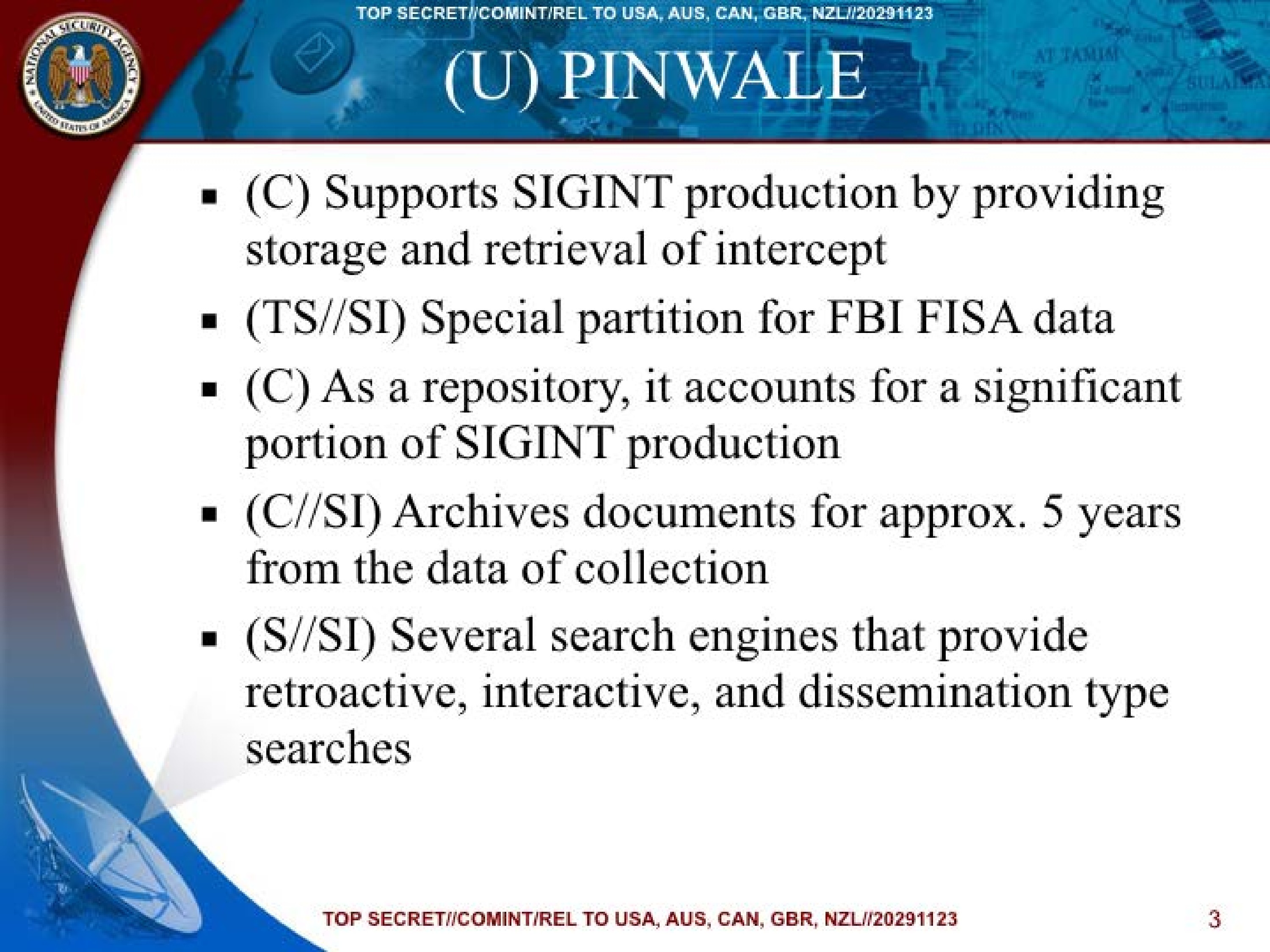
(U) PINWALE
- (C) Supports SIGINT production by providing storage and retrieval of intercept
- (TS//SI) Special partition for FBI FISA data
- (C) As a repository, it accounts for a significant portion of SIGINT production
- (C//SI) Archives documents for approx. 5 years from the data of collection
- (S//SI) Several search engines that provide retroactive, interactive, and dissemination type searches
TOP SECRET//COMINT/REL TO USA, AUS, CAN, GBR, NZL//20291123
3
TOP SECRET//COMINT/REL TO USA, AUS, CAN, GBR, NZL//20291123
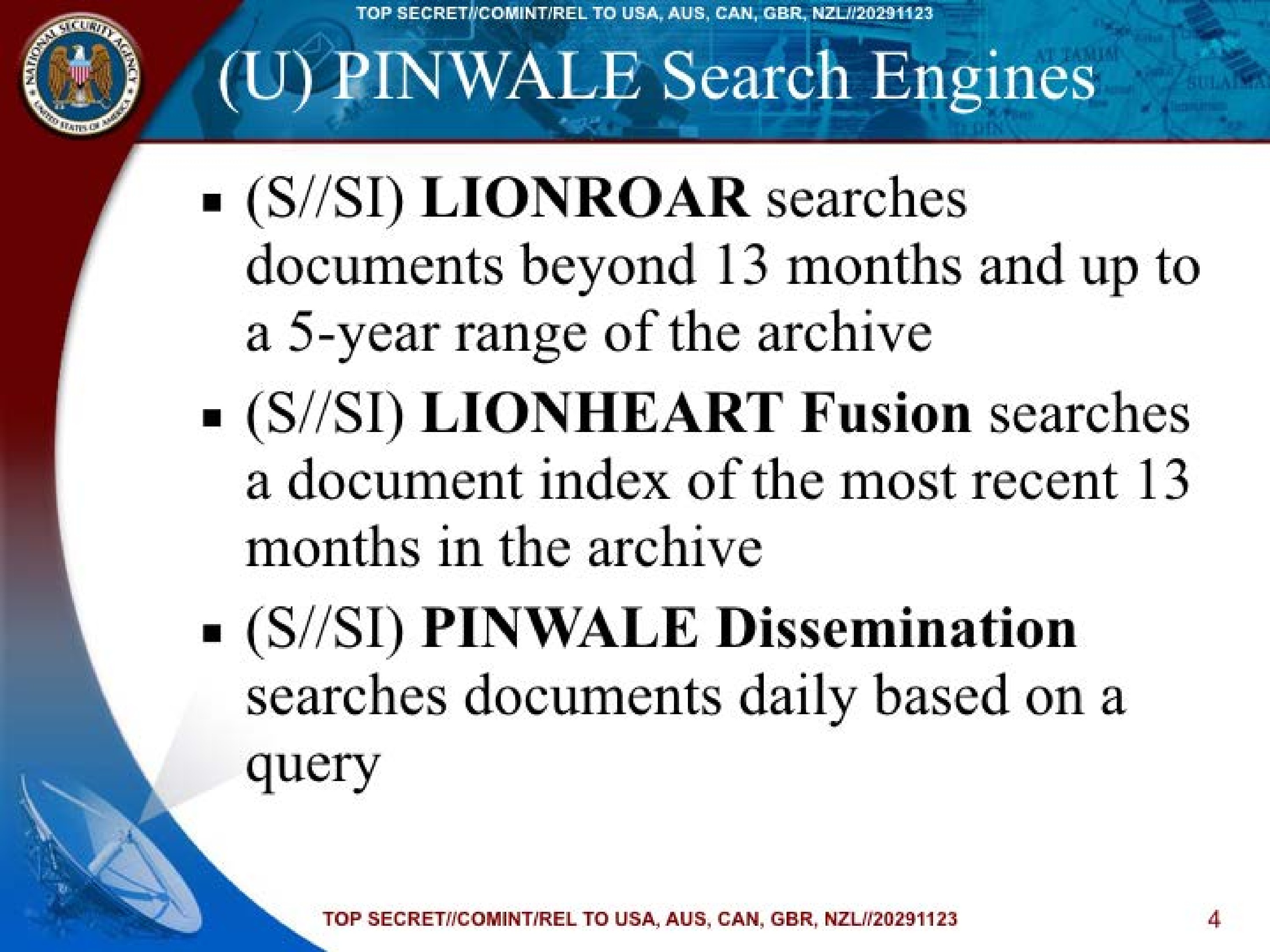
(U) PINWALE Search Engines
- (S//SI) LIONROAR searches documents beyond 13 months and up to a 5-year range of the archive
- (S//SI) LIONHEART Fusion searches a document index of the most recent 13 months in the archive
- (S//SI) PINWALE Dissemination searches documents daily based on a query
TOP SECRET//COMINT/REL TO USA, AUS, CAN, GBR, NZL//20291123
4
TOP SECRET//COMINT/REL TO USA, AUS, CAN, GBR, NZL//20291123
Creating a Query
- For a refresher on query syntax, use the PINWALE Syntax Quick Reference Card (http://rosato.do.nsa:9087/userweb/nexus/ref.card.030505.doc) or the course guide for TOOL 2201
- For additional help creating queries, contact PINWALE Help Desk [REDACTED]
TOP SECRET//COMINT/REL TO USA, AUS, CAN, GBR, NZL//20291123
5
TOP SECRET//COMINT/REL TO USA, AUS, CAN, GBR, NZL//20291123
(U) UIS, NEXUS, AGILITY and AGILEVIEW
- (C) NEXUS is interface where you can conduct searches in UIS
- (C//SI) User Interface Service (UIS) integrates search and retrieval systems and presents data queried through NEXUS like the intended user would see (UIS Text Presenter).
- (S//SI) AGILITY is an alternative document viewer to the UIS Text Presenter ideal for viewing Microsoft Windows applications (MS Office, Adobe PDFs) in their native format
TOP SECRET//COMINT/REL TO USA, AUS, CAN, GBR, NZL//20291123
6
TOP SECRET//COMINT/REL TO USA, AUS, CAN, GBR, NZL//20291123
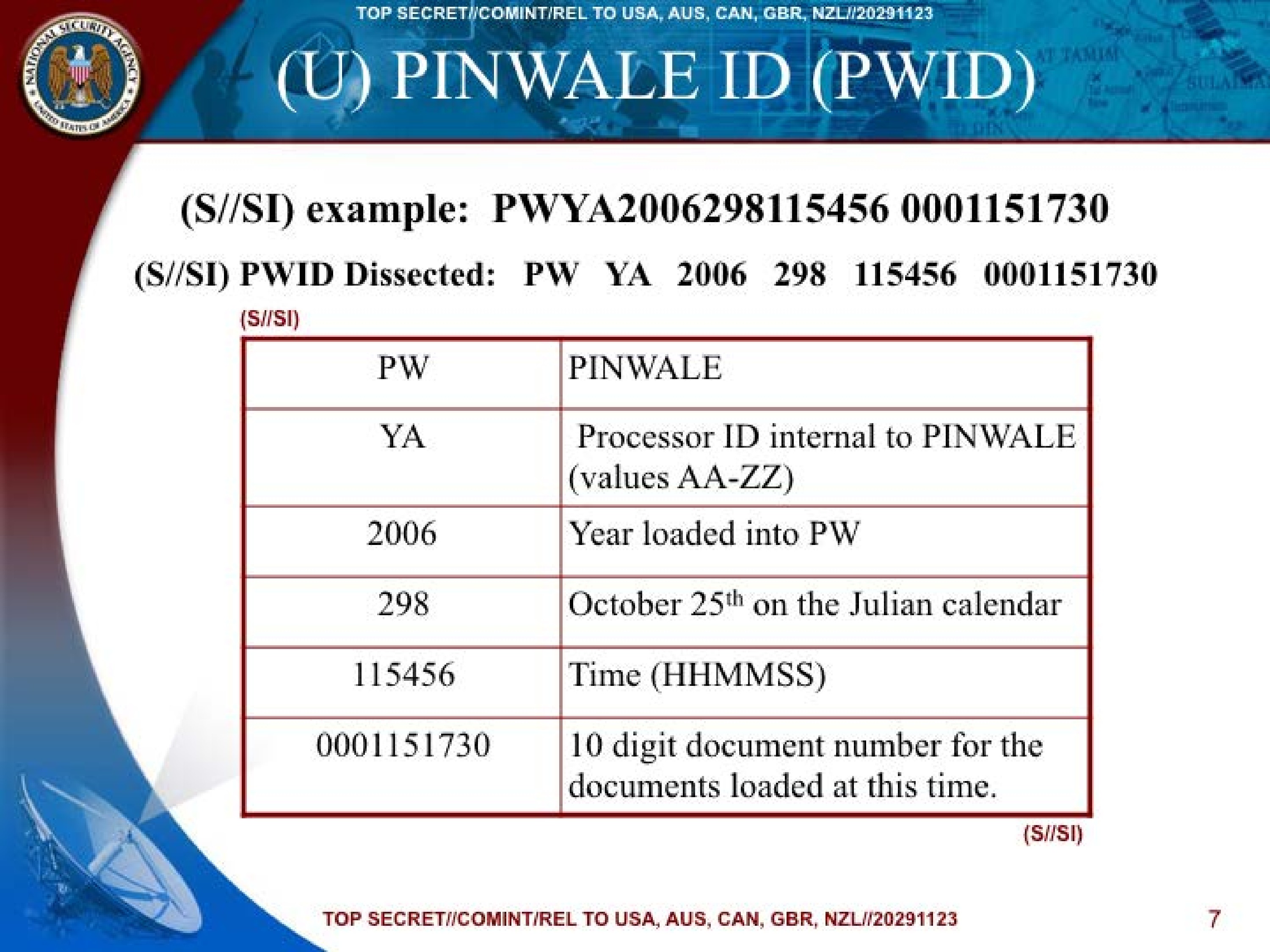
(U) PINWALE ID (PWID)
(S//SI) example: PWYA2006298115456 0001151730
(S//SI) PWID Dissected: PW YA 2006 298 115456 0001151730
| (S//SI) | |
|---|---|
| PW | PINWALE |
| YA | Processor ID internal to PINWALE (values AA-ZZ) |
| 2006 | Year loaded into PW |
| 298 | October 25th on the Julian calendar |
| 115456 | Time (HHMMSS) |
| 0001151730 | 10 digit document number for the documents loaded at this time. |
| (S//SI) |
TOP SECRET//COMINT/REL TO USA, AUS, CAN, GBR, NZL//20291123
7
TOP SECRET//COMINT/REL TO USA, AUS, CAN, GBR, NZL//20291123
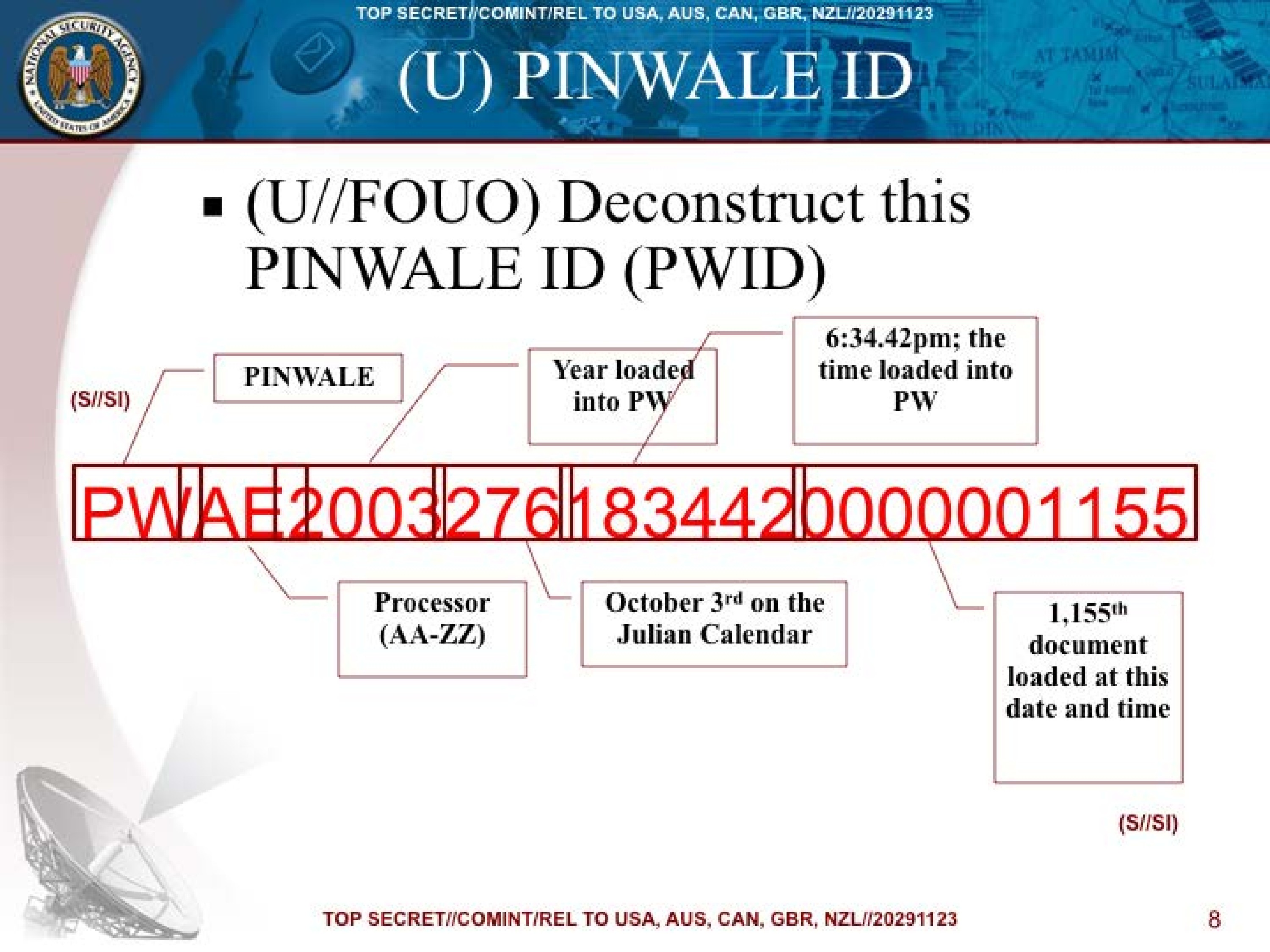
(U) PINWALE ID
- (U//FOUO) Deconstruct this PINWALE ID (PWID)
| (S//SI) | PINWALE | Year loaded into PW | 6:34.42pm; the time loaded into PW |
|---|---|---|---|
| PWAE20032761834420000001155 | |||
| Processor (AA-ZZ) | October 3rd on the Julian Calendar | 1,155th document loaded at this date and time | |
| (S//SI) |
TOP SECRET//COMINT/REL TO USA, AUS, CAN, GBR, NZL//20291123
8
TOP SECRET//COMINT/REL TO USA, AUS, CAN, GBR, NZL//20291123
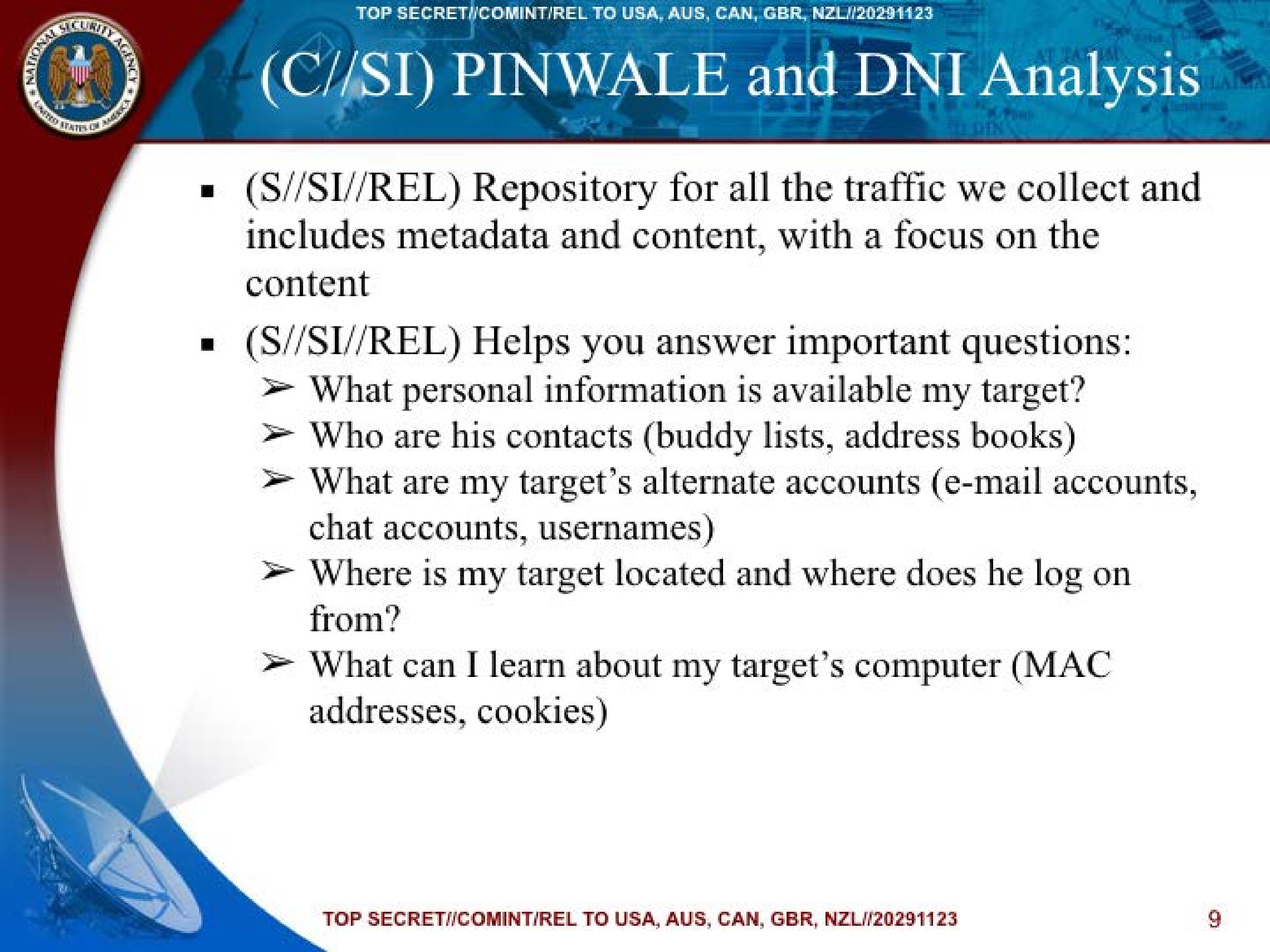
(C//SI) PINWALE and DNI Analysis
- (S//SI//REL) Repository for all the traffic we collect and includes metadata and content, with a focus on the content
- (S//SI//REL) Helps you answer important questions:
➤ What personal information is available my target?
➤ Who are his contacts (buddy lists, address books)
➤ What are my target's alternate accounts (e-mail accounts, chat accounts, usernames)
➤ Where is my target located and where does he log on from?
➤ What can I learn about my target's computer (MAC addresses, cookies)
TOP SECRET//COMINT/REL TO USA, AUS, CAN, GBR, NZL//20291123
9
TOP SECRET//COMINT/REL TO USA, AUS, CAN, GBR, NZL//20291123
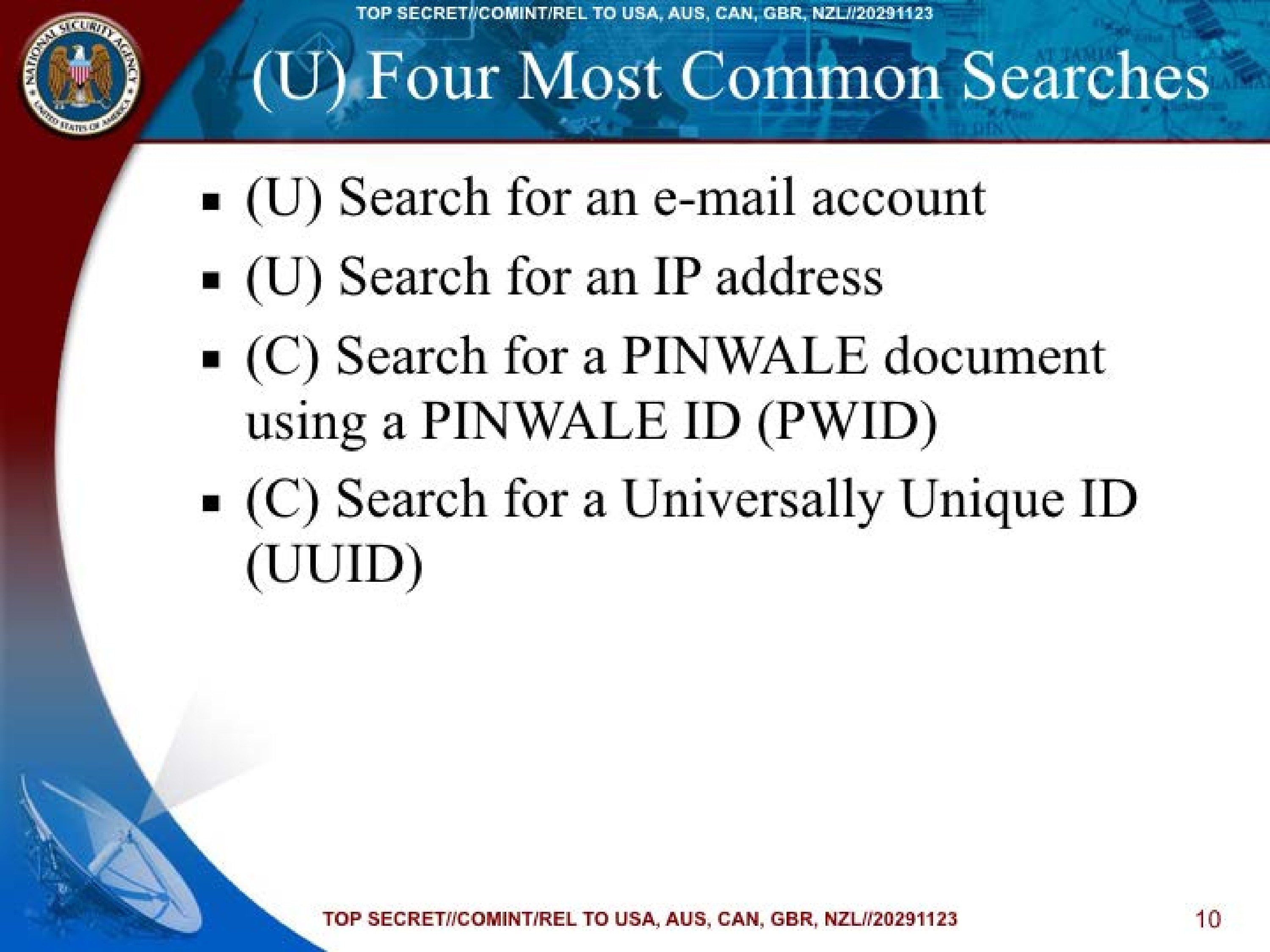
(U) Four Most Common Searches
- (U) Search for an e-mail account
- (U) Search for an IP address
- (C) Search for a PINWALE document using a PINWALE ID (PWID)
- (C) Search for a Universally Unique ID (UUID)
TOP SECRET//COMINT/REL TO USA, AUS, CAN, GBR, NZL//20291123
10
TOP SECRET//COMINT/REL TO USA, AUS, CAN, GBR, NZL//20291123
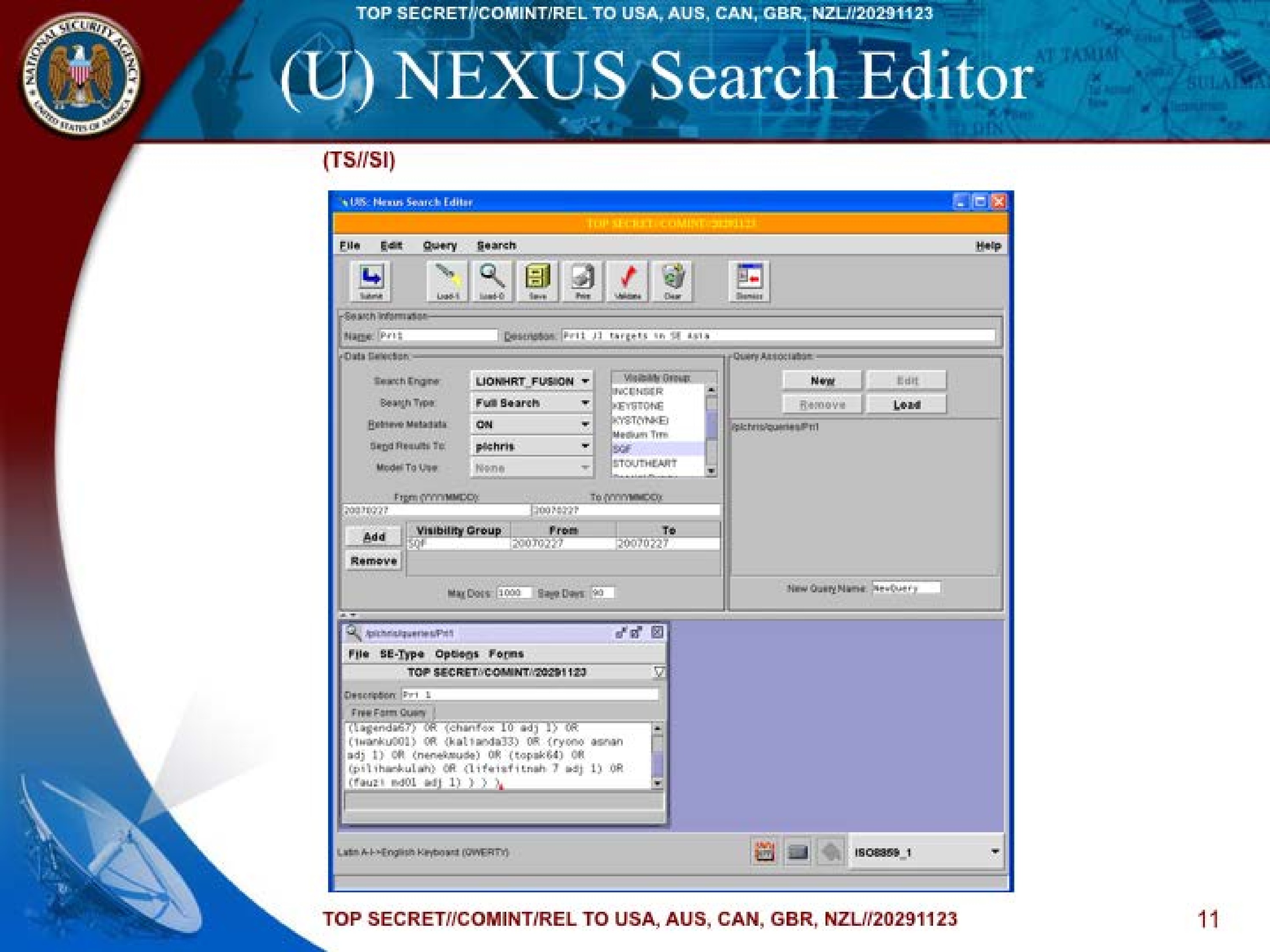
(U) NEXUS Search Editor
(TS//SI)
UIS: Nexus Search Editor

TOP SECRET//COMINT//20291123

File Edit Query Search Help

Submit Load-1 Load-0 Save Print Validate Clear Dismiss

Search information
Name: Pr11
Description: Pr11 J2 targets in SE Asia

Search Engine LIONHRT_FUSION
Search Type Full Search
Retrieve Metadata ON
Send Results To pichris
Model To Use None

Visibility Group:
INCENSER
KEYSTONE
KYSTONK
Medium Tm
SQF
STOUTHEART

From (YYYYMMDD) 20070227 To (YYYYMMDD) 20070227
Add Remove
Visibility Group From To
SQF 20070227 20070227

Max Docs: 1000 Save Days: 90

Query Association:
New Edit
Remove Load

pichris/queries/Pr1
New Query Name: NewQuery

pichris/queries/Pr1:
File SE-Type Options Forms
TOP SECRET//COMINT//20291123
Description: Pr1 1
Free Form Query
(lagenda67) OR (chanfox 10 adj 1) OR
(twanku001) OR (kalianda33) OR (ryono asnan
adj 1) OR (nenekmude) OR (topak64) OR
(pilihankulah) OR (lifeisfitnah 7 adj 1) OR
(fauzi mdol adj 1) ) ) )

Latin A-I English Keyboard (QWERTY) ISO8859_1
TOP SECRET//COMINT/REL TO USA, AUS, CAN, GBR, NZL//20291123
11
TOP SECRET//COMINT/REL TO USA, AUS, CAN, GBR, NZL//20291123
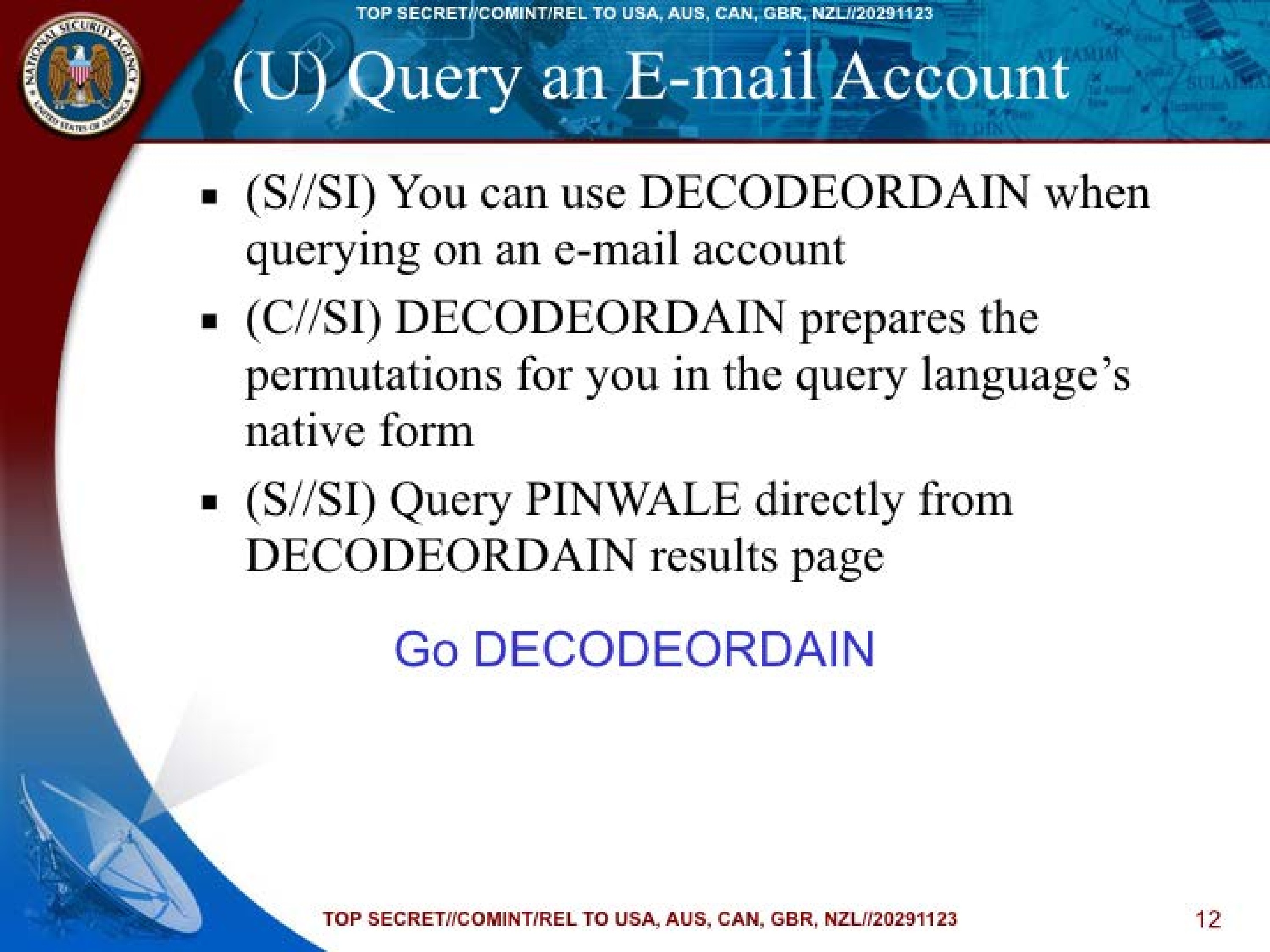
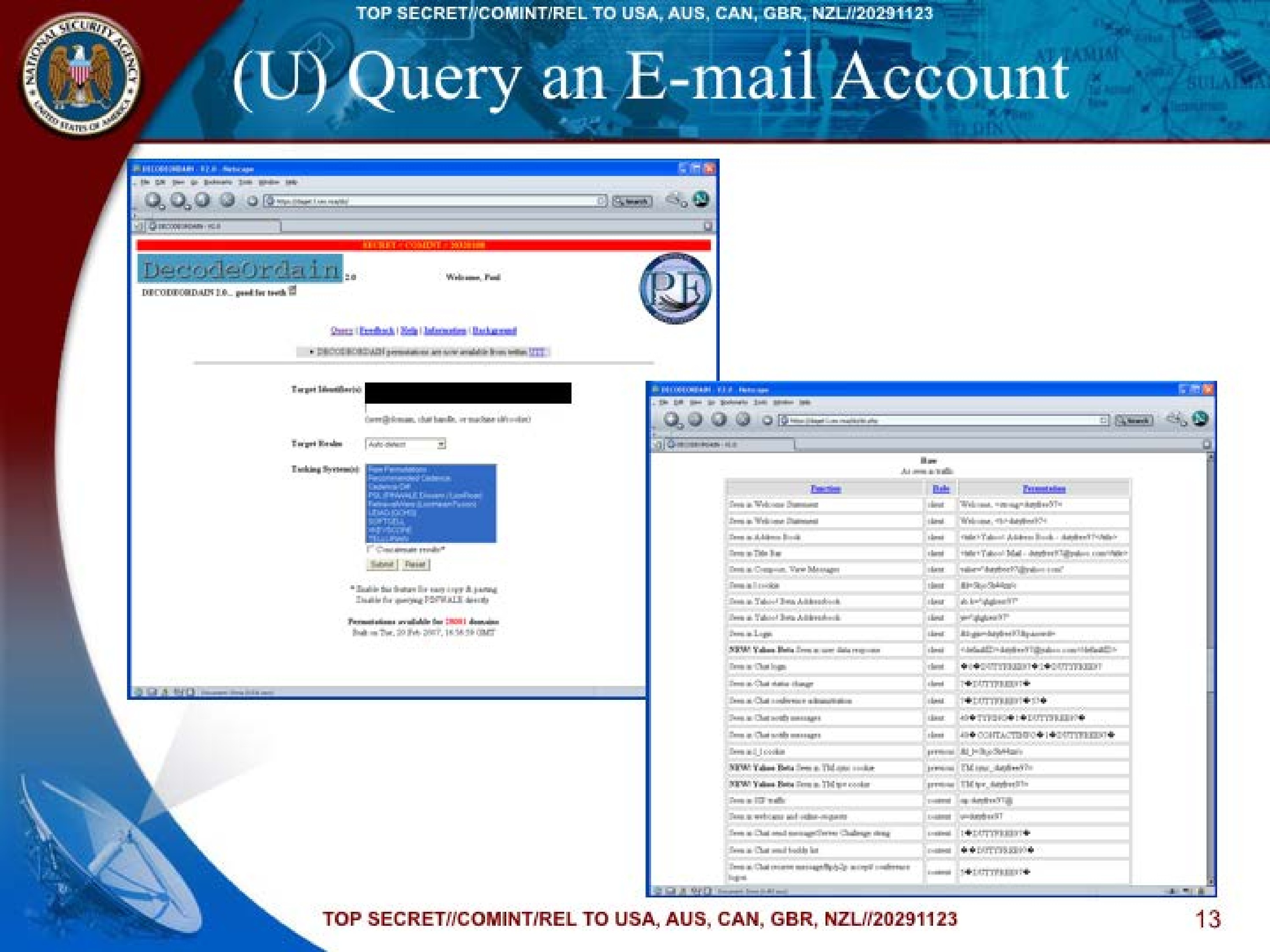
(U) Query an E-mail Account
- (S//SI) You can use DECODEORDAIN when querying on an e-mail account
- (C//SI) DECODEORDAIN prepares the permutations for you in the query language's native form
- (S//SI) Query PINWALE directly from DECODEORDAIN results page
Go DECODEORDAIN
TOP SECRET//COMINT/REL TO USA, AUS, CAN, GBR, NZL//20291123
12
TOP SECRET//COMINT/REL TO USA, AUS, CAN, GBR, NZL//20291123
(U) Query an E-mail Account
DECODEORDAIN V2.0 - Netscape

File Edit View Go Bookmarks Tools Help

https://stajust.l-am-realzzy/ Search

DECODEORDAIN V2.0
SECRET//COMINT//20291123

DecodeOrdain 2.0
Welcome, Paul
DECODEORDAIN 2.0... good for teeth

Query | Feedback | Help | Information | Background

DECODEORDAIN permutations are now available from within UTT

Target Identifier(s)
[REDACTED]
(email@domain, chat handle, or machine id/name)

Target Realm Auto detect

Tasking System(s)
Raw Permutations
Recommended Cadence
Cadence-Off
POLIWAWALE Divsers /LoadPost
Farmshvovve (Liv/smeart Points)
LIZUQ (GCHQ)
SOFTCELL
MAYISCOPE
TILLYParty

Concatenate results*

Submit Reset

*Enable this feature for easy copy & parsing
Enable for querying directly

Permutations available for domains
Built on Tue, 20 Feb 2007, 16:56:59 GMT
| Function | Role | Presentation |
|---|---|---|
| Item in Welcome Statement | client | "Welcome, <!dutyfree97>" |
| Item in Welcome Statement | client | Welcome, <!dutyfree97> |
| Item in Address Book | client | <title>Yahoo! Address Book - dutyfree97</title> |
| Item in Title bar | client | <title>Yahoo! Mail - dutyfree97@yahoo.com</title> |
| Item in Compose, View Messages | client | "dutyfree97@yahoo.com" |
| Item in To-box | client | fb=dutyfree97 |
| Item in Yahoo! Beta Addressbook | client | ab_b=dutyfree97 |
| Item in Yahoo! Beta Addressbook | client | q=dutyfree97 |
| Item in Login | client | id=dutyfree97&P=password |
| NEW! Yahoo! Beta item in user data response | client | <defaultID>dutyfree97@yahoo.com</defaultID> |
| Item in Chat login | client | ◄♦DUTYFREE97♦►◄♦DUTYFREE97♦► |
| Item in Chat status change | client | ▼♦DUTYFREE97♦► |
| Item in Chat conference administration | client | ◄♦DUTYFREE97♦► |
| Item in Chat sent messages | client | ◄♦DUTYFREE97♦►◄♦DUTYFREE97♦► |
| Item in Chat sent messages | client | 4♦TYPING♦►◄♦DUTYFREE97♦► |
| Item in Chat sent messages | client | 4♦CONTACTING♦►◄♦DUTYFREE97♦► |
| Item in J_J_cookie | previous | BL_k=dutyfree97 |
| NEW! Yahoo! Beta Item in TM type cookie | previous | TM_type_dutyfree97 |
| NEW! Yahoo! Beta Item in TM type cookie | previous | TM_type_dutyfree97 |
| Item in IM traffic | r-content | im=dutyfree97 |
| Item in webcams and video-request | r-content | v=dutyfree97 |
| Item in Chat sent message/Server Challenge string | r-content | ◄♦DUTYFREE97♦► |
| Item in Chat send buddy list | r-content | ◄♦DUTYFREE97♦► |
| Item in Chat recieve message/Reply-to accept conference login | r-content | ◄♦DUTYFREE97♦► |
TOP SECRET//COMINT/REL TO USA, AUS, CAN, GBR, NZL//20291123
13
TOP SECRET//COMINT/REL TO USA, AUS, CAN, GBR, NZL//20291123
(U) PINWALE
Objectives
- (U) Configure and use the UIS Metadata Viewer to process and view Pinwale search results and metadata
- (U) Create a query for viewing the FISA data
TOP SECRET//COMINT/REL TO USA, AUS, CAN, GBR, NZL//20291123
14
TOP SECRET//COMINT/REL TO USA, AUS, CAN, GBR, NZL//20291123
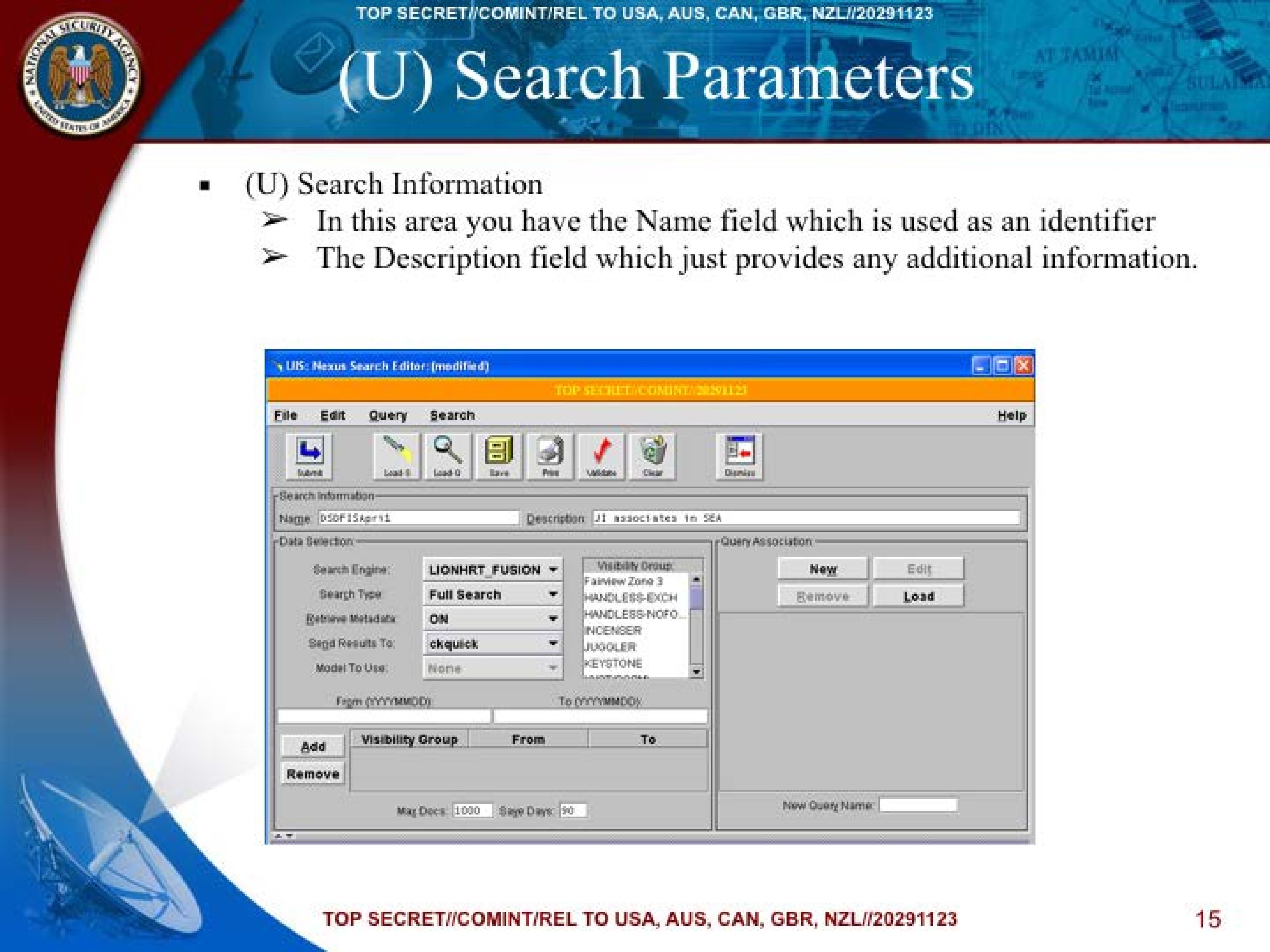
(U) Search Parameters
- (U) Search Information
➤ In this area you have the Name field which is used as an identifier
➤ The Description field which just provides any additional information.
UIS: Nexus Search Editor: (modified)

TOP SECRET//COMINT//20291123

File Edit Query Search Help
Submit Load S Load Q Save Print Validate Clear Dismiss

Search Information:
Name: DSDFISApr11
Description: JI associates In SEA

Data Selection:
Search Engine: LIONHRT_FUSION
Search Type: Full Search
Retrieve Metadata: ON
Send Results To: ckquick
Model To Use: None

From (YYYYMMDD):
To (YYYYMMDD):

Visibility Group:
Fairview Zone 3
HANDLESS-EXCH
HANDLESS-NOFO
INCENSER
JUGGLER
KEYSTONE

Add
Remove

Visibility Group From To

Max Docs: 1000 Save Days: 90

Query Association:
New Edit
Remove Load

New Query Name:
TOP SECRET//COMINT/REL TO USA, AUS, CAN, GBR, NZL//20291123
15
TOP SECRET//COMINT/REL TO USA, AUS, CAN, GBR, NZL//20291123
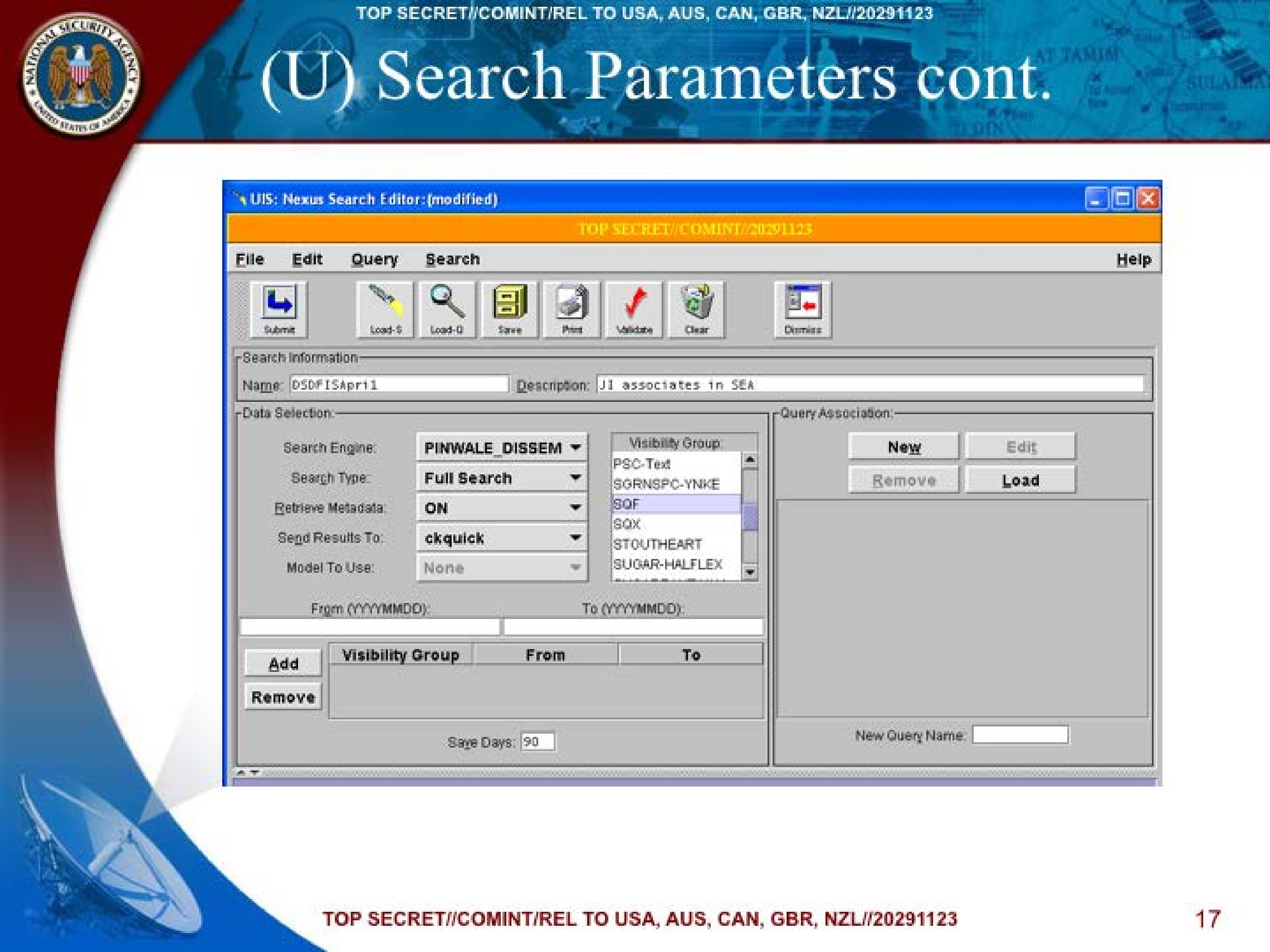
(U) Search Parameters cont.
- (U) Data Selection
- (U) Search Engine – Allows the user to select the search engine of their choice.
**** Select PINWALE_DISSEM - (U) Search Type – Used to select whether documents are actually retrieved or just counted.
**** Usually – Full Search - (U) Retrieve Metadata – Can be used to disable metadata. This is not available when the selected Search Type is Hits Only.
- (U) Send Results To – Sets the folder location to return the search results; defaults to your SID.
**** Leave your sid for this field. - (U) Visibility Group List – Allows you to select one or all of the Visibility Groups. Be sure to click on Add so it can be added to your search.
**** Select/Highlight SQF partition
- (U) Search Engine – Allows the user to select the search engine of their choice.
TOP SECRET//COMINT/REL TO USA, AUS, CAN, GBR, NZL//20291123
16
TOP SECRET//COMINT/REL TO USA, AUS, CAN, GBR, NZL//20291123
(U) Search Parameters cont.
UIS: Nexus Search Editor: (modified)

TOP SECRET//COMINT//20291123

File Edit Query Search Help
Submit Load S Load Q Save Print Validate Clear Dismiss

Search Information:
Name: DSDFISApr11
Description: JI associates In SEA

Data Selection:
Search Engine: PINWALE_DISSEM
Search Type: Full Search
Retrieve Metadata: ON
Send Results To: ckquick
Model To Use: None

From (YYYYMMDD):
To (YYYYMMDD):

Visibility Group:
PSC-Text
SGRNSPC-YNKE
SQF
SQX
STOUTHEART
SUGAR-HALFEX

Add
Remove

Visibility Group From To

Save Days: 90

Query Association:
New Edit
Remove Load

New Query Name:
TOP SECRET//COMINT/REL TO USA, AUS, CAN, GBR, NZL//20291123
17
TOP SECRET//COMINT/REL TO USA, AUS, CAN, GBR, NZL//20291123
(U) Search Parameters cont.
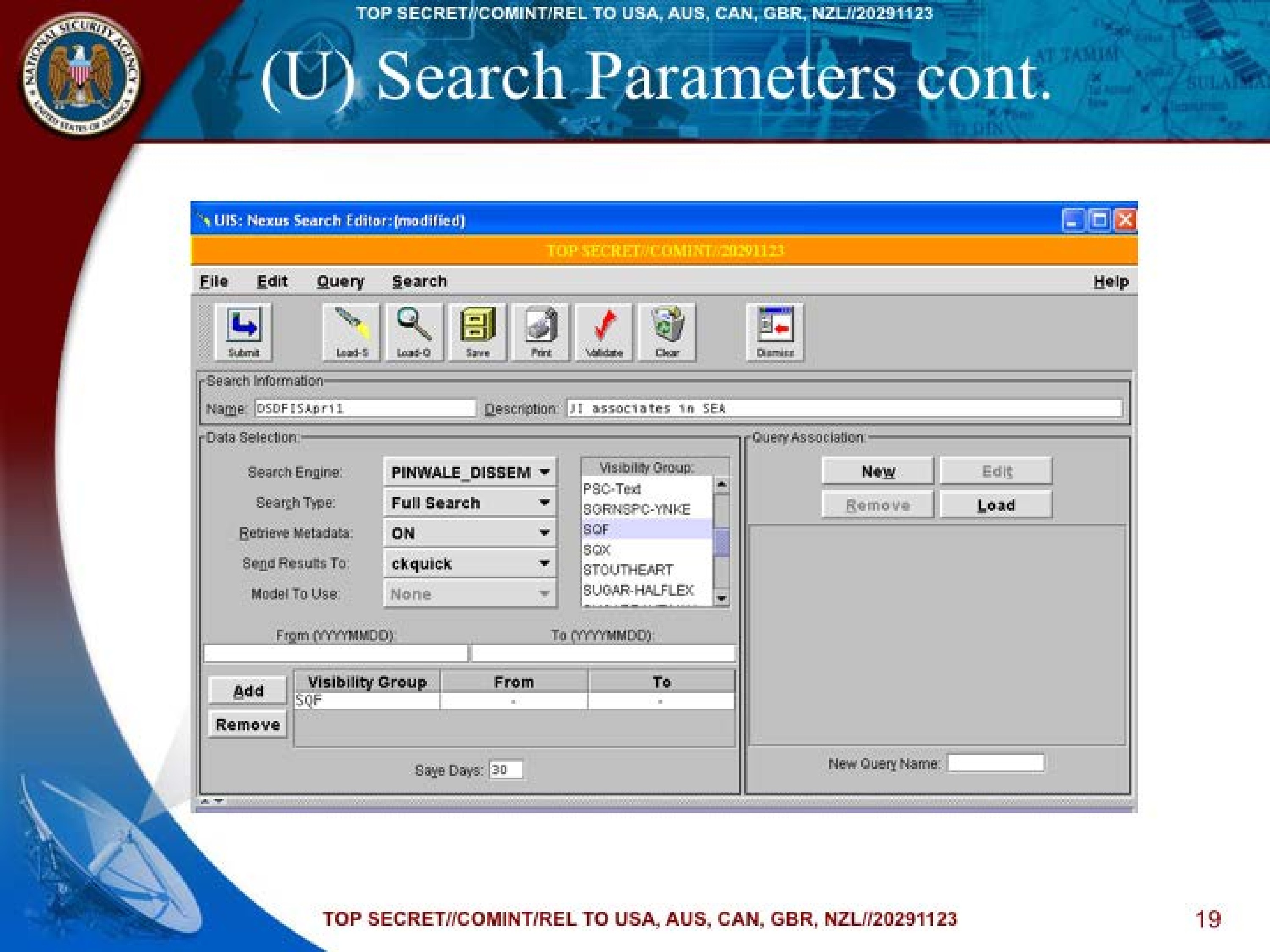
- (U) Date Range – Enter the date range in the From and To fields. It is important to remember to leave the fields blank for the PINWALE_DISSEM as it is a continuous running search.
- (U) Visibility Group Table – By clicking the Add you are able to insert the visibility groups and the date range into the Visibility Group table. Please note that if there is no data for any day within the date range you will get an informational window popping up and saying “Data is not available for the entire date range specified”.
- (U) Max Docs/Max Hits – Max Docs limits the number of documents that will be returned by the queries associated with a Full Search. Max Hits limits the number of hits that will be returned by the queries associated with a Hits Only query. Keep in mind that the system limits are 20,000 Max docs and 1000000 Max hits.
- (U) Save Days – Determines the length of time that the results from a search will remain in the folder manager.
TOP SECRET//COMINT/REL TO USA, AUS, CAN, GBR, NZL//20291123
18
TOP SECRET//COMINT/REL TO USA, AUS, CAN, GBR, NZL//20291123
(U) Search Parameters cont.
UIS: Nexus Search Editor: (modified)

TOP SECRET//COMINT//20291123

File Edit Query Search Help
Submit Load S Load Q Save Print Validate Clear Dismiss

Search Information:
Name: DSDFISApr11
Description: JI associates In SEA

Data Selection:
Search Engine: PINWALE_DISSEM
Search Type: Full Search
Retrieve Metadata: ON
Send Results To: ckquick
Model To Use: None

From (YYYYMMDD):
To (YYYYMMDD):

Visibility Group:
PSC-Text
SGRNSPC-YNKE
SQF
SQX
STOUTHEART
SUGAR-HALFEX

Add
Remove

Visibility Group From To

Save Days: 30

Query Association:
New Edit
Remove Load

New Query Name:
TOP SECRET//COMINT/REL TO USA, AUS, CAN, GBR, NZL//20291123
19
TOP SECRET//COMINT/REL TO USA, AUS, CAN, GBR, NZL//20291123
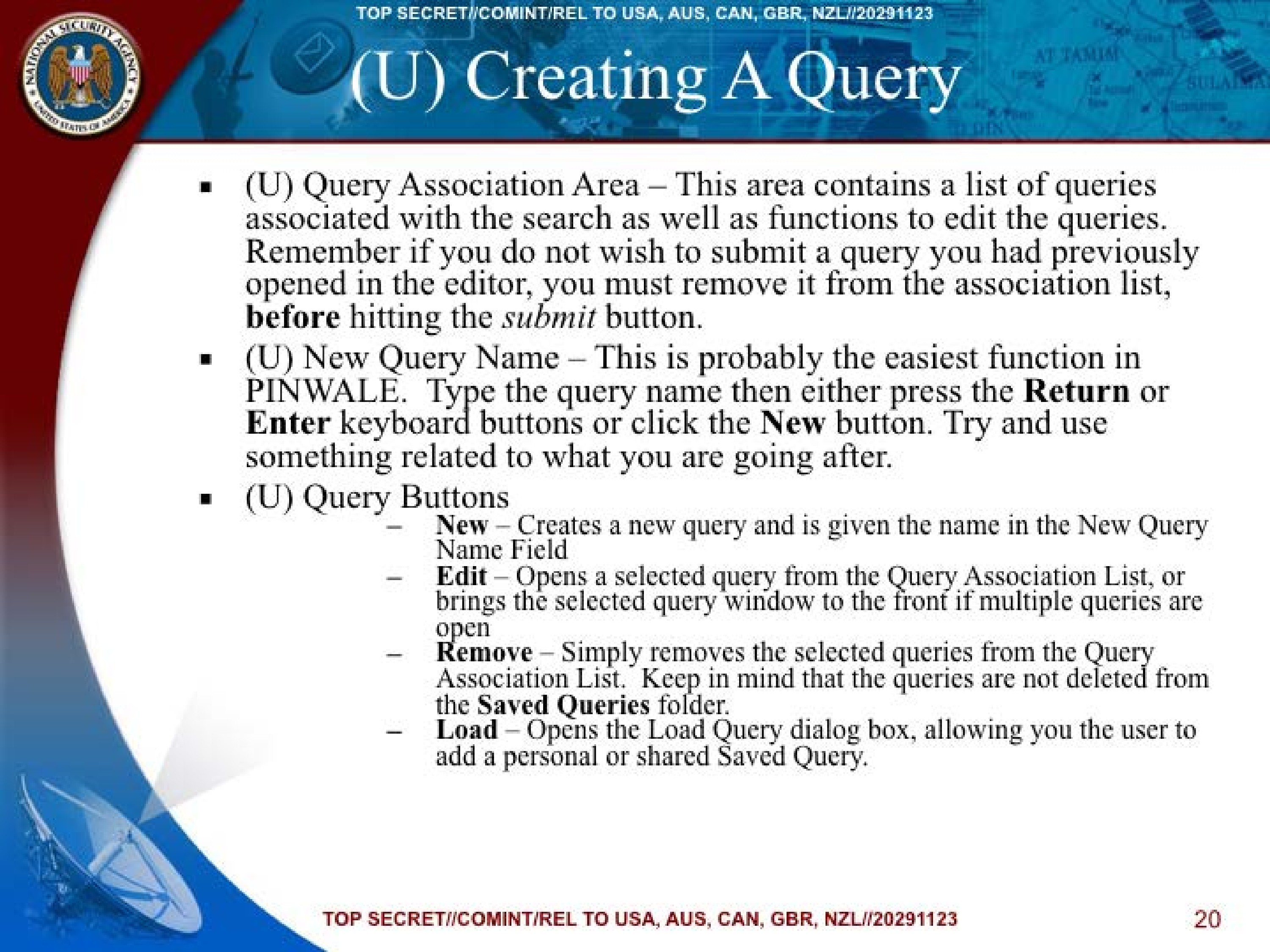
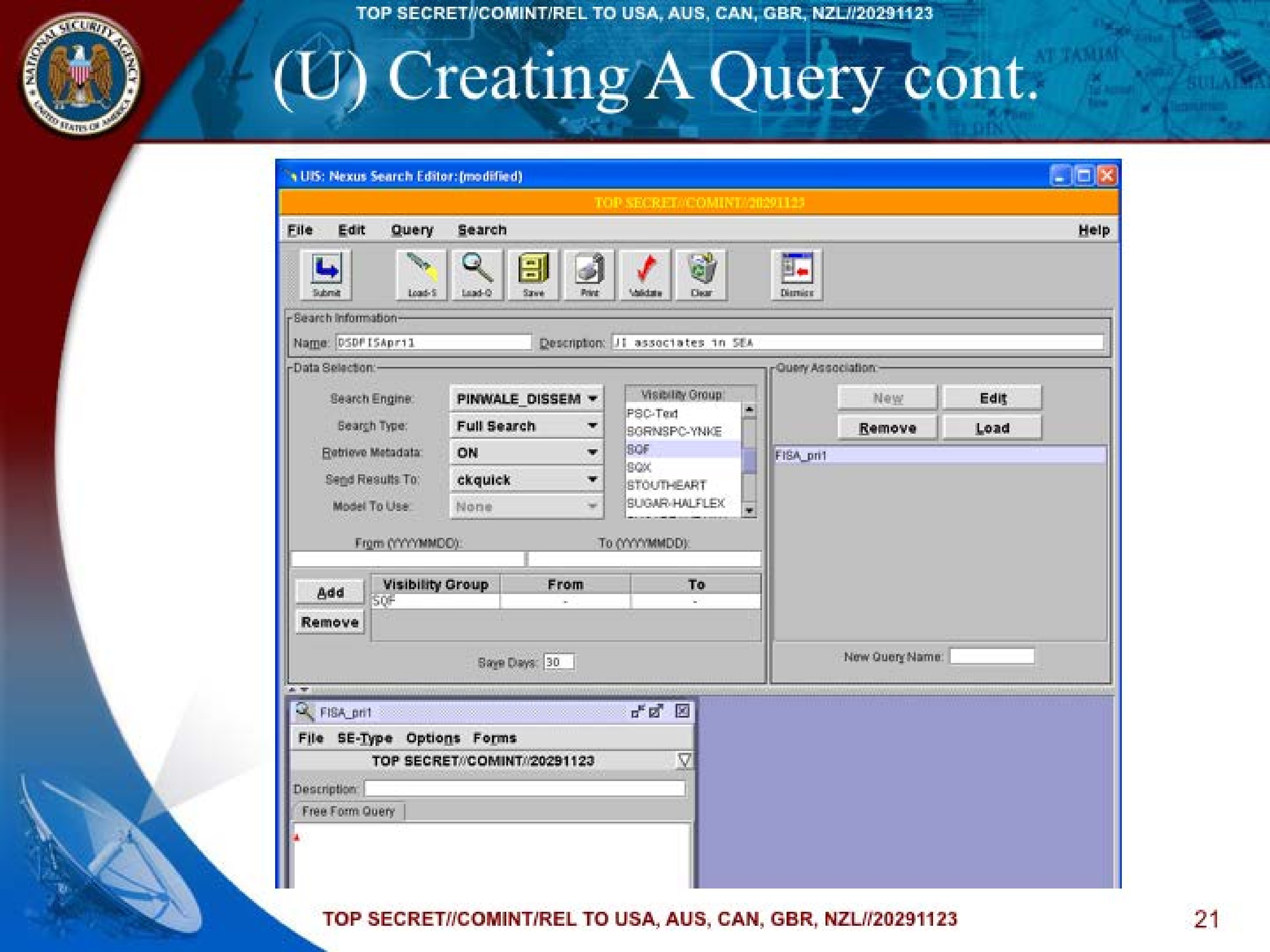
(U) Creating A Query
- (U) Query Association Area – This area contains a list of queries associated with the search as well as functions to edit the queries. Remember if you do not wish to submit a query you had previously opened in the editor, you must remove it from the association list, before hitting the submit button.
- (U) New Query Name – This is probably the easiest function in PINWALE. Type the query name then either press the Return or Enter keyboard buttons or click the New button. Try and use something related to what you are going after.
- (U) Query Buttons
- New – Creates a new query and is given the name in the New Query Name Field
- Edit – Opens a selected query from the Query Association List, or brings the selected query window to the front if multiple queries are open
- Remove – Simply removes the selected queries from the Query Association List. Keep in mind that the queries are not deleted from the Saved Queries folder.
- Load – Opens the Load Query dialog box, allowing you the user to add a personal or shared Saved Query.
TOP SECRET//COMINT/REL TO USA, AUS, CAN, GBR, NZL//20291123
20
TOP SECRET//COMINT/REL TO USA, AUS, CAN, GBR, NZL//20291123
(U) Creating A Query cont.
UIS: Nexus Search Editor: (modified)

TOP SECRET//COMINT//20291123

File Edit Query Search Help
Submit Load S Load Q Save Print Validate Clear Dismiss

Search Information:
Name: DSDFISApr11
Description: JI associates In SEA

Data Selection:
Search Engine: PINWALE_DISSEM
Search Type: Full Search
Retrieve Metadata: ON
Send Results To: ckquick
Model To Use: None

From (YYYYMMDD):
To (YYYYMMDD):

Visibility Group:
PSC-Text
SGRNSPC-YNKE
SQF
SQX
STOUTHEART
SUGAR-HALFEX

Add
Remove

Visibility Group From To
SQF

Save Days: 30

Query Association:
New Edit
Remove Load
FISA_pri1

New Query Name:

FISA_pri1
File SE-Type Options Forms
TOP SECRET//COMINT//20291123
Description
Free Form Query
TOP SECRET//COMINT/REL TO USA, AUS, CAN, GBR, NZL//20291123
21
TOP SECRET//COMINT/REL TO USA, AUS, CAN, GBR, NZL//20291123
(U) Selecting a Query Form
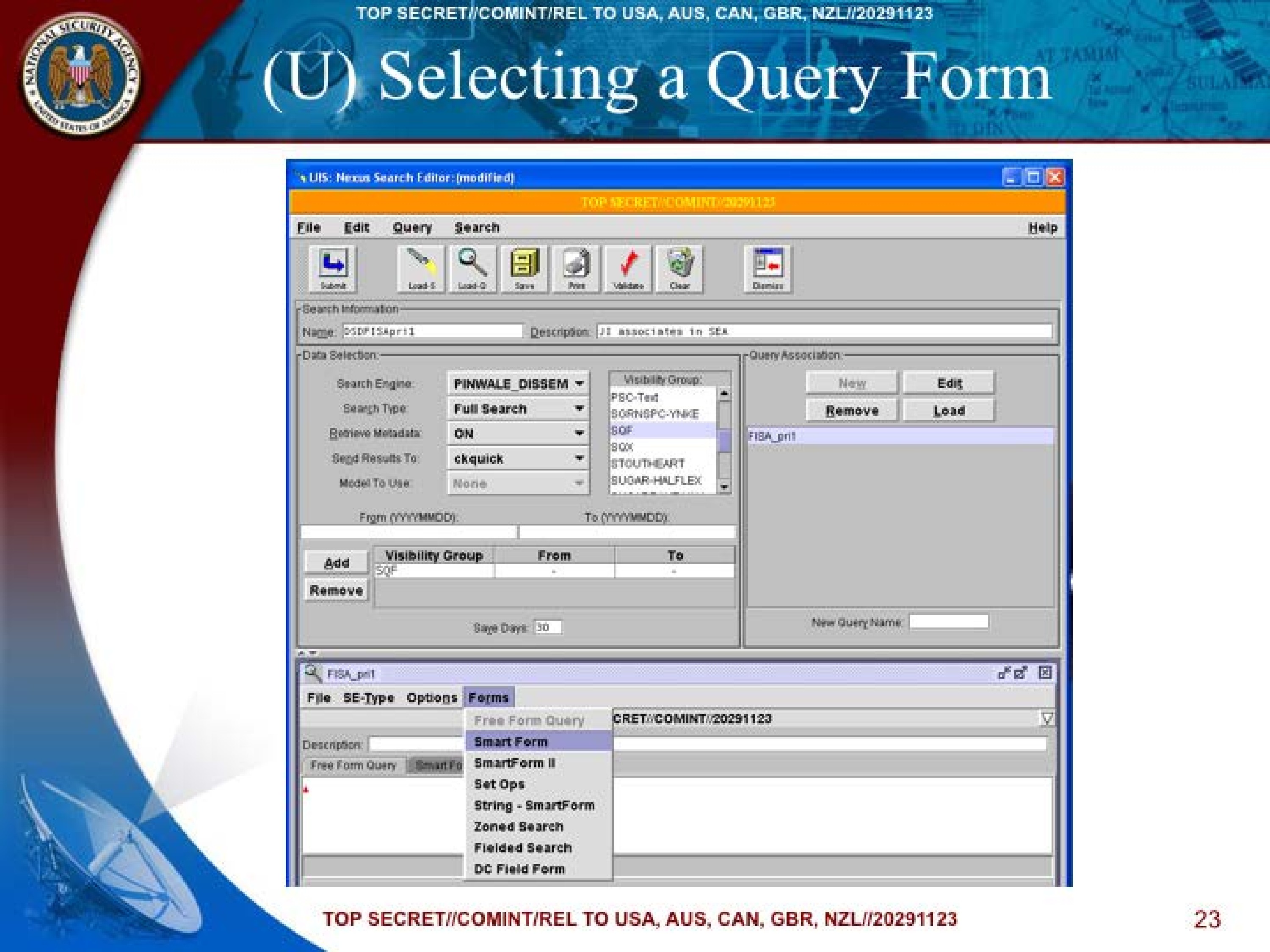
(U) Query Forms – Vary in complexity from the Smart Form, which performs syntax formatting to the Freeform which requires you to format the entire query in the native query language.
a. Valid LIONHEART_FUSION (RW) forms are SmartForm, SmartForm II, Fielded Search, and Freeform
b. Valid LIONROAR/PINWALE_DISSEM (PSL) forms are SmartForm, SmartForm II, Zoned Search, String – Smart Form, Set Ops, and Freeform
Select “Smartform”
TOP SECRET//COMINT/REL TO USA, AUS, CAN, GBR, NZL//20291123
22
TOP SECRET//COMINT/REL TO USA, AUS, CAN, GBR, NZL//20291123
(U) Selecting a Query Form
UIS: Nexus Search Editor: (modified)

TOP SECRET//COMINT//20291123

File Edit Query Search Help
Submit Load S Load Q Save Print Validate Clear Dismiss

Search Information:
Name: DSDFISApr11
Description: JI associates In SEA

Data Selection:
Search Engine: PINWALE_DISSEM
Search Type: Full Search
Retrieve Metadata: ON
Send Results To: ckquick
Model To Use: None

From (YYYYMMDD):
To (YYYYMMDD):

Visibility Group:
PSC-Text
SGRNSPC-YNKE
SQF
SQX
STOUTHEART
SUGAR-HALFEX

Add
Remove

Visibility Group From To
SQF

Save Days: 30

Query Association:
New Edit
Remove Load
FISA_pri1

New Query Name:

FISA_pri1
File SE-Type Options Forms
Free Form Query
SmartForm II
SetOpts
String - SmartForm
Zoned Search
Fielded Search
DC Field Form
TOP SECRET//COMINT//20291123
Description
Free Form Query
TOP SECRET//COMINT/REL TO USA, AUS, CAN, GBR, NZL//20291123
23
TOP SECRET//COMINT/REL TO USA, AUS, CAN, GBR, NZL//20291123
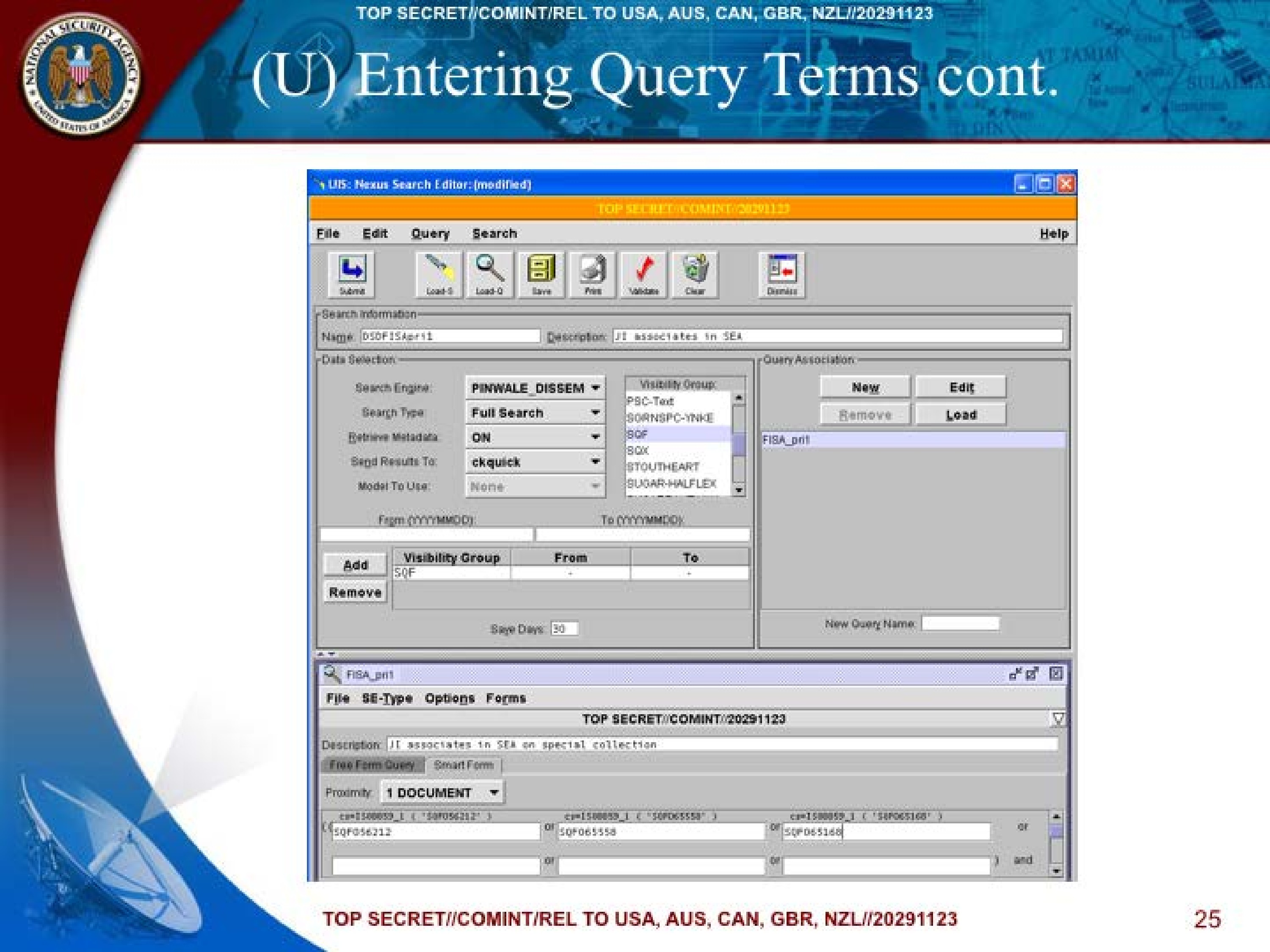
(U) Entering Query Terms
(U) As you type the terms into a form the native rendition of the term will be displayed above the field for information and feedback purposes.
(U) When using forms associated with RW, if you type something incorrect, the feedback will turn red, alerting you to the fact that the term needs to be fixed in some way.
➤ Enter FISA target case notations in the fields/blanks.
TOP SECRET//COMINT/REL TO USA, AUS, CAN, GBR, NZL//20291123
24
TOP SECRET//COMINT/REL TO USA, AUS, CAN, GBR, NZL//20291123
(U) Entering Query Terms cont.
UIS: Nexus Search Editor: (modified)

TOP SECRET//COMINT//20291123

File Edit Query Search Help
Submit Load S Load Q Save Print Validate Clear Dismiss

Search Information:
Name: DSDFISApr11
Description: JI associates In SEA

Data Selection:
Search Engine: PINWALE_DISSEM
Search Type: Full Search
Retrieve Metadata: ON
Send Results To: ckquick
Model To Use: None

From (YYYYMMDD):
To (YYYYMMDD):

Visibility Group:
PSC-Text
SGRNSPC-YNKE
SQF
SQX
STOUTHEART
SUGAR-HALFEX

Add
Remove

Visibility Group From To
SQF

Save Days: 30

Query Association:
New Edit
Remove Load
FISA_pri1

New Query Name:

FISA_pri1
File SE-Type Options Forms
TOP SECRET//COMINT//20291123
Description JI associates in SEA on special collection
Free Form Query
SmartForm
Proximity 1 DOCUMENT
ts=150000_b ("SQF056212") cr=150000_b ("SQF06556") ca=1500059_I ("SQF0651568")
SQF056212 SQF65556 SQF065168
TOP SECRET//COMINT/REL TO USA, AUS, CAN, GBR, NZL//20291123
25
TOP SECRET//COMINT/REL TO USA, AUS, CAN, GBR, NZL//20291123
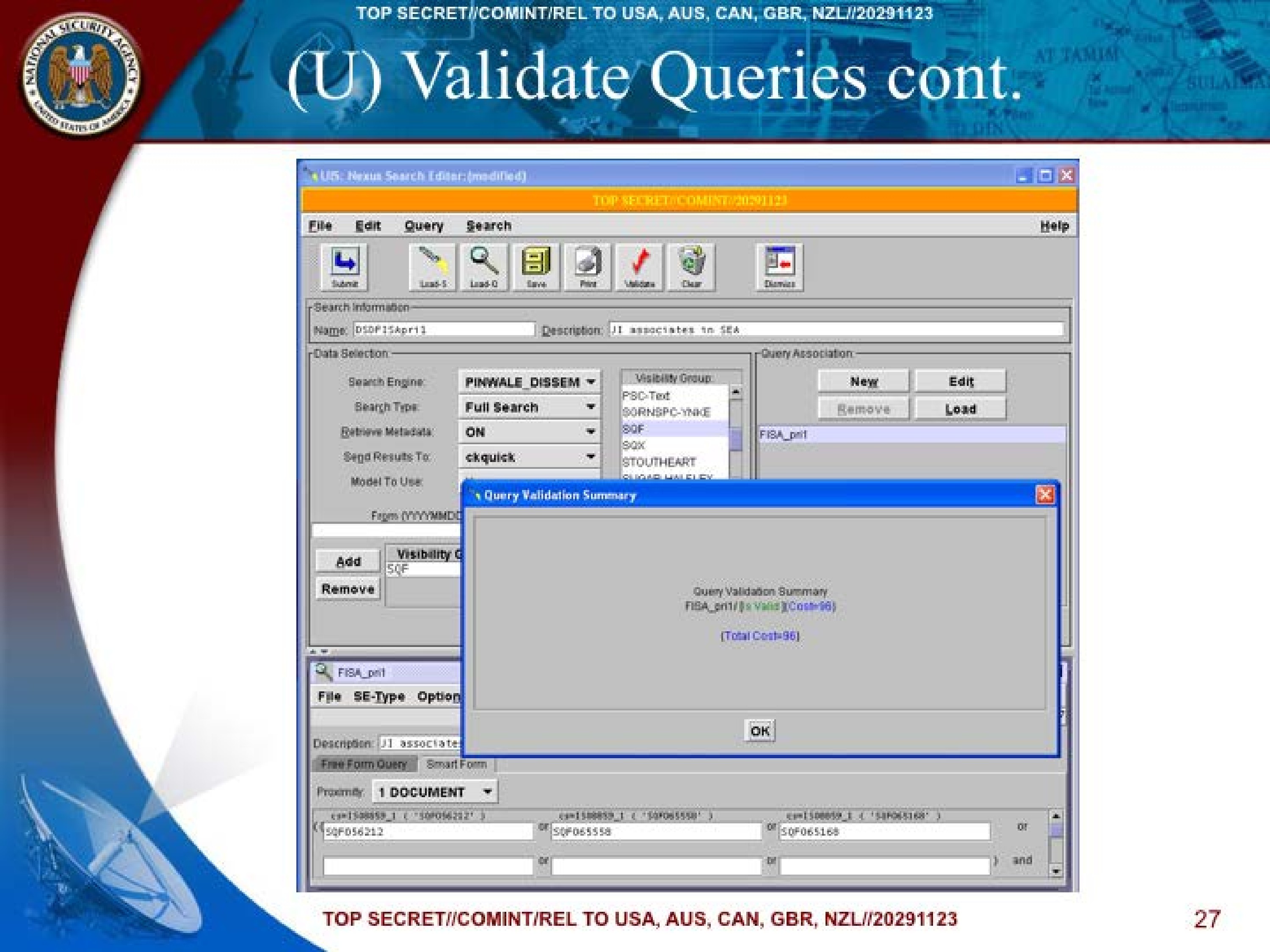
(U) Validate Queries
- (U) The Validate button runs all queries through a basic syntax check.
- (U) Pop-up window activated to show IS Valid or Has Errors
- (U) Best way to validate a query is to use the Validate command on the query form's Options menu.
TOP SECRET//COMINT/REL TO USA, AUS, CAN, GBR, NZL//20291123
26
TOP SECRET//COMINT/REL TO USA, AUS, CAN, GBR, NZL//20291123
(U) Validate Queries cont.
UIS: Nexus Search Editor: (modified)

TOP SECRET//COMINT//20291123

File Edit Query Search Help
Submit Load S Load Q Save Print Validate Clear Dismiss

Search Information:
Name: DSDFISApr11
Description: JI associates In SEA

Data Selection:
Search Engine: PINWALE_DISSEM
Search Type: Full Search
Retrieve Metadata: ON
Send Results To: ckquick
Model To Use:

Query Validation Summary
Query Validation Summary
Fisa_pri1 [Is Valid](Cost=96)
[Total Cost=96]
OK

From (YYYYMMDD

Visibility Group:
PSC-Text
SGRNSPC-YNKE
SQF
SQX
STOUTHEART
SUGAR-HALFEX

Add
Remove

Visibility G
SQF

Query Association:
New Edit
Remove Load
FISA_pri1

New Query Name:

FISA_pri1
File SE-Type Options Forms
TOP SECRET//COMINT//20291123
Description JI associate
Free Form Query
SmartForm
Proximity 1 DOCUMENT
ts=150000_b ("SQF056212") cr=150000_b ("SQF06556") ca=1500059_I ("SQF0651568")
SQF056212 SQF65556 SQF065168
TOP SECRET//COMINT/REL TO USA, AUS, CAN, GBR, NZL//20291123
27
TOP SECRET//COMINT/REL TO USA, AUS, CAN, GBR, NZL//20291123
(U) Saving your Work
- (U) Easiest way to save your search and queries at the same time is to click the Save button on the toolbar. There are other ways but this is the most efficient.
TOP SECRET//COMINT/REL TO USA, AUS, CAN, GBR, NZL//20291123
28
TOP SECRET//COMINT/REL TO USA, AUS, CAN, GBR, NZL//20291123
(U) Search & Results
Submit Search
- (U) This function can not be accomplished until your queries have been validated and optionally saved.
- (U//FOUO) The submitted search then goes through four phases
- Queued
- Submitted
- Running
- Getting results to complete
Checking the Hits
- (U) Once the search is complete the Hit Count and items column next to the query folders will be populated with the results.
- (U) If you don't see results then refresh the Folder manager
TOP SECRET//COMINT/REL TO USA, AUS, CAN, GBR, NZL//20291123
29
TOP SECRET//COMINT/REL TO USA, AUS, CAN, GBR, NZL//20291123
(U) Customizing Metadata Viewer Fields
- (U) Currently there are 700 fields that you as an analyst/linguist can select from to assist you in search of your target. Keep in mind that you can take and setup as many MDV layouts as you desire to suit the needs of the target that you are doing your research/analysis on.
TOP SECRET//COMINT/REL TO USA, AUS, CAN, GBR, NZL//20291123
30
TOP SECRET//COMINT/REL TO USA, AUS, CAN, GBR, NZL//20291123
(U) Loading Results
- (U) The Metadata Viewer or as it is commonly called the (MDV) is where the results set their metadata.
- (U) Results are stored in an ORACLE database and are linked to a container folder in the UIS Folder Manager.
- (U) To load the results from metadata for a Query, simply select the query folder and double click. Note: You may load multiple results into the MDV simply by CTRL-selecting multiple query folders before applying the load function.
- (U) Keep in mind that when loading documents it can take as short as a few second or longer depending on the actual number of results and the search engine that was being used.
TOP SECRET//COMINT/REL TO USA, AUS, CAN, GBR, NZL//20291123
31
TOP SECRET//COMINT/REL TO USA, AUS, CAN, GBR, NZL//20291123
(U) Sorting Metadata
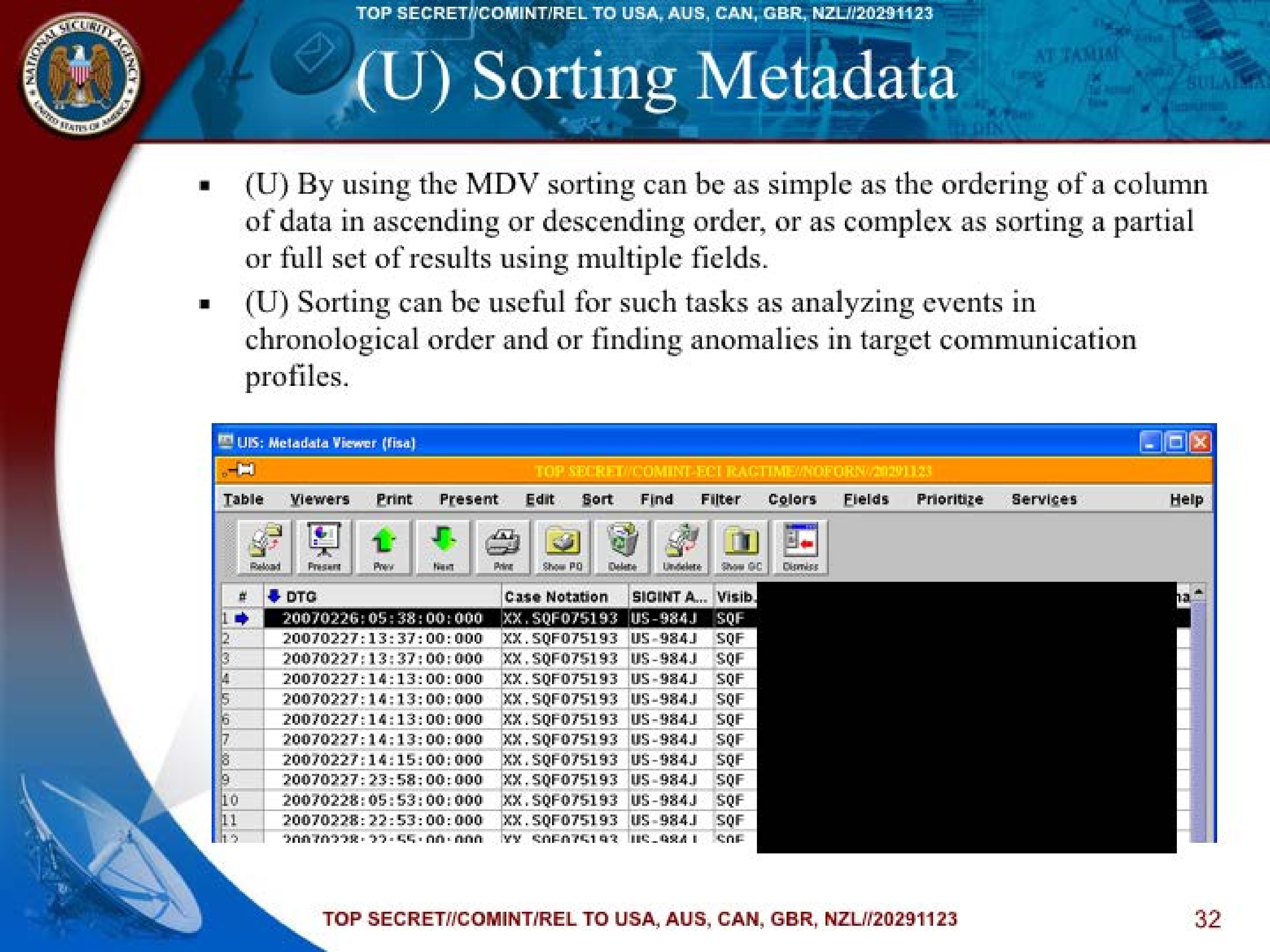
- (U) By using the MDV sorting can be as simple as the ordering of a column of data in ascending or descending order, or as complex as sorting a partial or full set of results using multiple fields.
- (U) Sorting can be useful for such tasks as analyzing events in chronological order and or finding anomalies in target communication profiles.
UIS: Metadata Viewer (fisa)

TOP SECRET//COMINT-ECI RAGTIME//NOFORN//20291123

Table Viewers Print Present Edit Sort Find Filter Colors Fields Prioritize Services Help

Reload Present Prev Next Print Show PQ Delete Undelete Show GC Dismiss
| # | DTG | Case Notation | SIGINT A... | Visib | [REDACTED] |
|---|---|---|---|---|---|
| 1 | 20070226:05:38:00.000 | XX.SQF075193 | US-984J | SQF | [REDACTED] |
| 2 | 20070227:13:37:00.000 | XX.SQF075193 | US-984J | SQF | [REDACTED] |
| 3 | 20070227:13:37:00.000 | XX.SQF075193 | US-984J | SQF | [REDACTED] |
| 4 | 20070227:14:13:00.000 | XX.SQF075193 | US-984J | SQF | [REDACTED] |
| 5 | 20070227:14:13:00.000 | XX.SQF075193 | US-984J | SQF | [REDACTED] |
| 6 | 20070227:14:13:00.000 | XX.SQF075193 | US-984J | SQF | [REDACTED] |
| 7 | 20070227:14:13:00.000 | XX.SQF075193 | US-984J | SQF | [REDACTED] |
| 8 | 20070227:14:15:00.000 | XX.SQF075193 | US-984J | SQF | [REDACTED] |
| 9 | 20070227:23:58:00.000 | XX.SQF075193 | US-984J | SQF | [REDACTED] |
| 10 | 20070228:05:53:00.000 | XX.SQF075193 | US-984J | SQF | [REDACTED] |
| 11 | 20070228:22:53:00.000 | XX.SQF075193 | US-984J | SQF | [REDACTED] |
| 12 | 20070228:22:55:00.000 | XX.SQF075193 | US-984J | SQF | [REDACTED] |
TOP SECRET//COMINT/REL TO USA, AUS, CAN, GBR, NZL//20291123
32
TOP SECRET//COMINT/REL TO USA, AUS, CAN, GBR, NZL//20291123
(U) PINWALE Resources
- (U) PINWALE Tip of the Week (E-mail)
- (U) Tip of the Week also announces dates and times for upcoming:
➤PINWALE Query Walk-in Service
➤PINWALE Users Group Meeting
➤PINWALE Training Sessions - (U) NCS Training dates and times also found in the tip of the week
- (U) You need to request to be on this mailing list. (DL NEXHELP)
TOP SECRET//COMINT/REL TO USA, AUS, CAN, GBR, NZL//20291123
33
TOP SECRET//COMINT/REL TO USA, AUS, CAN, GBR, NZL//20291123
(U) Protocol Help
- (S//SI) Problems with interpreting or identifying your traffic?
➤You can see your target's e-mail, but don't recognize the traffic
➤(C//SI) Send your questions to DL CTSAMPLES with only the PINWALE ID
TOP SECRET//COMINT/REL TO USA, AUS, CAN, GBR, NZL//20291123
34
TOP SECRET//COMINT/REL TO USA, AUS, CAN, GBR, NZL//20291123
(U) Help?
- (U//FOUO) UIS Help?
➤Contact [REDACTED]
➤E-mail: DL UIS_HELP - (U//FOUO) PINWALE Help?
➤Contact [REDACTED]
➤E-mail: DL NEXHELP
TOP SECRET//COMINT/REL TO USA, AUS, CAN, GBR, NZL//20291123
35
TOP SECRET//COMINT/REL TO USA, AUS, CAN, GBR, NZL//20291123
(U) QUESTIONS?
TOP SECRET//COMINT/REL TO USA, AUS, CAN, GBR, NZL//20291123
36
TOP SECRET//COMINT/REL TO USA, AUS, CAN, GBR, NZL//20291123
(U) Exercise
- (U) Create PINWALE_DISSEM query
- (U) Load Query Results
- (U) Customize MDV
TOP SECRET//COMINT/REL TO USA, AUS, CAN, GBR, NZL//20291123
37
Published in the Same Report
(8 documents)
-
Perseverance Pays Off: Eight-Year SIGINT Effort Culminates in Arrest of Elusive Colombian Terrorist SIDtoday [pdf]
In 2008, SIGINT from NSA Texas led to the arrest of Doris Adriana, a key FARC member, after eight years of surveillance. NSA's actionable intelligence provided Colombian authorities with crucial details about her border crossing from Venezuela, resulting in her capture and subsequent prosecution for cocaine trafficking and kidnapping U.S. citizens.
-
2009: A Watershed Year in the Fight Against Terrorism SIDtoday [pdf]
SIDtoday celebrated “a watershed period in the fight against terrorism and radical extremist groups,” noting that the NSA first discovered Najibullah Zazi’s email connections to Al-Qaeda operatives in Pakistan.
Programs: SCQAWKPeople: Zazi, Najibullah -
Classification Guide for FISA, the Protect America Act and the FISA Amendments Act [pdf]
The Foreign Intelligence Surveillance Act regulates spying for national security purposes on domestic soil. This guide lays out secrecy restrictions for various aspects of those programs. Among other things, it mentions the Large Content FISA order, a term that has not previously been disclosed.
-
Life as the SID Liaison to the Joint Terrorism Task Force in NYC SIDtoday [pdf]
The NSA provides intercepted information to assist law enforcement’s efforts to prevent future terrorist attacks and support the pursuit of suspects internationally. NSA reports have played a “key role” in prosecuting terror suspects “although this fact is unknown ... to the vast majority of the law enforcement community.” The NSA also provides equipment and communications support to the JTTF.
“NSA Secretly Helped Convict Defendants in U.S. Courts, Classified Documents Reveal” - The Intercept ↗ (2017-11-30) · The Intercept ↗ (2018-03-01) · Aaronson, Trevor -
The Saudi Assassination Plot -- How It Was Thwarted SIDtoday [pdf]
A plot by Libyan dictator Moammar Gadhafi to assassinate the Saudi Crown Prince was revealed by an alleged terrorist during interrogation and corroborated using signals intelligence.
Programs: FOLLOWTHEPEOPLE“NSA Secretly Helped Convict Defendants in U.S. Courts, Classified Documents Reveal” - The Intercept ↗ (2017-11-30) · The Intercept ↗ (2018-03-01) · Aaronson, Trevor -
FISA: Teaming with the FBI in the Global War on Terrorism SIDtoday [pdf]
The author describes being the first NSA employee integrated into the FBI unit responsible for the bureau’s data collected under the Foreign Intelligence Surveillance Act at the Digital Intercept Technology Unit at Quantico. The author is included in meetings with the “data providers.” Time-sensitive information from the FISA collection is sent to the NSA in a constant flow and provides up to 40 percent of the NSA’s counterterrorism reporting.
“NSA Secretly Helped Convict Defendants in U.S. Courts, Classified Documents Reveal” - The Intercept ↗ (2017-11-30) · The Intercept ↗ (2018-03-01) · Aaronson, Trevor -
SSO Weekly Brief 25 April 2013: Excerpt [pdf]
This document highlights a PRISM FAA report from 10 April 2013, detailing U.S.-based Uzbek refugee Fazliddin Kurbanov’s communications with Adnan, an official from the Pakistan-based Islamic Movement of Uzbekistan (IMU). Kurbanov expressed his continued intention to attack the U.S., involving explosives and potentially raising money for the IMU, despite believing he was under surveillance by the FBI.
-
Re: Ehsanul Sadequee FISA Request [pdf]
This NSA email chain from April 2006 shows NSA analysts urgently requesting FBI FISA authorization documents for Ehsanul Sadequee so they could conduct a "TAO operation" (Tailored Access Operations hack) to retrieve a file he had shared, racing against the FBI's impending arrest which would invalidate their surveillance authority. The emails reveal the NSA's dependence on FBI-obtained FISA warrants to justify their operations and their need to complete the hack before Sadequee's arrest made their authorization "invalid."
Programs: CADENCEPeople: Sadequee, Ehsanul Islam
Related Documents
-
DNI101 [pdf]
This TOP SECRET training guide, "DNI 101," provides a workflow for Digital Network Intelligence analysts on how to investigate a target's email address, detailing the specific tools, databases, and methodology used, and stressing the critical difference between initial open-source/classified research and the active "targeting" of raw SIGINT repositories like XKEYSCORE, PINWALE, and MARINA.
Programs: NKB · FOXTRAIL · FOREMAN · PINWALE · LIONHEART · XKEYSCORE · DISHFIRE · MARINA · MECWEB · MAINWAY · TRAFFICTHIEF · MAUI · ANCHORY · M3 · INTELLINK · HOMEBASE · PROTON · UTT · CADENCE · SPEEDBUMP · TUNINGFORK · MASTERSHAKE · BLACKPEARL · JACKSPARROW · ROADBED · STORYDUTY · LIONROAR · DOPHONE · UIS -
SSO dictionary relevant entries [pdf]
This document provides a detailed list of relevant entries related to NSA's Special Source Operations (SSO), highlighting various NSA surveillance and data collection systems used to monitor global communications. It includes descriptions of programs such as BIGBIRD and DISHFIRE, which focus on cable and SMS interception, as well as tools like LOPERS and COURIERSKILL for processing telephony metadata and refining target selection. The entries emphasize the extensive and automated nature of the NSA's intelligence-gathering operations, particularly in relation to undersea cables and telecommunication networks, and underscore the secretive and expansive scope of SSO's global surveillance activities.
Programs: ARTIFICE · BIGBIRD · FAIRVIEW · SSO · POORWILL · PINECONE · BLACKBELT · CADENCE · BLACKNIGHT · SHIPMASTER · COURIERSKILL · THEORYMASTER · WEALTHYCLUSTER · CLIFFSIDE · DISHFIRE · MARINA · MAINWAY · NUCLEON · PINWALE · FASCIA · BANYAN · LAMPSHADE · ASSOCIATION · HOMEBASE · SEDB · FRIAR · KEYCARD · TURMOIL · TURBULENCE · UTT · IRISHBEAUTY · OCTAVE · KOZYKOVE · LITHIUM · BLARNEY · LOPERS · MAILORDER · LUMBERYARD · MERLIN · NODDY · SAGUARO · NUTHATCH · CONTRAOCTAVE · XKEYSCORE · PLANK · RODEOSTAR · SAGURA · SERENADE · STARGATE · SILVERCOLLAM · SEALION · SEAGULL · SLIVER · SORA-2 · TITANPOINTE · TUBE · VPCS · STONEGATE“NSA Spying Relies on AT&T’s ‘Extreme Willingness to Help’” - ProPublica ↗ (2015-08-15) · “AT&T Helped U.S. Spy on Internet on a Vast Scale” - The New York Times ↗ (2015-08-15) · “The Wiretap Rooms: The NSA’s Hidden Spy Hubs in Eight U.S. Cities” - The Intercept ↗ (2018-06-25) · Angwin, Julia · Larson, Jeff · Savage, Charlie · Moltke, Henrik · Poitras, Laura · Risen, James · Gallagher, Ryan -
FAIRVIEW dataflow charts April 2012 [pdf]
This document outlines data flow diagrams that show how various types of sensitive communication, including voice, fax, and modem traffic, are handled through systems operated by the NSA and its partners. These partners include corporations, telecommunications companies, ISPs, and other entities involved in processing and managing the data through secure and classified channels. The document covers processing flows for various data types, metadata, and communications systems under NSA's control, detailing how data is routed, stored, and analyzed across different platforms and sites.
Programs: FAIRVIEW · SAGUARO · TURNSTILE · MESA · TITANPOINT · RIMROCK · MAILORDER · PINECONE · BLARNEY · STONEGATE · TINSEL · CONVEYANCE · FISHWAY · NUCLEON · PINWALE · SCISSORS · COURIERSKILL · DRIFTWOOD · ASDF · FALLOUT · MARINA · LOPERS · WEALTHYCLUSTER · PUPR · CLEARSIGHT · MIDFIELD · CADENCE · BUGCATCHER · WAYLAND · DESOTO · GATEKEEP · HIGHDECIBEL · XKEYSCORE · YANKEE · TOPROCK · FASCIA · DISHFIRE · SEAGULL · BIGDIPPER · CORPORATE · LILDIPPER · HAVASU · WEALTHYCLUSTER2 · RAGTIME · TUMULT · TATTOO · DARKTHUNDER · ICYTWINS · TML-STATUS · WATERFRONT · VULCANDEATHGRIP · STEELFLAUTA · UNITY · KEYCARD · UTT · BTUBE · ISLANDTRANSPORT · SSO · MAINWAY · SSDM · TUBE · TITANPOINTE · TURMOIL · VPCS“NSA Spying Relies on AT&T’s ‘Extreme Willingness to Help’” - ProPublica ↗ (2015-08-15) · “AT&T Helped U.S. Spy on Internet on a Vast Scale” - The New York Times ↗ (2015-08-15) · “Titanpointe: The NSA’s Spy Hub in New York, Hidden in Plain Sight” - The Intercept ↗ (2016-11-16) · Angwin, Julia · Larson, Jeff · Savage, Charlie · Moltke, Henrik · Poitras, Laura · Risen, James · Gallagher, Ryan -
Special Source Operations corporate overview [pdf]
A classified NSA training presentation providing an in-depth operational overview of the FAIRVIEW program — the agency's largest corporate partner surveillance program — detailing its collection capabilities, legal authorities, TAO shaping operations, targeting tools, and productivity statistics, while revealing that BLARNEY/PRISM was the single most productive SSO program in 2012 with 806 serialized product reports.
Programs: FAIRVIEW · BLARNEY · PRISM · RAMPART-A · RAMPART-I · RAMPART-X · RAMPART-T · RAMPART-M · DGO · WINDSTOP · MYSTIC · PINWALE · XKEYSCORE · TURMOIL · STORMBREW · OAKSTAR · OCTAVE · UTT · CADENCE · COWBOY · YANKEE · MAINWAY · TOYGRIPPE · BLACKPEARL · TWISTEDPATH · NUCLEON · DISHFIRE · SPYDER · CARBONFURY · NATIVEFLORA · UNICORNSANDWICH · CROSSEYEDBEAR · SCORCHERSIX · TROPICTHUNDER · DARKTHUNDER · STEELFLAUTA · RAGTIME · SWEETSMACK2 · SOURSMACK2 · EVILOLIVE · SCALEABLE · FLEXIBLE · MONKEYROCKET · SHIFTINGSHADOW · ORANGECRUSH · YACHTSHOP · ORANGEBLOSSOM · SILVERZEPHYR · BLUEZEPHYR · COBALTFALCON · RAGTIME-A · RAGTIME-C · SSO · SURREY“NSA Spying Relies on AT&T’s ‘Extreme Willingness to Help’” - ProPublica ↗ (2015-08-15) · “AT&T Helped U.S. Spy on Internet on a Vast Scale” - The New York Times ↗ (2015-08-15) · “The Wiretap Rooms: The NSA’s Hidden Spy Hubs in Eight U.S. Cities” - The Intercept ↗ (2018-06-25) · Angwin, Julia · Larson, Jeff · Savage, Charlie · Moltke, Henrik · Poitras, Laura · Risen, James · Gallagher, Ryan -
The Unofficial XKEYSCORE User Guide [pdf]
A TOP SECRET XKeyscore user guide written by a Booz Allen Hamilton consultant, providing step-by-step instructions for 32 classic search types — including email address queries, password extraction from mail server IPs, phone number extraction, HTTP activity analysis, document metadata fingerprinting and workflow automation — with worked examples targeting counterterrorism subjects in Afghanistan, Pakistan, Iran and Sweden, viewed through an Agility instance bearing the ECI RAGTIME classification banner confirming the tool was accredited for FISA-authorised collection.
Programs: XKEYSCORE · PINWALE · RAGTIME · AGILITY · METAFRAME · TIMBERLINE · YAKIMA · REDMINE · TUNINGFORK · FOGGYBOTTOM · FOXTRAIL · CADENCE · UTT · NKB · AIRGAP · DOPHONEPeople: bin Laden, Osama“XKEYSCORE: NSA’s Google for the World’s Private Communications” - The Intercept ↗ (2015-07-01) · “No Place to Hide” - Metropolitan Books ↗ (2014-05-13) · “FRA has access to controversial surveillance system” - SVT Nyheter ↗ (2013-12-11) · Marquis-Boire, Morgan · Greenwald, Glenn · Lee, Micah · Bergman, Sven · Dyfvermark, Joachim · Gallagher, Ryan · Laurin, Fredrik · Struwe, Filip